• Please see the most recent updates in the "Where did the .com name go?" thread. Posts number 16 and 17.

    Post 16 Update

    Post 17 Warning old domain name stealing credentials

  • Special Server Maintenance

    Just when you think you have everything running some what better...

    You get a message from the Hosting company. Short story they need to move us to a new server. I have been working with them to plan a good date for all concerned. Here is what we have come up with as a schedule.

    1. November 4th 17:00 -5UTC shut off the forums and start backup proceedures. During this time there will be no access to the forums or the Resource Section.
    2. November 5th Continue with Backups and download same until complete.
    3. November 6th 7:00 turn over server to hosting company to move system to new server
    4. November 7th - 8th restore backups and upgrade forum software.

    If all goes well we should be back online on November 8th.

    To keep you updated we will post updates on AVSIM forums.

    Thank you for your support.

DC-4 Skymaster

Thanks for your answer, Thomas but I have yet theses docs:
- AN 01- 40NM- 4A Parts Catalog for airplanes C-54 ...
- T.O. 1C-54D-1 Flight Manuel USAF series C-54 and Navy models R5D
Someone had indicated them to me at the beginning of the year and project, and I had downloaded them or been sent them to me.
 
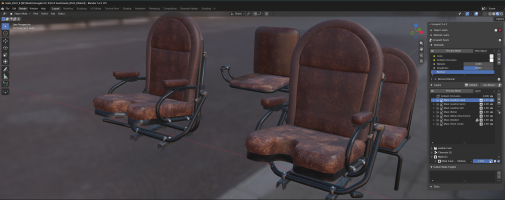
And today even the seats are moved under their PBR texture:

1792746295415.png

On the other hand, I notice a slight problem regarding reflectivity.
a) In Blender and UcuPaint, the seats look perfect on the texture side: no metallic appearance and the roughness seems convincing.
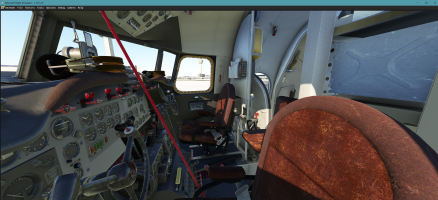
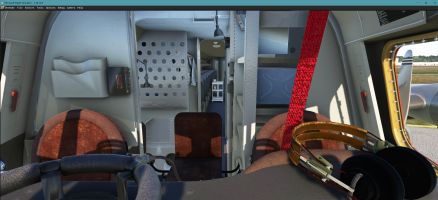
b) On the other hand, after creating the COMP file to use them in MSFS, it’s not at all the same thing anymore; the COMP file seems to increases the metallic appearance of the leather too much...

Theses new seats under MSFS 2020 (Bloom is desactivated - DX12 beta used):
1792747564133.png

1792748381045.png
If it is the case, I will have to correct the COMP files after creation by modifying whatever the values in the roughness and metalness files.

PS: Unless it comes from my settings in the simulator, which is strange because I only use those from MSFS and not any shader modifiers external to the application.
 
Last edited:
@Hazza112,
Sorry if you signed up just to have a delivery date, but this addon is freeware and I never set myself a time limit to complete a project: the PBY was done in more than 10 years.
No doubt that the first version of DC-4 was made very quickly, but as for this one, the project started in January 26 and is not yet finished, that’s all I can say.

@Hollister,
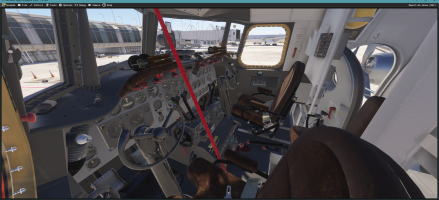
As you said, just a little modification with Gimp (saturation) on the albedo texture for the seats and the result seems much better (too tan looking => a brown more darker).
The flight commands are also improved: less noise and less roughtness on the black layer in Ucupaint, a "bake on all the textures" to build all the various textures neeeded and now I have a "black paint with less wear".

1792776135716.png
 
Last edited:
Hello,

Today, I’m going to show you a Blender modeller’s trick to fix certain Blender behaviors that aren’t appreciated by exporting to MSFS.

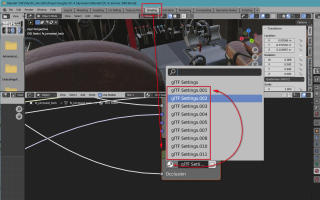
In Blender when you create a material, if you look via the "SHADING tab" (in the top menu of Blender view) at the structure of the nodes that make up this material, you have a box whose name is gLTF Settings.

1793096499293.png

In fact, when you duplicate an object with a material assigned to that object, Blender normally duplicates this node and renames it "gLTF Settings.001" and so on. This behavior is completely normal for Blender, but when exporting to MSFS, it causes problems and some COMP textures are not processed. In the end, the texture file COMP_PNG.DDS is very often missing.

There is no easy way to find the objects that have this problem except going into the node tree after copying an object and via the drop-down list in this node changing each gLTF Settings.00x to gLTF Settings.
If we don’t pay attention, we can end up with a multitude of nodes of this type and consequently not have a COMP.PNG.DDS file during a compilation for all these objects.

Nevertheless, I have developed a trick to solve this (I insist: the best way to do it is to rename the node with each copy) when you are pressed by modeling when you don’t pay attention to it. This trick requires using the scripting tab and manually entering a few lines of python:

Code:
import bpy

target_name = "glTF Settings.001"
matches = []
for obj in bpy.data.objects:
    for slot in obj.material_slots:
        mat = slot.material
        if not mat or not mat.use_nodes or not mat.node_tree:
            continue
        for node in mat.node_tree.nodes:
            if node.type == "GROUP" and node.node_tree:
                if node.node_tree.name == target_name:
                    matches.append((obj, mat))
                    break  # Avoid reporting the same object twice for this material

# Print results in the System Console
for obj, mat in matches:
    print(f"Object: {obj.name} | Material: {mat.name}")

print(f"\nFound {len(matches)} object/material match(es).")

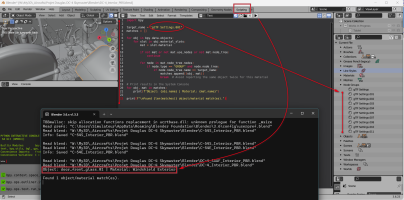
Then you have to run this script via the RUN button you can then in the console window of Blender read the objects that can be the source of these problems.
1793097041281.png
Then you need to click on each of these listed objects and then via the Shading tab to check if they are compliant or correct.

By modifying the gLTF Settings.001 target name in the script for each item encountered (.001, .002, .003, ..., .0010, .0011, etc.), we can clean up your Bllender file of these "slags" and obtain that each object in your Blender file is associated to a simply node group "gLTF Settings" without any suffix. Then you have an export that will allow us to compile all the texture files correctly.

You can find several days on Internet: this trick isn't documented but I can certified that it really function :cool:
 
Hello,

I have just finished to migrate my 11 repaints to the last paintkit and the checks seem to be working well. There are indeed a few details here and there that need to be reviewed to perfect each livery, but overall it’s quite satisfactory.

So I hope to release this version 0.60 that many are waiting to see tomorrow at the beginning of next week. This will be the first official Beta.
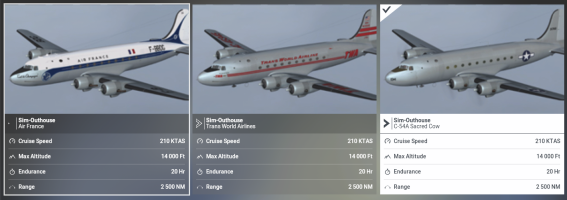
I replaced the Reeve Aleutian Airways, which was not to my liking, with President Truman’s C-54 Sacred Cow. Some will also want the electric elevator that was installed at the back of the plane under the fuselage to mount the president’s wheelchair, but for now I prefer to finish what has already been started ;)

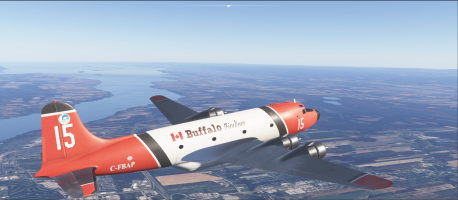
The last livery of this afternoon was the Fireliner of Buffalo in a repaint of 2004.

1793465566647.png
EDIT:
Well, in any project it is necessary to decide at some point that the version is mature enough to be released.
We can always try to fix the little details that any developer sees as "his nose in the middle of the face" and that no one else will notice, but this only increases stress and impatience, so I’m stopping my improvements there after these last changes.noon on textures and I finally deliver this v0.60 which will be the first Beta.

The version is configured to be directly usable in FS24: the Avionic points to the panel directory panel.24 so if you prefer to simulate with FS20, all you have to do is change the panel parameter in the aircraft.cfg files and redo the layout.json.

Regarding the paintkit, the only change concerns the "fuselage" assembly, which was changed from 4K to 8K and whose UVs have been modified.
I published a few weeks ago (page 16 or 17 of the post) the new "fuselage" texture, but if anyone would like to have a PSD or XCF file with the main layers I used: I can make it available.

In fact, I created 11 files of this type, one for each repaint, but each file between 300 and 400 MB would be gigantic to publish :cool:

Version v0.60 official Beta

DC-4 L-1009 :
1793472733093.png

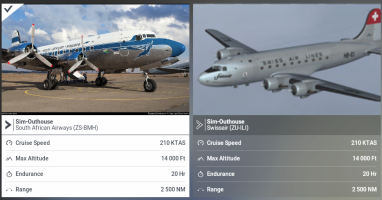
DC-4 South Africa :
1793472765666.png

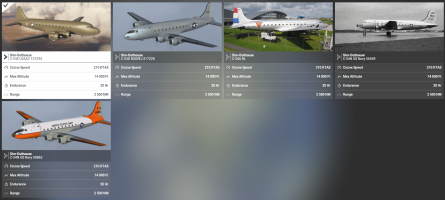
C-54 variations :
1793472817275.png

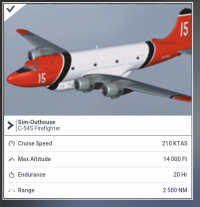
C-54 firefighter (long noze):

1793472869342.png

If you see some details which needs to bee improved: you can ask it following this post. Thanks.

PS: Today is exactly the 10-month project, it’s the longest project I’ve created alone without any kind of interruption

 
Last edited:
Hi
the Aircraft is looking amazing!! Is there anyway currently that I'm able to get GPS navigation on any of the airliner variants like the dc4 or the L-1009

Regards

HAZZA112
 
Hello,

I have just finished to migrate my 11 repaints to the last paintkit and the checks seem to be working well. There are indeed a few details here and there that need to be reviewed to perfect each livery, but overall it’s quite satisfactory.

So I hope to release this version 0.60 that many are waiting to see tomorrow at the beginning of next week. This will be the first official Beta.
I replaced the Reeve Aleutian Airways, which was not to my liking, with President Truman’s C-54 Sacred Cow. Some will also want the electric elevator that was installed at the back of the plane under the fuselage to mount the president’s wheelchair, but for now I prefer to finish what has already been started ;)

The last livery of this afternoon was the Fireliner of Buffalo in a repaint of 2004.

View attachment 201574
EDIT:
Well, in any project it is necessary to decide at some point that the version is mature enough to be released.
We can always try to fix the little details that any developer sees as "his nose in the middle of the face" and that no one else will notice, but this only increases stress and impatience, so I’m stopping my improvements there after these last changes.noon on textures and I finally deliver this v0.60 which will be the first Beta.

The version is configured to be directly usable in FS24: the Avionic points to the panel directory panel.24 so if you prefer to simulate with FS20, all you have to do is change the panel parameter in the aircraft.cfg files and redo the layout.json.

Regarding the paintkit, the only change concerns the "fuselage" assembly, which was changed from 4K to 8K and whose UVs have been modified.
I published a few weeks ago (page 16 or 17 of the post) the new "fuselage" texture, but if anyone would like to have a PSD or XCF file with the main layers I used: I can make it available.

In fact, I created 11 files of this type, one for each repaint, but each file between 300 and 400 MB would be gigantic to publish :cool:

Version v0.60 official Beta

DC-4 L-1009 :
View attachment 201582

DC-4 South Africa :
View attachment 201583

C-54 variations :
View attachment 201584

C-54 firefighter (long noze):

View attachment 201585

If you see some details which needs to bee improved: you can ask it following this post. Thanks.

PS: Today is exactly the 10-month project, it’s the longest project I’ve created alone without any kind of interruption
The last released version has the same number (0.60) and also in version before this one I had a soh-dc-4-skymaster_v060_CVT_in my
community folder. It had a effects folder in it. So is that kept or deleted?, I would of thought that this new version would have a higher number and not the same as the last version...I'm confused.....
 
@Hazza112
Although I tried to make each element of this development modular, some things are possible but require time and more developments.
Each VC is a separate 3D model that is called by the interior model via an Attachment. Nevertheless, the central console is integrated into each interior model (it was my choice at the begginning of the project)
To achieve this, one of the possible solutions would be to create an additional model directory for the DC-4 (model.modern), to integrate a specific 3D interior model into it, to call the exterior 3D model of the vintage model and attach the 3D model of the modern VC while updating all the necessary XML files. Not to mention about possible changes to be made to fuel tanks management ...
After that, what would be the overall consistency of the addon with a DC-4 L-1109, which would be equipped with a modern VC with GPS and all the radios elements located behind the pilot (radio and navigator desktop). To stay in line with my approach, these radio sets should then be removed one by one (what adds still more work).

Managing two displays (meters or feet) of an instrument is quite simple, a whole VC is less convenient, not to mention that animations and elements (needles) sometimes have the same name in both VCs and I don't think to change that.
Ultimately, this would require at least a week of work, including production and testing.

As I said, this project already has 10 months at the rate of 5 hours of work per day, which makes a total of 1,500 hours, so questioning the initial assumptions so close to the end is still a bit too much to ask ... I will see perhaps ...

@gray eagle
The last official version was v0.55 on September 1st.
The version v0.60 you have, was a pre-release from my development version (sended only for you), which explains the version number. That said, yes, this version is well complete and corresponds to v0.60: there are no errors. So remove the old one and copy this one ;)

As for the effect, it’s normal; this is indeed a legacy-type effect that I haven’t processed yet. In fact, in this version, the fire fighter lacks some animations, XML code, and effects to open the tanks and simulate the retardant release effects. I will correct this CVT issue when dealing with this phase of development. The goal of v0.60 was to migrate textures to PBR textures without more.
 
Last edited:
Desktop Screenshot 2026.11.01 - 11.27.05.60.png
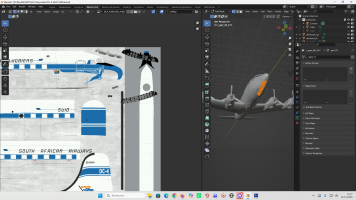
Hi Didier, I imported the SAAF model into Blender 3.6, and the upper fuselage is overlapping the nose landing gear doors. Do you have any idea why?

Bjr Didier j'ai importé le model saaf dans blender 3.6 et j'ai le upper fuselage qui chevauche sur les nose landing gear doors. As tu une idée ?
 
Back
Top