• Please see the most recent updates in the "Where did the .com name go?" thread. Posts number 16 and 17.

    Post 16 Update

    Post 17 Warning old domain name stealing credentials

  • Special Server Maintenance

    Just when you think you have everything running some what better...

    You get a message from the Hosting company. Short story they need to move us to a new server. I have been working with them to plan a good date for all concerned. Here is what we have come up with as a schedule.

    1. November 4th 17:00 -5UTC shut off the forums and start backup proceedures. During this time there will be no access to the forums or the Resource Section.
    2. November 5th Continue with Backups and download same until complete.
    3. November 6th 7:00 turn over server to hosting company to move system to new server
    4. November 7th - 8th restore backups and upgrade forum software.

    If all goes well we should be back online on November 8th.

    To keep you updated Tom Clayton has offered to post updates on AVSIM forums.

    Thank you for your support.

DC-4 Skymaster

Thanks for your answer, Thomas but I have yet theses docs:
- AN 01- 40NM- 4A Parts Catalog for airplanes C-54 ...
- T.O. 1C-54D-1 Flight Manuel USAF series C-54 and Navy models R5D
Someone had indicated them to me at the beginning of the year and project, and I had downloaded them or been sent them to me.
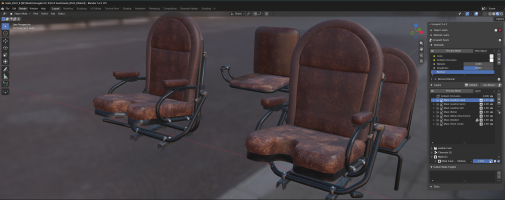
 
And today even the seats are moved under their PBR texture:

1792746295415.png

On the other hand, I notice a slight problem regarding reflectivity.
a) In Blender and UcuPaint, the seats look perfect on the texture side: no metallic appearance and the roughness seems convincing.
b) On the other hand, after creating the COMP file to use them in MSFS, it’s not at all the same thing anymore; the COMP file seems to increases the metallic appearance of the leather too much...

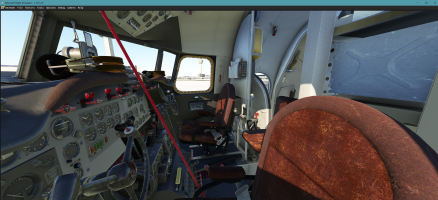
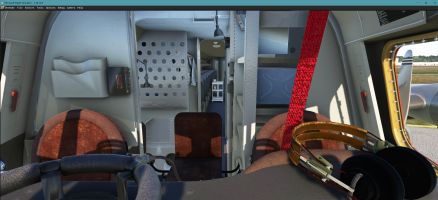
Theses new seats under MSFS 2020 (Bloom is desactivated - DX12 beta used):
1792747564133.png

1792748381045.png
If it is the case, I will have to correct the COMP files after creation by modifying whatever the values in the roughness and metalness files.

PS: Unless it comes from my settings in the simulator, which is strange because I only use those from MSFS and not any shader modifiers external to the application.
 
Last edited:
Back
Top