• There seems to be an uptick in Political comments in recent months. Those of us who are long time members of the site know that Political and Religious content has been banned for years. Nothing has changed. Please leave all political and religious comments out of the forums.

    If you recently joined the forums you were not presented with this restriction in the terms of service. This was due to a conversion error when we went from vBulletin to Xenforo. We have updated our terms of service to reflect these corrections.

    Please note any post refering to a politician will be considered political even if it is intended to be humor. Our experience is these topics have a way of dividing the forums and causing deep resentment among members. It is a poison to the community. We appreciate compliance with the rules.

    The Staff of SOH

  • Please see the most recent updates in the "Where did the .com name go?" thread. Posts number 16 and 17.

    Post 16 Update

    Post 17 Warning

Dino's Cat is out!!

i just use the VC switch for the probe - problem solved for me ...

 
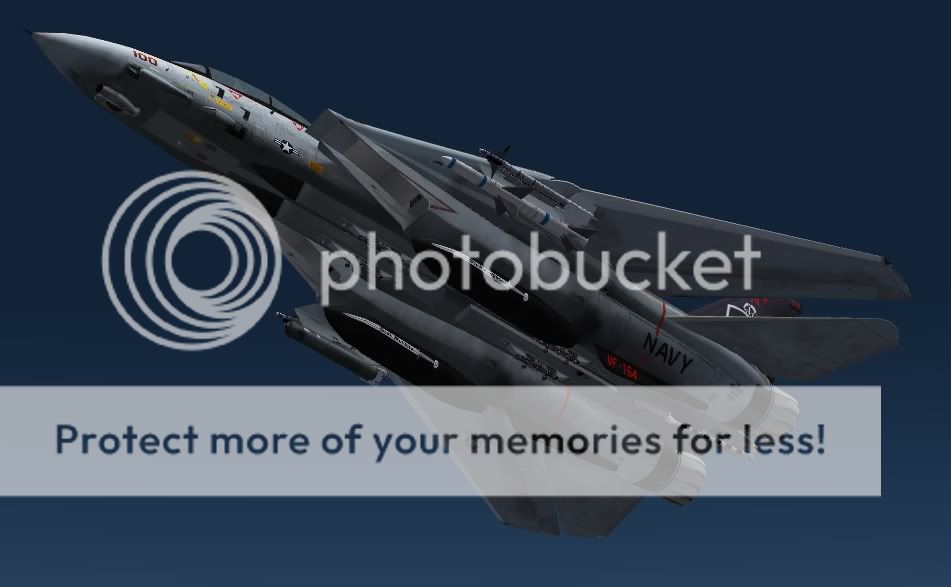
Having fun here with Tom Stovalls new repaint of VF31 and using Hifi X graphics!
Its the best repaint so far in my opinion!
Still its early days!

Here a question for you where am I flying from in this pic?
Call it a test of geography only really UK and USA flyers should know this base, as the UK uses it for our IFR tankers and the Americans use it for the longest bombing missions ever concieved! B1B's, B52's and Kc135R 's are the normal residents but we in the UK own it! Think Indian Ocean now thats a massive clue!

20097221495731.png


Buzzing the tower here as we say lol
20097221558609.png


And off I go!!
200972215421718.png

Hope you like them guys and I'll tell you where I was if you don't know its great for framerates I find!!
 
Having flown the Tomcat a bit more I have two issues/questions:<?xml:namespace prefix = o ns = "urn:schemas-microsoft-com:eek:ffice:eek:ffice" /><o:p></o:p>
<o:p> </o:p>
1: Since the HUD (the Acceleration F/A-18 HUD is used) is not stabilized/collimated, I tried to replace it with the Iris F-14 Pro HUD by changing the line that defines the HUD in the panel.cfg (which appears twice) with the line defining the Iris Tomcat HUD. I also copied the zipfile F-14_Systems from the Iris panel directory into Dino’s panel directory (of all the three panel variations) and in the gauges directory. Still the F-18 HUD keeps appearing. Does anyone know how I can get rid of the F-18 HUD and make the Iris HUD (or any other, for that matter) appear?<o:p></o:p>
<o:p> </o:p>
2: I wonder whether the real plane is really so responsive while approaching the carrier. I had expected it to be more sluggish and less stable and hence more difficult to land, which I read about the real Tomcat. Is the digital Tomcat indeed a bit too easy to fly or is the D version so much improved over the A and B in this respect?<o:p></o:p>
<o:p> </o:p>
For the rest: the plane is a joy to fly. Time to watch Top Gun once more! By the way: there is a nice video about the F-14 called <?xml:namespace prefix = st1 ns = "urn:schemas-microsoft-com:eek:ffice:smarttags" /><st1:place><st1:placeName>Tomcat</st1:placeName> <st1:placeType>Territory</st1:placeType></st1:place>. It is old and I don’t know whether it is still available, but it may be of interest for some.<o:p></o:p>
<o:p> </o:p>
 
please stickshacker follow my intructions ..
open your panel.cfg
go to the [Vcockpit01] section..

completely delete it and replace in it's place this..

[Vcockpit01]
Background_color=1,1,1
size_mm=512,512
visible=1
pixel_size=512,512
texture=$vc
;1 = left DDI
;2 = right DDI
;3 = center DDI
gauge00=F-14_Systems!HUD-V14, 36,36,440,440,
gauge01=shockwave_lights!SW Lights_gear, 1,1,1,1 //shockwave light

Then mate, add the F-14_Systems.cab found in the panel folder of the Iris pro series (F14B clean) folder to the panel folder of dino's, and you should enjoy the Iris hud which is much better until we can get a real F14D HUD for her!
Good luck and hope I have helped!
Feel free to PM me if you need any more help!
 
1: Since the HUD (the Acceleration F/A-18 HUD is used) is not stabilized/collimated, I tried to replace it with the Iris F-14 Pro HUD by changing the line that defines the HUD in the panel.cfg (which appears twice) with the line defining the Iris Tomcat HUD. I also copied the zipfile F-14_Systems from the Iris panel directory into Dino’s panel directory (of all the three panel variations) and in the gauges directory. Still the F-18 HUD keeps appearing. Does anyone know how I can get rid of the F-18 HUD and make the Iris HUD (or any other, for that matter) appear?<o:p></o:p>
<o:p></o:p>

Is the payware HUD collimated? If it is, I notice that the price seems to have come down (from AU$50 to AU$37, or about US$30). http://irissimulations.com/catalog/product_info.php?products_id=114
 
What ive been trying to do was get the Aerosoft F16 AM HUD working in her, and it doesn't at the minute sorry, I'm out of idea's for tonight I know why it doesn't work I just can't fix it now though sorry!
Will try again later I'm sure it looks the same as the real F14D hud though!
Need food and sleep for now! :sleep:
 
So what's the easiest way to get an awesome-looking afterburner in this thing? I've seen a bunch of replies but can't sort them all out.
 
Paranormal things are happening with my afterburner..It shifts by itself..Now I got a perfect position,next time when i start FSX it moved out of wack , In the cfg file numbers remain unchanged, still the effects are changing position,or the fuselage is rubber made, god knows but it,s frustrating that makes me jump back into the F-16 wagon.
 
Default HUD not collimated

Just a quick note: you should be able to align the default HUD using the controls in the cockpit....

I wish I had the time to write a proper manual... Here is a reference pic for the HUD controls:
f14dhud.jpg
 
Thanks, Dino. I will try that this afternoon. Meanwhile -- and Dino needn't be the one to answer -- can anyone tell me how to operate the autopilot? I found the switches on the left side, but only the master AP switch seems to work.
 
Has anyone else noticed Dino's Tomcat sits static with a slightly nose down attitude ?, I've looked at photos and seen the real thing enough to notice this, the real fwd fuselage sits perfectly parallel with the ground, while the aft section sits a bit more toward the ground, the fix may be nothing more than making the main landing gear a touch shorter ?.
 
Paranormal things are happening with my afterburner..It shifts by itself..Now I got a perfect position,next time when i start FSX it moved out of wack , In the cfg file numbers remain unchanged, still the effects are changing position,or the fuselage is rubber made, god knows but it,s frustrating that makes me jump back into the F-16 wagon.

I have the same problem Ive noticed if you hold your throttle forward the left engine throttle lever moves back and forward causing asemetric nossle positions this could be the cause for the burners moving! And as for the Aerosoft F16 that thing just makes my day everyday, by far the best addon aircraft ever made!
 
Thanks, Dino. I will try that this afternoon. Meanwhile -- and Dino needn't be the one to answer -- can anyone tell me how to operate the autopilot? I found the switches on the left side, but only the master AP switch seems to work.
dswo---
My thanks to Dino, also, for the VC information.
I use the radio stack ---shift+2--- and not the left side panel. To use ILS Approach put the left MFD to HSI and select ILS. Then select the ILS radio frequency NAV 1.

yago9---
"3.Add this line to each panel.cfg for the effect to work via throttle ( I have no idea why we have three panel folders )"
In the readme of v0.95 are many explanations one of which is about the installation.
"Default 2D HUD is 16:9 - alternate CFG file for 4:3 displays and 16:9 backup are provided (see relevant subfolders)."
Any new paint ready?

Beaufighter---
"..there's something wrong here. Sometimes they work perfectly, most of the time ...."
I've tried a little testing and here is my conclusion. On the ground, I have proper function and go through all functions. Then I fly and shift+2(refuel probe) works as well as the VC switch.

I have no need to open the nose radome in flight and the bombs have been added or not before flight with payload weight adjustment made before flight. I did these functions and they work.

However, if I do not do all these functions before flight, then in flight I get only the cockpit canopy and stairs opening in flight.

Have you tried this method?

Hoping this is of some help.
 
DX10, Mach 1.8 at 40,097 feet, 575 KIAS, 1045 KTAS, 1,203mph.

Thanks for the latest repaints, Stovall and wingmate.:applause::running::ernae:
 
Back
Top