Flight Réplicas Douglas Dc-4 and B-24 free Released

interesting pic, looks as if they lifted the engines of a PBY
Most likely right. Being in corporate use, she most likely didn't fly very high for passenger comfort not being pressurized. So the low altitude PB4Y-2 engines would be available and a less costly option
 
We've been busy adding more to the B-24, although we aren't quite ready to reveal the next update yet.

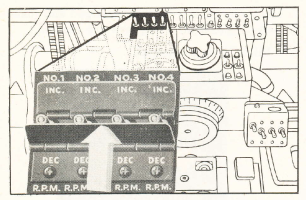
One thing we are experimenting with is making the prop RPM switches behave closer to the real thing. In the real aircraft, the prop RPM is controlled by 3-way toggle switches as shown in this image from the flight manual.
1771778659206.png

We are evaluating 3 potential solutions for this, and would be interested to hear thoughts on which direction we should take this, especially regarding how it will interact with control bindings. Here's an overview of the 3 options:
  1. (Experimental 1) The prop RPM switches will function as real 3-way toggle switches. If you have an axis bound to prop RPM, the direction you move the lever controls the switch position (i.e. move your axis up will flick the switch up). EDIT: correction from the person working on this code - rather than adding me as a middle man, here is his explanation: "There is a PROP LEVER POSITION target and also a currentposition. If you have an external axis, the movement adjusts a target % for an internal virtual lever position target. Similarly you can map PROP_PITCH_INCR and PROP_PITCH_DECR to buttons which again adjust the target up and down. When the target is moved away from the current position % the visible switches animate in the correct direction and hold that animation for the time required to adjust current to target. "
    1. Mouse interaction: if you drag with the mouse, the target is moved and the switches animate. If you click on the INC / DEC all plates, all the targets move.
  2. (Experimental 2) The prop RPM switches will function as real 3-way toggle switches. If you have an axis bound to prop RPM, the lever position range controls the switch position (i.e. 70-100% = switch up, 30-70% = switch middle, 0-30% = switch down). This is similar to the FlyingIron BF109 manual pitch control.
    1. Mouse interaction: the switches will behave like a 3-way toggle switch. Click and hold of the INC / DEC all plates would hold all 4 switches in place.
  3. (Current implementation)The prop RPM switches function like a lever, so if you have an axis bound to prop RPM, the lever position controls the prop RPM %, and also the switch position. If your lever is at 75% then prop RPM is 75% and the lever position is 75%. This is least realistic but perhaps most convenient and familiar since it's how we typically control RPM in other aircraft.
    1. Mouse interaction: the switches will behave like a draggable lever
We'll probably share an experimental build here soon-ish, and listen to user feedback before making any final decision. We've prototyped Experimental 1 solution already.
 
Last edited:
I would go with Experimental 1, but if there's a way to make the switch position override the lever position I'd go with that instead.
Lever position authority over switch position would ideally require an EFB configuration utility where the user can define their own limits as per the Experimental 2 definition.
 
Either 1 or 2 would work pretty well!

Don't know if it's of interest or possible in MSFS but in the old A2A B-17 and P-40 for FSX the increase/decrease prop pitch key bindings would instead toggle between decrease/neutral/increase, and I found that setup a pretty good compromise. So basically, if the switch was in the middle position you would press the key once to move to the increase or decrease postion, and if it was in either extreme and you wanted to move to the opposite extreme you would press the key twice. The controls for the gear, wing flaps and cowl flaps worked the same way.
 
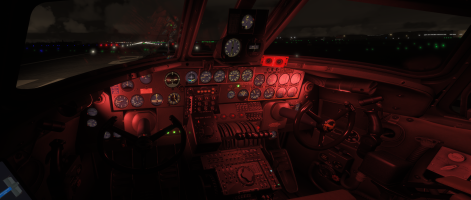
We are getting close to releasing V21. Here's a provisional changelog and screenshot of the new cockpit lighting.
  • Improved cockpit lighting
  • Added cockpit lighting control knobs in position as per original flight manuals
  • Fixed issues with exterior lights
  • Updated exterior light labels to align with assigned switch functions
  • Added animated "change-all" switch plates for Cowl Flap switches and Prop RPM switches
  • Updated Prop RPM switch logic to function as a real 3-way switch
  • Replaced many low res, pixelated cockpit labels and placards with all new higher resolution artwork created from scratch.
  • Corrected Group ID letter and Radio Call letter on "The Beast" livery
  • Fixed Attitude Indicator Cage knob
  • Added click spots for sun visors (D only)
  • Added settable intercooler switches, however these are only cosmetic, no intercooler is modeled
  • Added attitude gyro cage knob
1773010643029.png
 
Great to hear the Liberator's development continues. A little off-topic, but looking at that panel, and those of other aircraft from the 1940s through to the 1960s, it strikes me how much better the instruments and controls were laid out in American aircraft than British ones. We built some great aircraft, but when it came to cockpit ergonomics, the Americans were way ahead of us.
 
That's beautiful work FlakNine and thanks for the update. That goes for everyone working on this project with you. Looking forward to flying your next release. Thanks, Ed
 
V21 is released! Full changelog is
  • Improved cockpit lighting
  • Added cockpit lighting control knobs in position as per original flight manuals
  • Fixed issues with exterior lights
  • Updated exterior light labels to align with assigned switch functions
  • Added animated "change-all" switch plates for Cowl Flap switches and Prop RPM switches
  • Updated Prop RPM switch logic to function as a real 3-way switch (see flight manual for details)
  • Replaced many low res, pixelated cockpit labels and placards with all new higher resolution artwork created from scratch.
  • Corrected Group ID letter and Radio Call letter on "The Beast" livery
  • Fixed Attitude Indicator Cage knob
  • Added click spots for sun visors (D only)
  • Added settable intercooler switches, however these are only cosmetic, no intercooler is modeled
  • Added attitude gyro cage knob
  • Added PDF copy of Flight Manual in Docs folder - always up-to-date web version is here

That's beautiful work FlakNine and thanks for the update. That goes for everyone working on this project with you. Looking forward to flying your next release. Thanks, Ed
Thanks for the kind words Ed - much appreciated!
 
In parallel to adding new systems to the B24 we are starting to look at the 3D model itself - while it's a great model, it's starting to perhaps show its age compared to modern aircraft, so we are thinking about remodelling some portions of the cockpit.

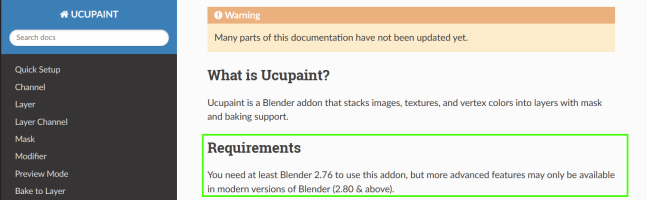
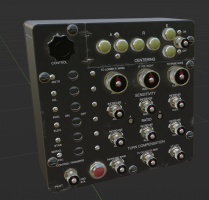
I used this as an opportunity to get to grips with a free Blender add-in called Ucupaint which offers multi-layer texturing conceptually similar to Adobe Substance Painter (but without the cost). I created a new 3D model from scratch for the Honeywell C1 Autopilot Control Panel (using CAD software), then imported it into Blender for UV unwrapping and texturing with Ucupaint - and I must say it's pretty good for a freebie! Here is a snapshot of my work in progress, showing a variety of PBR materials. The decals and lettering are unfinished (some misaligned and incomplete areas), and I want to completely redo the weathering / chips / scratches.... however the beauty of Ucupaint is that it's all non-destructive, so I can edit / delete my weathering layer, just as I can while painting on layers with Photoshop! I can definitely recommend Ucupaint for any Blender users interested in better texturing capabilities.

If I can get proficient with this workflow I think I'll be able to spruce up a good amount of the cockpit 3D model.

1773616411063.png
 
Last edited:
In the Blender world, you can find a lot of plugin to create 3D painting.
The last two years, I have tested several of them :
  • HAS Paint Layer (free),
  • Layer Painter (free),
  • Ravage 2 (free),
  • Subtance Painter (payware : hight cost),
  • UcuPaint (free),
  • Texture Paint Champ (free),
  • PBR Painter (payware but lower cost)

You have also standalone software like ArmorPaint (payware) or Quixel Mixer (free with a large assets base).
For more informations, you can read my various posts on this subject: "3D painting" or Gman5250's post (Quixel) .
 
In the Blender world, you can find a lot of plugin to create 3D painting.
The last two years, I have tested several of them :
  • HAS Paint Layer (free),
  • Layer Painter (free),
  • Ravage 2 (free),
  • Subtance Painter (payware : hight cost),
  • UcuPaint (free),
  • Texture Paint Champ (free),
  • PBR Painter (payware but lower cost)

You have also standalone software like ArmorPaint (payware) or Quixel Mixer (free with a large assets base).
For more informations, you can read my various posts on this subject: "3D painting" or Gman5250's post (Quixel) .
Thanks I’ve been tempted to try PBR Painter after reading some of your posts, seems pretty capable at a good price point. I have also been hovering over buying a perpetual license of Substance Painter on Steam, however I just don’t know if I can justify the cost when other tools are “good enough” - I don’t really know what I’m missing with Substance though!

I tried ArmorPaint a while ago and it was very unstable. I also tried Quixel and it was ok but I really want to stay in the Blender environment to avoid switching applications to do something like tweak the model / UV. I know Substance has a Blender add-in but I haven’t checked on it’s capabilities yet.

I think I’ll finish this C1 panel in Ucupaint and then give PBR Painter a try on another section of the B24 cockpit - it’s pretty low cost after all.
 
Last edited:
I limited myself to listing the different available addons that I had tested.

The first one I used was ArmorPaint but indeed the obligation to download the sources every 2 months and compile via Visual Studio Code a new executable became a bit painful.

Subtance Painter is a very good product but its change of status and license has repelled me especially since I never understood its interface well. I still have an old license (Allegorithmic - 2020) bought before the change of owner but I hardly use it anymore.

The big advantage of PBR Painter is that it has a dedicated Discord and its creator makes it progress regularly. Moreover, there are very many videos about this software and RonH ( DA40CGDFQ / GrandSkies 614) with whom I exchange from time to time with others also uses it for MSFS.
So since almost 2 years I completely switched to PBR Painter that I use in a dedicated version: Blender 4.2 for PBR Painter and 3.16.23 for MSFS developments. Using a version of Blender with too many plugins can lead to incompatibilities and may limit potential updates compatible with all the plugins.
The Aeronca has been created only with PBR Painter and the PBY's exterior also.
 
Last edited:
In parallel to adding new systems to the B24 we are starting to look at the 3D model itself - while it's a great model, it's starting to perhaps show its age compared to modern aircraft, so we are thinking about remodelling...

I don't suppose you could remodel it even further, into a PB4Y Privateer, could you ? ( Just joking....sort of..) ;)

Along with AH's Lanc, this developing B-24 is right up my street.
 
Hello,

To answer some questions that were asked to me by MP and because the answers may interest several people:

1) it is quite possible to split a Project into several Blender files, each dedicated to a particular object or part of the project, the modifications made in one of the Blender files will be found in the general Project (all the files are linked together );)

2) to link all these files within the General Project that would group all or part of these different objects, we use a function that I had discovered in 3DS Max but which also exists in Blender, the LINKS function; it is used via the File menu - Links then we browse the project tree to choose a Blender file in which we can select one or more materials, mesh, collection (the selection is the same as for the Append function).

Warning: take care to carefully choose the names of your files because if you rename one (or move it in an other folder ...), the connection breaks and you risk losing data.
Deleting a link object it in the main Projetc is not a good advice: I thought I did well by simply deleting the Links and in the end I lost data, so fortunately I had recent backups :p.
For more information you can use the Blender Manual (https://docs.blender.org/manual/en/latest/files/linked_libraries/link_append.html) or Google (I prefer Qwant ...).

It is moreover this method that I use for the PBY project and the DC-4 project :cool:

On the other hand, it is not advisable to use different Blender versions for these files: you have to choose a given version and do everything with the same version.
To illustrate this technical point: Blender 4.x uses a different animation coding mode than the one used by Blender 3.x, so mixing files that have been modified with different versions can lead to some serious surprises or even break the project.
This is the result of a technical discussion I had with RonH (DA40CGDFQ in MSFS and discord), who is a developer very familiar with Blender since he develops forks for the MSFS export plugins.
References: GitHub of Ronh991 : glTF-Blender-IO-MSFS / Blender2P3DFSX

Using the latest versions of Blender is not a guarantee of productivity: it is the worker who makes an object with the help of a tool, and the tool is only a means given to the author of the work in question.

In the event that a software requires a more up-to-date version than the one you are using, it is possible to export your object in WaveFront OBJ or in FBX to import it in the recent version of Blender to paint it in 3D for example and retrieve the textures made to reuse them under Blender 3.x

In my case, I use Blender 3.6.23 to work on my projects and Blender 4.2 with PBR Painter v3.4.4 ;)

For FS20 developments, the most advanced version is Blender 3.6.23 with the official plugin Asobo v1.3.3.
Otherwise it is possible to also use Blender 4.2 with the plugins of RonH but there are too few people who work this way so little feedback and therefore Ronh will not be able to provide much support.
To resume, you can use also Blender 4.2 LTS or 4.5 LTS with the Ronh's plugins ... but it's more risky and there will be no solution in case of problems :banghead:
Reference: https://www.fsdeveloper.com/forum/t...-to-a-newer-version-blender-3-6-may-be.460434

For FS24 developments, the version Blender 4.5 with the last official plugin from Asobo (that of the last SU4 SDK) is the most stable version at the moment.

Migrating a 3.x project to a 4.5 is risky: it can happen well but you can also break your entire project. The best advice I can give is to make regular backups (the more you do, the more sure you will be able to recover in case of issues).
In this case and if I cannot do differently, I export my work in FBX and import then this FBX in my last Blender version.
 
Last edited:
Back
Top