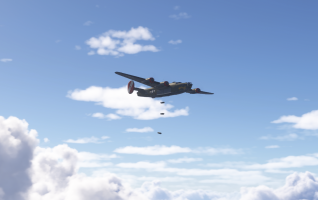
Flight Réplicas Douglas Dc-4 and B-24 free Released

Thanks again lagaffe - I value your opinion, but will of course evaluate tools for myself.

It seems both of my potential texture painting tools will work with 3.1 - so it's great to eliminate that factor.

I took the plunge and bought PBR Painter 3 - it looks pretty good but I'm going to reserve judgement for a while, as I get up to speed with it. I can't say I picked it up and instantly thought it was massively superior to UcuPaint - but right now I have only scratched the surface. I'm going to retexture the B-24 console, turbo boost selector and throttle quadrants using PBR3; only then can I make a fair comparison.

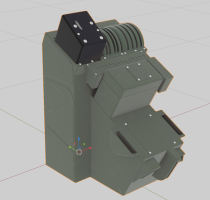
Here's work in progress remodelling some of the cockpit in CAD. The transparent "ghost" is the original model which I'm using as a reference. As mentioned above, the green and pink regions will be next up in the re-texturing work!
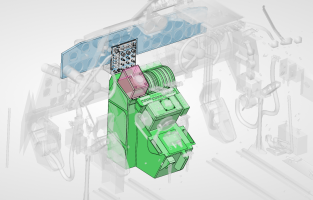
1773942224677.png
 
Last edited:
From what I see, you are probably working with Sketchup, which might cause duplicate polygon issues or 3DS Max.

For a few years, I decided to only use open source tools (free or paid) so under Blender, there are three methods to add details to an object
1 - completely redo the object using a pluggin that allows to draw edges with very high precision, this is a plugin:
- CAD_Sketcher : https://www.cadsketcher.com
2 - isolate the object and modify it to have more details with the consequence of breaking the UV so it will be necessary to make different textures without having to
3 - use a technique called "retopology" or remeshing technics which consists of schematically tracing the 3D object like what we used to do when we were kids with a sheet of paper copied from an existing illustration, except that we do it in 3D ...

This technic is addressed in the Blender manual: https://docs.blender.org/manual/en/latest/modeling/meshes/retopology.html
There are several videos that detail this technique which is very effective when mastered. It can be used with the basic tools provided in Blender, but there are specialized plugins that make work easier.

Personally since January 2020 I use SpeedRetopo from Cedric Letellier (https://pitiwazou-1.gumroad.com/l/speedretopo - with this link you can find a simple video to illustrate how to use this plugin ...), it is paid (10$ for personnal usage) for but very efficient and available for almost all versions of Blender (2.90 ... 4.2). You can find others plugins about this technic.

To illustrate my answer, here two images for my Porco Rosso project.
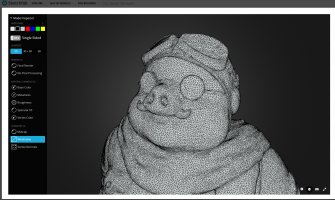
The first image is a character based on photogrametry (to much polygones) download from Sketfab and

Sketchfab.jpg

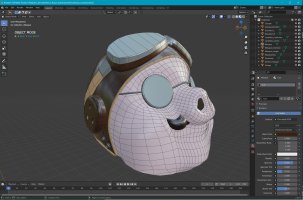
The second my result after one day of "retopoly actions".

Porco_Rosso.jpg

The technique allows to keep the initial shapes but to completely master the way in which the mesh is constructed (square polygons) which greatly facilitates the creation of UV when the object is finished.
 
Last edited:
From what I see, you are probably working with Sketchup, which might cause duplicate polygon issues or 3DS Max.
No, I'm using SolidWorks. I know what you mean about duplicate polygons and it's easy enough to solve on Blender side. I don't intend to do any serious modelling in Blender - I'm much faster in SolidWorks since I used it for work every day, and I'm limiting my aircraft remodelling to mechanical objects which are well suited to CAD.

Now if I was modelling freeform shapes I'd definitely need to do that in Blender, but I have no plans for that any time soon. But thanks for sharing info on SpeedRetopo - good to know that exists if I need it.

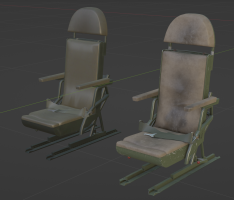
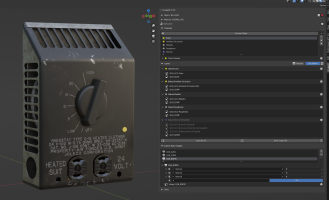
I'm starting to get to grips with PBR Painter 3! Here's my test model - very much work-in-progress as I learn how to use it.

1774021355810.png
 
Last edited:
I have works only one time with SolidWorks in 2013 to a project asked by a friend who wanted a "Gaz'Aile II" under FSX.
=> http://frenchvfr.free.fr/articles.php?lng=en&pg=264&mnuid=491&tconfig=0

The transformation from IGS format to 3DS (because I was working under Gmax) did not leave me with very good memories. Since then, it may have improved and gateways to glTF or FBX undoubtedly exist.

Under PBR Painter, Bevel masks are very interesting to obtain scratches on the "edges" of your object.
 
I have works only one time with SolidWorks in 2013 to a project asked by a friend who wanted a "Gaz'Aile II" under FSX.
=> http://frenchvfr.free.fr/articles.php?lng=en&pg=264&mnuid=491&tconfig=0

The transformation from IGS format to 3DS (because I was working under Gmax) did not leave me with very good memories. Since then, it may have improved and gateways to glTF or FBX undoubtedly exist.

Under PBR Painter, Bevel masks are very interesting to obtain scratches on the "edges" of your object.
Yes I started playing with the bevel masks but haven't got it looking right yet, so I MIGHT end up painting the edge wear mask by hand for more control. Can use a Blender brush with jitter to get a good ragged paint chip edge. I won't give up on the PBR3 procedural masks yet, it's early days... and of course I can stack several masks to do a mix of hand-painted and procedural.
 
Last edited:
Back
Top