
-
Please see the most recent updates in the "Where did the .com name go?" thread. Posts number 16 and 17.
-
IMPORTANT DOWNLOADING INFORMATION - ALL MEMBERS PLEASE READ
Please see this thread for updates. Update Thread
SOH ADMINISTRATION
You are using an out of date browser. It may not display this or other websites correctly.
You should upgrade or use an alternative browser.
You should upgrade or use an alternative browser.
Model Converter X Question and Help
- Thread starter expat
- Start date
padburgess
Charter Member
Hi lazarus
I have been following this and have a question for you. I have tried this on a couple of older models (Ju_Attacker, Fw200c6) and they export fine but the animations for ailerons and rudder are backwards. Both ailerons move in the same direction and the rudder moves in the opposite direction to anticipated but when in Model converter the animations appeared to be fine. Can you explain this for me and do you know how I fix it?
thanks in advance
Paul
I have been following this and have a question for you. I have tried this on a couple of older models (Ju_Attacker, Fw200c6) and they export fine but the animations for ailerons and rudder are backwards. Both ailerons move in the same direction and the rudder moves in the opposite direction to anticipated but when in Model converter the animations appeared to be fine. Can you explain this for me and do you know how I fix it?
thanks in advance
Paul
Hi, Paul. Sometimes you just have to keep trying different animation definitions, export it, load it up, run the sim and try it. It can be time consuming, and frustrating.
Expat, you're selling yourself short-it's just tedious digging through lists- in the case of the 767-100, it's a long, dull job, but doable. As you wish. Many times, I note 'how do I do this?' questions are semantically equal to 'would somebody else do this for me?'. It's not hard.
Expat, you're selling yourself short-it's just tedious digging through lists- in the case of the 767-100, it's a long, dull job, but doable. As you wish. Many times, I note 'how do I do this?' questions are semantically equal to 'would somebody else do this for me?'. It's not hard.
Setting materials
We want shiny glass, and reflections! I sat down with the box, a jumbo tin of Kirin, a combat hookah and a colt series 70, one of Henks explanations, and forced myself to figure out the material settings.
So. Open up the A-3B in MDl converter, then open material editor, we'll start with glass from where we left it.
View attachment 36711
On the right side of that window, roll down to the bottom, and work your way up the list-it's easier. You will have to do some fiddling with some textures. Lets save some time.
View attachment 36712 Dump these in your A-3B texture folder. Starting at the bottom of the list, you are going to change these values and make some new texture assignments.
recipe for shiny glass, reflections and environment maps enabled.
-----------------------------------------------------------------------------
alpha test function never
alpha test level 1
Z-test alpha false
allow bloom true
specular bloom floor 0.89999997615814209
ambient colour 255, 255, 255
diffuse colour 64, 255, 255, 255
specular colour 255, 255, 255
no shadow true
source blend SrcColor
fresnel ramp
diffuse true
reflection true
specular true
blend environment
by inverse diffuse alpha true
reflection scale 0.800000011920929
specular map scale 128
use global environment map true
diffuse texture GLASS_T.DDS
fresnel texture CANOPY_FRESNEL_RAMP.DDS
specular texture GLASS_S.DDS
--------------------------------------------------------------------------------------------
Now we're going to do the same thing for the external textures, a basic shine and enable reflections. Select one of the exterior textures. You'll want to do the same thing for glare panel, engine bullet and oleo. scroll down the right hand side list, make the following changes.
View attachment 36713
Remove the specular texture assignment- we'll cope with spec and bumps later. Change these values.
recipe for shiny surfaces-reflections and environment maps enabled
--------------------------------------------------------------------------------------------------
allow bloom true
specular bloom floor 0.89999997615814209
ambient colour 149, 149, 149
diffuse colour 149, 149, 149
specular colour 49, 49, 49
reflection scale 0.10000000149011612
specular map power scale 0
use global environment map true
-------------------------------------------------------------------------------------
Do this for all the external textures, update the model name in the object information editor and export.
If faced with a long list of animations and textures to convert, you may want to export a back up X file periodically as you go along. If the converter eats all your memory and derps, you wont loose all your work.
Now your A-3B has nice fsx glass and textures interacting with the environment. I forgot to grab a cap, so the B-66 will be illustrative.
View attachment 36714
I ran these processes on a selection of different models with consistent results.
Next, those dastardly coded lights
We want shiny glass, and reflections! I sat down with the box, a jumbo tin of Kirin, a combat hookah and a colt series 70, one of Henks explanations, and forced myself to figure out the material settings.
So. Open up the A-3B in MDl converter, then open material editor, we'll start with glass from where we left it.
View attachment 36711
On the right side of that window, roll down to the bottom, and work your way up the list-it's easier. You will have to do some fiddling with some textures. Lets save some time.
View attachment 36712 Dump these in your A-3B texture folder. Starting at the bottom of the list, you are going to change these values and make some new texture assignments.
recipe for shiny glass, reflections and environment maps enabled.
-----------------------------------------------------------------------------
alpha test function never
alpha test level 1
Z-test alpha false
allow bloom true
specular bloom floor 0.89999997615814209
ambient colour 255, 255, 255
diffuse colour 64, 255, 255, 255
specular colour 255, 255, 255
no shadow true
source blend SrcColor
fresnel ramp
diffuse true
reflection true
specular true
blend environment
by inverse diffuse alpha true
reflection scale 0.800000011920929
specular map scale 128
use global environment map true
diffuse texture GLASS_T.DDS
fresnel texture CANOPY_FRESNEL_RAMP.DDS
specular texture GLASS_S.DDS
--------------------------------------------------------------------------------------------
Now we're going to do the same thing for the external textures, a basic shine and enable reflections. Select one of the exterior textures. You'll want to do the same thing for glare panel, engine bullet and oleo. scroll down the right hand side list, make the following changes.
View attachment 36713
Remove the specular texture assignment- we'll cope with spec and bumps later. Change these values.
recipe for shiny surfaces-reflections and environment maps enabled
--------------------------------------------------------------------------------------------------
allow bloom true
specular bloom floor 0.89999997615814209
ambient colour 149, 149, 149
diffuse colour 149, 149, 149
specular colour 49, 49, 49
reflection scale 0.10000000149011612
specular map power scale 0
use global environment map true
-------------------------------------------------------------------------------------
Do this for all the external textures, update the model name in the object information editor and export.
If faced with a long list of animations and textures to convert, you may want to export a back up X file periodically as you go along. If the converter eats all your memory and derps, you wont loose all your work.
Now your A-3B has nice fsx glass and textures interacting with the environment. I forgot to grab a cap, so the B-66 will be illustrative.
View attachment 36714
I ran these processes on a selection of different models with consistent results.
Next, those dastardly coded lights

morpheusfz
Members +
Hi,
are you planning to release the B-66 fsx conversion?
are you planning to release the B-66 fsx conversion?
smoke test. Plug in the lights
I should mention most of my problem with the lights and whatnot was due to sto0pidity. I didn't have the latest model converter X installed. If you don't have the latest
http://www.fsdeveloper.com/forum/forums/modelconverterx.87/
Do that first, it has the new bits for this.
Now, you open up your trusty A-3 with it's sparkly glass and hide, click the paperclip icon, then click the wrench icon.
View attachment 36730
We are going to assign a light to the attach points in the model. I used default to keep things simple. Red left, green right.
View attachment 36730
Now, klick the green 'add' icon top left, select add effect, assign what ever landing light you like,
View attachment 36731
the location co-ordinates are bottom right.
position ( -0.15, 9.88, -1.07)
Close the attached object editor. Now we have to set conditions. Click the org chart icon for the hierarchy editor,
View attachment 36732
look down the list on the left of the dialog window for 'attached effect'. There is one for the landing light, and two pairs for the nav lights.
View attachment 36733
Find the first attached effect, click on it. On the right, find and click on visibility conditions. It's just like running the animation editor.
View attachment 36733
This looks right, allowing the light to come on after the gear is down.
View attachment 36734
Now we hunt down the pairs of nav lights
View attachment 36735
Set one pair
View attachment 36736
Then the other
Now, close the hierarchy editor, open the object information, update the name, save, set the radius with special tools/model tweaker, or with raditor, do your final export.
Now you have a nice A-3, and the basics for a FSX conversion.
https://drive.google.com/file/d/0Bymd7iALx2FoNE1VYS16WkszcGc/view?usp=sharing
View attachment 36737View attachment 36738
All the lights turn on and off, and gosh, she's real purty for a big blue whale.
I should mention most of my problem with the lights and whatnot was due to sto0pidity. I didn't have the latest model converter X installed. If you don't have the latest
http://www.fsdeveloper.com/forum/forums/modelconverterx.87/
Do that first, it has the new bits for this.
Now, you open up your trusty A-3 with it's sparkly glass and hide, click the paperclip icon, then click the wrench icon.
View attachment 36730
We are going to assign a light to the attach points in the model. I used default to keep things simple. Red left, green right.
View attachment 36730
Now, klick the green 'add' icon top left, select add effect, assign what ever landing light you like,
View attachment 36731
the location co-ordinates are bottom right.
position ( -0.15, 9.88, -1.07)
Close the attached object editor. Now we have to set conditions. Click the org chart icon for the hierarchy editor,
View attachment 36732
look down the list on the left of the dialog window for 'attached effect'. There is one for the landing light, and two pairs for the nav lights.
View attachment 36733
Find the first attached effect, click on it. On the right, find and click on visibility conditions. It's just like running the animation editor.
View attachment 36733
This looks right, allowing the light to come on after the gear is down.
View attachment 36734
Now we hunt down the pairs of nav lights
View attachment 36735
Set one pair
View attachment 36736
Then the other
Now, close the hierarchy editor, open the object information, update the name, save, set the radius with special tools/model tweaker, or with raditor, do your final export.
Now you have a nice A-3, and the basics for a FSX conversion.
https://drive.google.com/file/d/0Bymd7iALx2FoNE1VYS16WkszcGc/view?usp=sharing
View attachment 36737View attachment 36738
All the lights turn on and off, and gosh, she's real purty for a big blue whale.
Re B-66
Shortly. Just finished building and installing some whiskey compass and heads up horizon that went missing in the conversion, still have to assign all the switches, too. Then convert the EB and RB...and B-52's. Migs. Sukhoi's. And update the catalog...and...Soon, with the F-100C.
Shortly. Just finished building and installing some whiskey compass and heads up horizon that went missing in the conversion, still have to assign all the switches, too. Then convert the EB and RB...and B-52's. Migs. Sukhoi's. And update the catalog...and...Soon, with the F-100C.
morpheusfz
Members +
Thx for the info and the great Tutorial, i try to convert the BAC TSR.2 from Alphasim. This Tutorial is a Big Help for that.
I tried to add the Glass effect to your Starlifter Package from Simviation but when i save the model the Converter stops with an error?!
When i'm back from office i write the Error in this Thread.
I tried to add the Glass effect to your Starlifter Package from Simviation but when i save the model the Converter stops with an error?!
When i'm back from office i write the Error in this Thread.
Visor animation?
Ignore this - I hadn't read the text closely enough.
Thanks
Gavin
Hi,
I started working thru the tutorial and have a question.
One of the animations in the Skywarrior is the bomb bay doors. These appear to be assigned to the Visor key in FS2004 and there isn't an equivalent animation in FSX (or at least in the mdldef version I have).
I have assigned it to the tailhook animation but I was wondering if I missed something.
thanks
Gavin
Ignore this - I hadn't read the text closely enough.
Thanks
Gavin
Hi,
I started working thru the tutorial and have a question.
One of the animations in the Skywarrior is the bomb bay doors. These appear to be assigned to the Visor key in FS2004 and there isn't an equivalent animation in FSX (or at least in the mdldef version I have).
I have assigned it to the tailhook animation but I was wondering if I missed something.
thanks
Gavin
A small favour
Hi,
Much as I appreciate all the work that lazarus, henk et al are putting into this tutorial thread can I make a small request for those of us with eyes of a 50 something year old.
Would you be able to make the graphics that illustrate the instructions a bit larger? Even with my glasses I have trouble seeing some of the info.
thanks
Gavin
Hi,
Much as I appreciate all the work that lazarus, henk et al are putting into this tutorial thread can I make a small request for those of us with eyes of a 50 something year old.
Would you be able to make the graphics that illustrate the instructions a bit larger? Even with my glasses I have trouble seeing some of the info.
thanks
Gavin
morpheusfz
Members +
First Try

I have only a problem with the Front gear Animation, it does not turn. and Landing light nada.
try to make the jdam's visible with load and dissapear pilots with waterrudder, but for the first time thumbs up! it works and its easy.
https://drive.google.com/file/d/0B5kx6bSnvk6veHRSZ3ptUXVUeHM/view?usp=sharing
I have only a problem with the Front gear Animation, it does not turn. and Landing light nada.
try to make the jdam's visible with load and dissapear pilots with waterrudder, but for the first time thumbs up! it works and its easy.
https://drive.google.com/file/d/0B5kx6bSnvk6veHRSZ3ptUXVUeHM/view?usp=sharing
Attachments
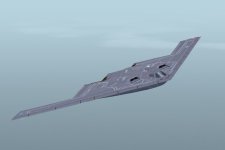
Good show! I don't know what type of animation is used for the nlg steering on that B-2, so you might have to keep trying things. If it looks like it moves in opposition, try one of the rudder reversed.If it spins in a 360, try C_wheel, or c_wheel_100_200. Some times you go through 20 exports before you get lucky.
Sprinkled through the posts above are a couple of zips and a drive download, those have all the screen grabs at full size, glass textures, and the demo A-3 with the blue skin.
Some of us have eyes pushing 70 Gone all farsigted, and the flight surgeon keeps asking if my glasses are bird strike rated.
Sprinkled through the posts above are a couple of zips and a drive download, those have all the screen grabs at full size, glass textures, and the demo A-3 with the blue skin.
Some of us have eyes pushing 70
Gone all farsigted, and the flight surgeon keeps asking if my glasses are bird strike rated.If you put the bomb bay on tailhook, you'll interfere with the tailhook. You have four door commands that work fine- put the crew door on door0, and the bomb doors on door2. It'll save you some fiddling. Make sure that the config file has appropriate entries for tail hook-also dependent on hydraulic power and hydraulic pump engine map, make sure you have enough doors assigned in the exits section, that you have a water rudder line in the contact points, that you have a wing fold section added in,thrust reverser enabled; you might need a new Air file. All this stuff has dependencies
If you put the bomb bay on tailhook, you'll interfere with the tailhook. You have four door commands that work fine- put the crew door on door0, and the bomb doors on door2. It'll save you some fiddling. Make sure that the config file has appropriate entries for tail hook-also dependent on hydraulic power and hydraulic pump engine map, make sure you have enough doors assigned in the exits section, that you have a water rudder line in the contact points, that you have a wing fold section added in,thrust reverser enabled; you might need a new Air file. All this stuff has dependencies
Hi lazarus
thanks yes I figured that out about 2 minutes after I posted,
Working thru a couple of other issues but getting there.
Thanks again for all your info and help.
Gavin
Sorting out Bounding Boxes
Hi,
I have found one way to get the correct parameters for the Bounding Boxes.
MDLX can read the co-ordinates of the original FS9 model, so you need to record those somewhere and then use MDL Tweaker or RADitor to fix the FSX model.
Start by pulling the original model into MDLX and click the Object Information button (looks like a piece of paper with a magnify glass - it is the same one you use to change the model name and the guid)
In the pop up window you can see the bounding box co-ordinates

Record those 6 numbers somewhere safe.
Now do all the adjustments and fixes that you need to do to the model and export it as an FSX native.
Import this FSX model back into MDL Tweaker (Which you can find in the Special Tools menu) or Raditor

Note that the numbers are wildly wrong but this can be easily fixed back to the values that you wrote down earlier. The Radius I just picked as the most reasonable value based on the X and Y co-ordinates.

Now export the model, fire up FSX and hopefully everything works first time
Thanks
Gavin
Hi,
I have found one way to get the correct parameters for the Bounding Boxes.
MDLX can read the co-ordinates of the original FS9 model, so you need to record those somewhere and then use MDL Tweaker or RADitor to fix the FSX model.
Start by pulling the original model into MDLX and click the Object Information button (looks like a piece of paper with a magnify glass - it is the same one you use to change the model name and the guid)
In the pop up window you can see the bounding box co-ordinates
Record those 6 numbers somewhere safe.
Now do all the adjustments and fixes that you need to do to the model and export it as an FSX native.
Import this FSX model back into MDL Tweaker (Which you can find in the Special Tools menu) or Raditor
Note that the numbers are wildly wrong but this can be easily fixed back to the values that you wrote down earlier. The Radius I just picked as the most reasonable value based on the X and Y co-ordinates.
Now export the model, fire up FSX and hopefully everything works first time
Thanks
Gavin
morpheusfz
Members +
Any idea about the rotor or prop animation? I have found nothing that seems right. 
padburgess
Charter Member
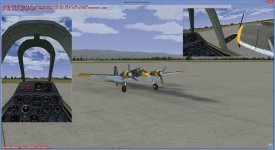
First Attempt
Hi
Here is my first successful attempt at converting an aircraft. And yes I know the cockpit is not true to life, but it is the best approximation I had in my library and I am happy that it is a close enough representation of the general wing and engine layout to be "good enough".
Aircraft Hs129B
Cockpit Milton's F7F Tigercat
Sounds Twin P&W's for fast cats
Gauges, a mixture from the gauges folder.
All animations work satisfactory with exception of prop spinning. I get a windmilling effect and so far no animation I try corrects this.

Cheers
Paul
Hi
Here is my first successful attempt at converting an aircraft. And yes I know the cockpit is not true to life, but it is the best approximation I had in my library and I am happy that it is a close enough representation of the general wing and engine layout to be "good enough".
Aircraft Hs129B
Cockpit Milton's F7F Tigercat
Sounds Twin P&W's for fast cats
Gauges, a mixture from the gauges folder.
All animations work satisfactory with exception of prop spinning. I get a windmilling effect and so far no animation I try corrects this.
Cheers
Paul
Attachments
morpheusfz
Members +
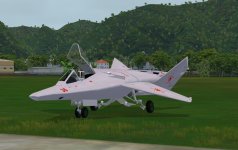
Just for fun. ;-) Oldie but goldie... Mig-37B Ferret-E by ITO
https://drive.google.com/open?id=0B5kx6bSnvk6vb2xxX283T196cDA

https://drive.google.com/open?id=0B5kx6bSnvk6vb2xxX283T196cDA
Attachments

falcon409
SOH-CM-2026
Ok, so I must be the only lame one here as no one else has asked this question.Everybody has model converter installed and pointed at the SDK? Henk's mdl def XML there, it goes in the SDK, just as the file structure of the nested folders.
Back up your existing XML, or move it to a spare folder, as you wish.
First, I didn't have a modeldef.xml file to begin with so there was no need to overwrite.
Henks download shows the sub_folder to be "3DSM7", but the SDK has three other folders inside that one. Where does the modeldef file go? (Plugins? Scripts? Samples? or by itself inside the 3DSM7 folder?)

hschuit
SOH-CM-2026
Ok, so I must be the only lame one here as no one else has asked this question.
First, I didn't have a modeldef.xml file to begin with so there was no need to overwrite.
Henks download shows the sub_folder to be "3DSM7", but the SDK has three other folders inside that one. Where does the modeldef file go? (Plugins? Scripts? Samples? or by itself inside the 3DSM7 folder?)
Ed, I have the ModelDef.xml file in the "bin" folder: .\Microsoft Flight Simulator X SDK\SDK\Environment Kit\Modeling SDK\bin