*MSFS 2020 Tools

If you're logged into Windows with an admin account, you should have full control over the files. I've never had any issue.
No, I am ,and I do, but I don't, and never had control over MS assumed files, that's why everything sim related stays very clear of designated/default locations. Then I never have problems. What happened here is that, fs2024 placed my Addon Linker shortcuts outside of my Community folder, which is why nothing was showing up in the sim. Once I realized that, when I cut and pasted the shortcuts into the community folder, the whole install of the addon transferred into the Community folder where it became locked up and MS property, I was not able to move it, or copy it, only delete it. This is a common thing with the store bought version. This file zipping from the Community folder saved my work, which is mine, created by me, and I do have full permissions on my system. As soon as they went into the MS folder, I lost all rights to my own files. I'm glad you never had a problem Tom, hopefully this helps someone else who does.
 
If you're logged into Windows with an admin account, you should have full control over the files. I've never had any issue.

MS does some nasty permission stuff with their games. Even if you're an admin, it can take some real permissions wizardry to get control of files in the \xboxgames folder and elsewhere when the MS Store is involved. Discovered this when trying to install some Starfield mods.

One of many reasons I suggest installing the FS2020 files in a custom folder rather than the default.
 
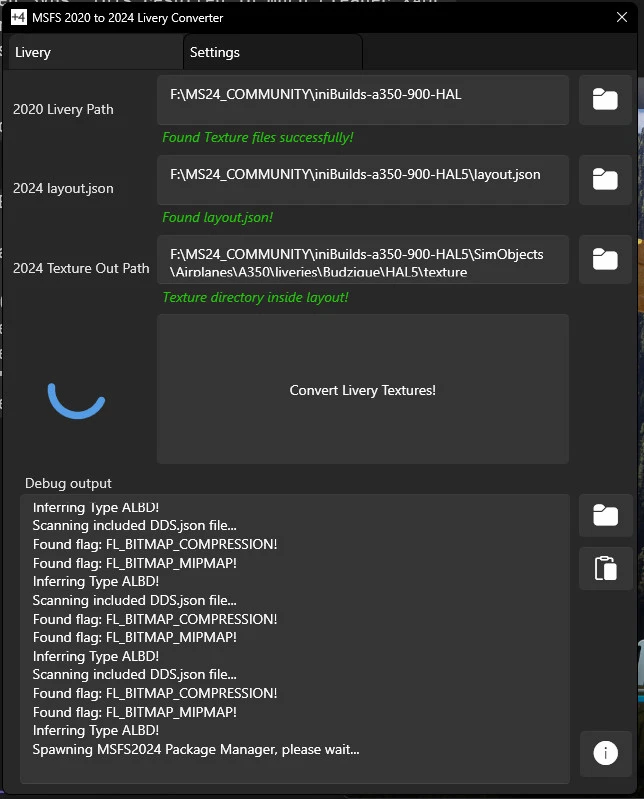
You can try this out, it works quite well for me.
Will it work the other way? There are a couple of paint jobs for the 2024 Albatross that I'd like to convert to 2020 for the 2020 version..
 
Will it work the other way? There are a couple of paint jobs for the 2024 Albatross that I'd like to convert to 2020 for the 2020 version..
No, sadly it won't.
The only way that i know is,
to use Nvidias Texture Tools Exporter ,
which you get it here
You can export your texture to DDS , KTX2, PNG or any other file format.
But only one by one.
 
Thanks for your replies. I'm already using Nvidia Texture Tool to convert KTX2 textures to PNG. But I can't seem to convert the PNG to KTX2.
 
Last edited:
Another tool that not many people may be aware of is ChatGPT. I have recently been using it for a variety of Sim uses. Modifying .cfg files, setting up controller sensitivities specific to your hardware & flying/aircraft preferences even aircraft specific tuning. I also recently used it to refine my RealTurb settings for a more realistic feel & depiction of turbulence... The possibilities are endless with this one!
 
COMPRESSONATORGUI

If you make liveries for the sim, buildings, or effects, make or manipulate PNG files for the sim using GIMP and Paint.net, there is a better way to finalize your textures, you should check this out:

I just discovered a little program at GitHub that renders PNG files with BC7 compression when saving as a DDS file for livery artists as a final step before the sim folder. The program is called CompressonatorGUI and it finalizes the entire PBR set ALBD, COMP, NORM far better than Paint.net for NORMALS, and GIMP's outdated DDS plugin. The results it the sim are very noticable. I was unaware that GIMP was carving so much detail off my DDS conversions, all the while maintaining a huge uncompressed file. Using Compressonator now, I've gone from *64mb files to 16mb files and they look incredible in the sim. I don't fully comprehend the algorithm manipulation, or the code as described in the Youtube video, but my eyes do not deceive. I have gone back and redone all my current B-25 liveries, I thinks it's that good. It's just a little time consuming setting up mutiple PNGs for conversion as you need to tell the program how to handle the files and where to place them. But I swear the results in the sims (20 and 24) are amazing. It also converts PNG directly to KTX2

Please have a look here to read about the science behind the program, and download the latest version to check out
https://compressonator.readthedocs.io/en/latest/

Because this program can run off of a .bat file, I used ChatGPT to help me write an automated conversion .bat for converting my PNG to DDS through Compressonator reducing my workflow time considerably.

If you intend on using the .bat file feature, you must download and install in the same location - CompressonatorCLI
GUI is the user interface which works great as a stand-alone, ChatGPT determined we needed to include the latter to aid the automated process.

BTW, the title of the program may be called "Compressionator" but the .exe file is called "Compressonator". Typo? Intentional? Don't know, but the difference doesn't seem to have any negative affect on the functions or features.

* 16mb was the result of 1 mip level. For a full set of 13 mip levels from a 4096 x4096 texture, the file size became a total of 21mb. Still, a significantly reduced strain on the processing with the reduced size, and extra LODs.

 
Last edited:
COMPRESSONATORGUI

If you make liveries for the sim, buildings, or effects, make or manipulate PNG files for the sim using GIMP and Paint.net, there is a better way to finalize your textures, you should check this out:
Wow, thank you for mentioning this.
I tried it and it does not run on my system though. Can it be that it only works natively on AMD GPU type systems?
 
Can it be that it only works natively on AMD GPU type systems?
My guess would be yes. This is from Google's AI when I looked it up:
Compressonator GUI is a graphical tool by AMD used to compress, decompress, and view 3D textures and models. It helps game artists and developers test image quality and convert files like BCn, ETCn, and ASTC without using a command line. You can download the software from AMD GPUOpen.
 
No need to be sad, you just need to familiarize yourself with the options. Unless this option is bogus, as I haven't tried converting PNG-KTX2 yet, Once you load in your texture for conversion, tell it to create KTX2 files by selecting KTX2 in the Destination drop down menu. You see the options are for DDS by default, or KTX, and KTX2 are the alternative file formats.

And just to note, the quality levels range from 0 to 1 with 1 having no BC7 compression, essentially a duplicate of the uncompressed texture. The amount of time to render the textures goes up considerably the closer to 1 you select. If you are thinking the best quality is 1, as I did, the rendering of a folder of PNGs takes hours...and hours. The result is very little reduction in file size.. I have found that a compression of .4 is the highest I need to go for my Albedos to maintain the best quality. That may even be a little high, it just depends on your personal preference, and how much time you care to wait. My recent B-25 liveries were compressed at .4 for ALBEDOs, and 1.5 for the COMPs and NORMALs.

This video explains the quality algorithms used very well. It's technical, but understandable for the most part.
 

Attachments

  • Screenshot_compressonator.jpeg
    Screenshot_compressonator.jpeg
    401.2 KB · Views: 2
Last edited:
No need to be sad, you just need to familiarize yourself with the options. Unless this option is bogus, as I haven't tried converting PNG-KTX2 yet, Once you load in your texture for conversion, tell it to create KTX2 files by selecting KTX2 in the Destination drop down menu. You see the options are for DDS by default, or KTX, and KTX2 are the alternative file formats.

And just to note, the quality levels range from 0 to 1 with 1 having no BC7 compression, essentially a duplicate of the uncompressed texture. The amount of time to render the textures goes up considerably the closer to 1 you select. If you are thinking the best quality is 1, as I did, the rendering of a folder of PNGs takes hours...and hours. The result is very little reduction in file size.. I have found that a compression of .4 is the highest I need to go for my Albedos to maintain the best quality. That may even be a little high, it just depends on your personal preference, and how much time you care to wait. My recent B-25 liveries were compressed at .4 for ALBEDOs, and 1.5 for the COMPs and NORMALs.

This video explains the quality algorithms used very well. It's technical, but understandable for the most part.
Thanks for explaining this! That's highly useful!

Cheers,
Mark
 
My pleasure Mark, thanks! Hope you find some good use with it, I have a .bat file for converting to DDS. I'll gladly share.
 
Back
Top