
-
Please see the most recent updates in the "Where did the .com name go?" thread. Posts number 16 and 17.
-
Special Server Maintenance
Just when you think you have everything running some what better...
You get a message from the Hosting company. Short story they need to move us to a new server. I have been working with them to plan a good date for all concerned. Here is what we have come up with as a schedule.
- November 4th 17:00 -5UTC shut off the forums and start backup proceedures. During this time there will be no access to the forums or the Resource Section.
- November 5th Continue with Backups and download same until complete.
- November 6th 7:00 turn over server to hosting company to move system to new server
- November 7th - 8th restore backups and upgrade forum software.
If all goes well we should be back online on November 8th.
To keep you updated we will post updates on AVSIM forums.
Thank you for your support.
You are using an out of date browser. It may not display this or other websites correctly.
You should upgrade or use an alternative browser.
You should upgrade or use an alternative browser.
Orbx Pac 750
- Thread starter Killbilly
- Start date


I bought it for MSFS a couple years ago.My only gripe was that it was not the Pac Cresco because at that time i had become heavely interested in New Zealand aerial topdressing. I mean what is not to love about this kind of hill dodging flying. (not sure if there's any impact on the environment using this way of fertilizing farmland..)
Apart from hauling pax and skydivers you can still have at topdressing as well with this newer Pac 750. When i was employed overthere in beautiful NZ i can't remember any sort of animated fertilizer loading facility (a special truck delivers the fertilizer powder right on top of the fuselage into a compartiment aft of the cockpit. The pilot opens and closes the lid from within his office) but if you ask me it's about time Orbx gets on to that asap. Should be fun, right ?
The Pac 750 model is done very well, inside and out, and IIRC it flies very well too. On the Orbx page it says "MSFS 2024 compatible" so i guess it's about the same as the MSFS version which i did like very much. Been topdressing away in NZ with great enjoyment !
Here's a topdressing session of a real Cresco filmed in external view (Ok. its the forerunner and original Fletcher FU-24 but the operation is exactly the same as with the Cresco and Pac-750) :
I'd say get to work ! You'll love it !
Apart from hauling pax and skydivers you can still have at topdressing as well with this newer Pac 750. When i was employed overthere in beautiful NZ i can't remember any sort of animated fertilizer loading facility (a special truck delivers the fertilizer powder right on top of the fuselage into a compartiment aft of the cockpit. The pilot opens and closes the lid from within his office) but if you ask me it's about time Orbx gets on to that asap. Should be fun, right ?
The Pac 750 model is done very well, inside and out, and IIRC it flies very well too. On the Orbx page it says "MSFS 2024 compatible" so i guess it's about the same as the MSFS version which i did like very much. Been topdressing away in NZ with great enjoyment !
Here's a topdressing session of a real Cresco filmed in external view (Ok. its the forerunner and original Fletcher FU-24 but the operation is exactly the same as with the Cresco and Pac-750) :
I'd say get to work ! You'll love it !
Last edited:

DennyA
SOH-CM-2023
It works okay in FS2024, but it's an FS2020 plane. It's decent but not exceptional. There have been a number of nice updates to it since release. I don't think we ever got the promised enhanced sound pack, but the one it has is inoffensive.
It's not amazing, but if you're interested in the plane, it's pretty good.
It's not amazing, but if you're interested in the plane, it's pretty good.

Killbilly
SOH-CM-2026
Well, I bought it, customized it, flew it, and unfortunately regretted it.
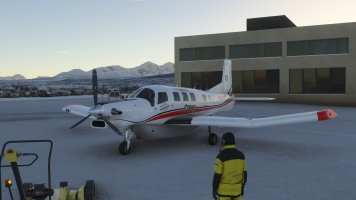
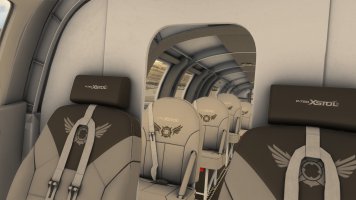
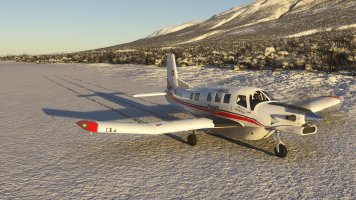
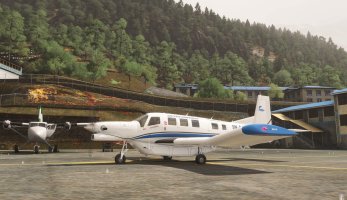
THE GOOD: it is a really nice model inside and out with lots of features and four great variations. It looks great and performs as expected. In fact, it's basically perfect for what I intended to use it for (getting in and out of just about anywhere -- even fully loaded). Some pics . . .
THE BAD: There is no sound difference when the doors are open, no visible copilot in cockpit view, and (of course) the inability to fly as a male -- stupid random 2020 avatars.
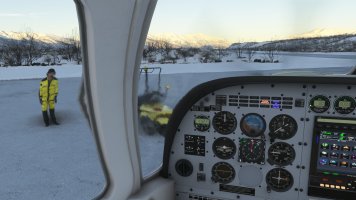
THE UGLY: This has the WORST heatblur effect I have ever seen! It's just out of control. While flying, it distorts your glareshield and cockpit in dizzying waves, and it completely negates the advantage of the dropped-corner windscreen for forward and down visibility. From outside, it looks like the front end of the plane is passing through some sort of space-time distortion out of a sci-fi film. Basically, it renders the plane impossible to enjoy flying. Some pics . . .

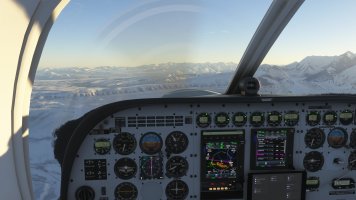
FINAL THOUGHTS:

If anyone knows how to completely remove an effect, please let me know.
THE GOOD: it is a really nice model inside and out with lots of features and four great variations. It looks great and performs as expected. In fact, it's basically perfect for what I intended to use it for (getting in and out of just about anywhere -- even fully loaded). Some pics . . .
THE BAD: There is no sound difference when the doors are open, no visible copilot in cockpit view, and (of course) the inability to fly as a male -- stupid random 2020 avatars.
THE UGLY: This has the WORST heatblur effect I have ever seen! It's just out of control. While flying, it distorts your glareshield and cockpit in dizzying waves, and it completely negates the advantage of the dropped-corner windscreen for forward and down visibility. From outside, it looks like the front end of the plane is passing through some sort of space-time distortion out of a sci-fi film. Basically, it renders the plane impossible to enjoy flying. Some pics . . .
FINAL THOUGHTS:
If anyone knows how to completely remove an effect, please let me know.

tankerguy72
SOH-CM-2023
Is it a marketplace purchase or do you have access to the model xml?
DennyA
SOH-CM-2023
It's available from OrbX direct (where I got mine), so the xml files are available.
The only other issue I've seen reported is fuel feeding, which isn't handled realistically compared to the real plane. According to posts over on the MS forum, OrbX fixed it at one point, but the fix broke in 2024 (and maybe an SU on 2020??).
The only other issue I've seen reported is fuel feeding, which isn't handled realistically compared to the real plane. According to posts over on the MS forum, OrbX fixed it at one point, but the fix broke in 2024 (and maybe an SU on 2020??).
Killbilly
SOH-CM-2026
Is it a marketplace purchase or do you have access to the model xml?
Unfortunately, I bought it in the Marketplace (I didn't want to deal with OrbX's management software. I downloaded it in MSFS2020 to get access to the textures, but no model.xml file. Sigh.
If anyone has access to it and could create a mod, it would be very much appreciated.
Killbilly
SOH-CM-2026
So, let's say I buy this again from Orbx. What would I need to modify in the model.xml file to remove the heat blur effect?Is it a marketplace purchase or do you have access to the model xml?

tiger1962
SOH-CM-2026
I don't have the Pac 750 myself, but I know that the effects are called in the aircraft.cfg file, so it's a simple text edit with Notepad that's needed.
In the [EFFECTS] section, look for two lines similar to these:
effect.0=fx_exhaust_left#(A:GENERAL ENG COMBUSTION:1, boolean)#FX_ASOBO_M_REACTORHEAT_TBM930
effect.1=fx_exhaust_right#(A:GENERAL ENG COMBUSTION:2, boolean)#FX_ASOBO_M_REACTORHEAT_TBM930_R
You can either delete these two lines to remove the effect altogether, or you can replace the effect itself (FX_ASOBO_M_REACTORHEAT_TBM930 & _R) with a smaller one:
effect.0=fx_exhaust_left#(A:GENERAL ENG COMBUSTION:1, boolean)#FX_ASOBO_TBM930_EXHAUST
effect.1=fx_exhaust_right#(A:GENERAL ENG COMBUSTION:2, boolean)#FX_ASOBO_TBM930_EXHAUST
Or:
effect.0=fx_exhaust_left#(A:GENERAL ENG COMBUSTION:1, boolean)#FX_ASOBO_HEAT_SMALL
effect.1=fx_exhaust_right#(A:GENERAL ENG COMBUSTION:2, boolean)#FX_ASOBO_HEAT_SMALL
The effect files can be found here (MS Store version):
C:\XboxGames\Limitless\Content\Packages\fs-base-effects-legacy\effects
In the [EFFECTS] section, look for two lines similar to these:
effect.0=fx_exhaust_left#(A:GENERAL ENG COMBUSTION:1, boolean)#FX_ASOBO_M_REACTORHEAT_TBM930
effect.1=fx_exhaust_right#(A:GENERAL ENG COMBUSTION:2, boolean)#FX_ASOBO_M_REACTORHEAT_TBM930_R
You can either delete these two lines to remove the effect altogether, or you can replace the effect itself (FX_ASOBO_M_REACTORHEAT_TBM930 & _R) with a smaller one:
effect.0=fx_exhaust_left#(A:GENERAL ENG COMBUSTION:1, boolean)#FX_ASOBO_TBM930_EXHAUST
effect.1=fx_exhaust_right#(A:GENERAL ENG COMBUSTION:2, boolean)#FX_ASOBO_TBM930_EXHAUST
Or:
effect.0=fx_exhaust_left#(A:GENERAL ENG COMBUSTION:1, boolean)#FX_ASOBO_HEAT_SMALL
effect.1=fx_exhaust_right#(A:GENERAL ENG COMBUSTION:2, boolean)#FX_ASOBO_HEAT_SMALL
The effect files can be found here (MS Store version):
C:\XboxGames\Limitless\Content\Packages\fs-base-effects-legacy\effects
Last edited:
Killbilly
SOH-CM-2026
Thanks very much. I'll probably re-purchase and give that a try in the next week or so. I appreciate the help.I don't have the Pac 750 myself, but I know that the effects are called in the aircraft.cfg file, so it's a simple text edit with Notepad that's needed.
In the [EFFECTS] section, look for two lines similar to these:
effect.0=fx_exhaust_left#(A:GENERAL ENG COMBUSTION:1, boolean)#FX_ASOBO_M_REACTORHEAT_TBM930
effect.1=fx_exhaust_right#(A:GENERAL ENG COMBUSTION:2, boolean)#FX_ASOBO_M_REACTORHEAT_TBM930_R
You can either delete these two lines to remove the effect altogether, or you can replace the effect itself (FX_ASOBO_M_REACTORHEAT_TBM930 & _R) with a smaller one:
effect.0=fx_exhaust_left#(A:GENERAL ENG COMBUSTION:1, boolean)#FX_ASOBO_TBM930_EXHAUST
effect.1=fx_exhaust_right#(A:GENERAL ENG COMBUSTION:2, boolean)#FX_ASOBO_TBM930_EXHAUST
Or:
effect.0=fx_exhaust_left#(A:GENERAL ENG COMBUSTION:1, boolean)#FX_ASOBO_HEAT_SMALL
effect.1=fx_exhaust_right#(A:GENERAL ENG COMBUSTION:2, boolean)#FX_ASOBO_HEAT_SMALL
The effect files can be found here (MS Store version):
C:\XboxGames\Limitless\Content\Packages\fs-base-effects-legacy\effects

Killbilly
SOH-CM-2026
Thanks for all the help, Gents. After getting the non-marketplace version, I was able to remove the offending effect, and as a bonus, I was able to switch the pilot and copilot avatars so my male self is in the left seat.
Now I can really enjoy this unusual and very capable plane!
I hate the marketplace.
Now I can really enjoy this unusual and very capable plane!
I hate the marketplace.