Shrike F-86F

Hollister56

Members +
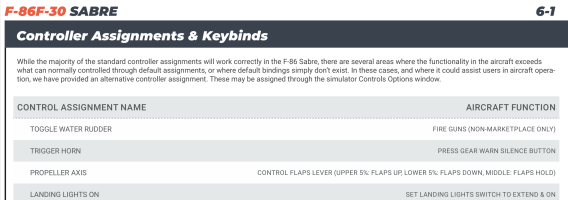
I copied the F-86 to my Community Folder in FS2024 and it seems to work really well, except I can't get the flaps to work with the flap lever in the cockpit. That's the only issue I've come across. I can bind them to a key stroke, but they are either full up or full down, no intermediate position. I can't get the Propeller Axis as per the manual to work either. Is anyone flying the F-86 in FS2024 that has seen this or come up with a solution?
Thanks, Ed
 
Not to sound factitious, Ed. But, what do you need a propeller axis for in a F-86?
 
I copied the F-86 to my Community Folder in FS2024 and it seems to work really well, except I can't get the flaps to work with the flap lever in the cockpit. That's the only issue I've come across. I can bind them to a key stroke, but they are either full up or full down, no intermediate position. I can't get the Propeller Axis as per the manual to work either. Is anyone flying the F-86 in FS2024 that has seen this or come up with a solution?
Thanks, Ed
An update has been issued some time now that fixes many compatibility issues with 2024. It also includes a new set of textures where many mistakes in markings have been improve, especially the USAF stars and bars and many others (I know cause I made many of them). If you own it you should have received an update email, unless you opted out of updates when asked. In any case your original download link will give you the latest version.
 
Hello Dimus,
I do have the latest version, 1.1.0, is that what you are using?
Have you installed the F-86 into FS2024 and are your flaps working?
Can you bind them to the Propeller Axis? Does your cockpit flap control lever work?
Just wondering if you have it working in FS2024?
Thanks, Ed
 
The problem was I actually had 1.0.3 installed not 1.1.1.
That solved my flap problem.
Glad to see you're sorted.

For those interested the below is the changelog just for the liveries:
- Addition of black radar nose in all
- For all US liveries correction of shape of US Stars and bars
- Adjustment of font and size of "USAF" on wings
- Major reduction of "metalness" in all painted areas
- More glossy aerobatic liveries
Specific ones:
- Frecce Tricolori: Brighter blue
- Skyblazers: New "Skyblazers" fonts especially the "S", various corrections on fonts and details, addition of specific decals
- Golden Hawks: Adjustment of the "Hawk" lower, new stencilled fonts on sides, adjustment of roundels and new "G-H" on fin, correction of black antiglare and painted areas on wings
- RCAF: Adjustment of antiglare, addition of the "Bluenose" boat
- NoAF UMU: Correction of U-MU on stbd side, addition of decals around canopy
- ANG: Siver grey areas on wings more pronounced
- Several smaller adjustments on all others

 
1787512795203.png

I noticed that only the right side of the cockpit is illuminated. There are two lights on the left side, but they are not working. Has anyone else noticed this? Hopefully this is an easy fix, especially for those night flights!
 
View attachment 196306

I noticed that only the right side of the cockpit is illuminated. There are two lights on the left side, but they are not working. Has anyone else noticed this? Hopefully this is an easy fix, especially for those night flights!

I've got the same thing. I never noticed before since I've never flown the Sabre at night (it's too pretty to be kept in the dark, I guess).

20260824041932_1.jpg

I'll be d&#ned if I can figure out how to turn on the lights on the left.
I guess if you need to see over there and don't want to switch on your flashlight, you can always pull the throttle back all the way so the warning light in the gear handle kicks on. It does a pretty good job of lighting up that left side.

20260824043125_1.jpg
 
Brian I like flying the Sabre all times of the day. This might be an issue that Shrike has to fix, or Milviz, or Blackbird. This needs to be tied in to the rotary switches that controls the right side. There are actually two lights on the left side and neither of them work.
 
1787584379473.png
Don't forget this great cockpit mod and I think is a big improvement from the default beat up one.


It says it's only for FS2020, but I copied and pasted it into the FS2024 Shrike F-86 and it worked without issue. What I did was just take the textures and copied/pasted them into the original texture folder and then ran the layout.json Generator to make them work. The rest of the files in this mod can be discarded.

OF COURSE back up your original texture folder if you ever want to revert back!

I highly recommend this mod.
 
View attachment 196368
Don't forget this great cockpit mod and I think is a big improvement from the default beat up one.


It says it's only for FS2020, but I copied and pasted it into the FS2024 Shrike F-86 and it worked without issue. What I did was just take the textures and copied/pasted them into the original texture folder and then ran the layout.json Generator to make them work. The rest of the files in this mod can be discarded.

OF COURSE back up your original texture folder if you ever want to revert back!

I highly recommend this mod.
Thanks! I was unaware of that mod. I does look nicer.
 
1787592185249.png

Look at that beautiful night cockpit lighting! It was a bit of a mess and it took several hours with Claude to finally get it to this state, and I would estimate around 6 hours, but we got there in the end. These lights are controlled by the Console and Panel rheostat rotary knob.

In the picture above the lights are at the dimmer value and the lights will go much brighter if you like. Notice the left console has all the letters illuminated such as the throttle quadrant.

I attached a PDF discribing mods that were made and a zip file of the modified files.
 

Attachments

  • Shrike_F86F_Left_Console_Lighting_Fix_Files.zip
    160.5 KB · Views: 12
  • Shrike_F86F_Left_Console_Lighting_Fix.pdf
    46.8 KB · Views: 13
1787593543297.png

Here is another mod I worked on which I like very much. I removed the AERA GPS unit and now I have a very clear unobstructed forward view.

This mod is already incorporated into the lighting mod that I posted in #14 above.
 
Last edited:
You're welcome Brian.

I use the Thrustmaster Warthog throttle and I wrote some lua scripts via FSUIPC to control things like the Battery/Starter switch. It work justs like the real F-86. I use a sping loaded to center switch and when you move it to the start position to start the start cycle you can immediately go to the battery position and the start sequence will continue until 23 percent and you get starter cutout. So it's really a 3 position switch with one position spring loaded to center to engage the starter and the center position and a latching battery position. When you move the switch to the center it is programmed upon release and the cockpit switch will move to the center off position.

Shrike had it setup where you had to leave it in the start position and after start cutout it moved to the center off position. If you moved it out of the start position before start cutout the start sequence was aborted.

The only way to make this work correctly is writing a Lua script as far as I know? It might also be doable with Spad.Next?

Ed
 
Clever. I admire the dedication to realism. I'll have to experiment with my X-56 HOTAS. It's a lot less customizable than the Warthog, but I might be able to figure something out. I do have one spring-loaded toggle that I have nothing bound to . . .
 
1787679640935.png

This is pretty cool not having the pilot in the seat when you do a walkaround. I had to modify the F86F_Interior.xml file and write a lua script to assign a button on my controller. The button press hides or shows the pilot. It would be nice if Shrike would add more detail to the brakes and add the 120 gallon inboard drop tanks. Also a modern cockpit like the one found in the F-86 Steve Hinton flies at the Planes of Fame.
 
1787815338320.png

1787818067968.png

Now this is how a F-86F should look like sitting on the ramp. Gear doors open and no pilot sitting in the seat. This was a great little project to get the doors to open on the ground and it is just like the real jet. The Landing Gear Emergency release handle is animated too. That is what opens the gear doors on the ground and it is in the checklist for the pilot to pull it out before leaving the cockpit. With the handle pushed in and the utility hydraulic system pressure above 500 psi the doors will close. Pushing the handle in is on the before start checklist. I watched Steve Hinton start the Planes of Fame F-86 and he waited until after the engine was started to close the door? Steve Hinton is a Warbird Legend.

It is too bad Shrike didn't spend a little more time with this iconic jet to bring it up to at least the Milviz Corsair level. I would have gladly paid more to get more. Like that yellow area on the right main gear door. That's been there since day one. I wish I could figure out how to remove it.

I will try to make a Youtube video of a few of these mods. One big one was the battery/starter switch which now works as it should, with it momentarily held in the start position and then moved right into the battery position and the start cycle continues. Shrike did not have it working that way. If you moved it out of the start position before starter cutout the start cycle would terminate.

The brakes definately need to me modeled too. Those brakes just don't cut it.

It would have been nice if they took the time to model the two 120 gallon inboard drop tanks. I wrote the code to add them to the [Fuel System] and the logic for the inboard tanks fuel selector switch and it works, the fuel tank fuel management is correct too. The only thing missing are the physical tanks.

Another thing I noticed is that there are no FS2024 repaints for this jet. I wonder why?
 

Attachments

  • F86F_Gear_Door_Emergency_Release_Reference_1.pdf
    22.1 KB · Views: 14
Last edited:
Back
Top