Thanks
Dangerousdave26 for the confirmation re FS2002. Excuse the long post, but would like to get specific help, am getting closer but still no luck (all problems are at my end).
On my old
laptop that has
FS2002 on it,
Windows Vista Home Edition, plugged via ethernet cable into my router, I could ping websites but the old Internet Explorer browser wouldn't display anything.
Today I did a Google Search for 'can ping but browser won't connect to Internet, Windows Vista, how to fix?’ Got the AI Overview ‘To fix a Windows Vista computer that can ping external IP addresses or domains but cannot browse the web, reset the Winsock catalog and check your browser's proxy LAN settings. ’ '1. Reset Winsock (Command Prompt). A corrupted Winsock catalog often blocks application and browser traffic while allowing basic ICMP pings to go through. 1. Click the Start button, type cmd in the search box. 2. Right-click on Command Prompt in the results and choose Run as administrator. 3. Type the following command and press Enter: cmd then in the command prompt window enter
netsh winsock reset then restart the computer.' I did that successfully. The AI Overview also said 'Check Browser Proxy and LAN Settings. Accidental proxy configurations can intercept and block browser traffic even when the network stack is healthy.' I did that and it was set correctly at the default of no proxy. I then tried in the browser to get some websites.
Success with
https://www.chocolatesoftware.com appearing and the linked webpages also accessible. Also appears is
https://www.chocolatesoftware.com/cgi-bin/fshost_master.cgi?. (Some other websites and pages, including my own, won't display, but the browser is very old and outdated so maybe webpage protocols or somesuch prevent this (some messages came up suggesting this). Am not concerned as such, as I only want to keep using the laptop offline in my sim booth, and if possible, sometimes connect via ethernet cable only to 73.154.69.150 for a multiplayer session.
I opened FS2002, went to the Multiplayer settings, nothing there to set or change, then Multiplayer session (been to this numerous times in past years), per instructions (
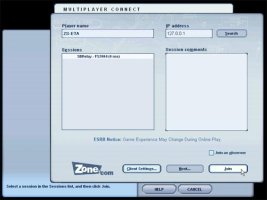
Flight Simulator Multiplayer Tutorial), same as I've done before (I click 'Join as observer), entered into the top right field 'IP address' the address 73.154.69.150 and click the Search button. The spinning circle appears for a few seconds but nothing appears in the other field, no sessions appear.
This is my appeal: could someone who connects successfully in FS2004 (the screens are the same/similar in FS2002) post some screenshots of what they see e.g. as shown in
https://flyawaysimulation.com/news/782/ (screenshot attached). I'm perhaps delusional but feeling and hoping that it's only some little setting somewhere on my laptop that I have to tweak to get FS to see the server. Thanks in advance, cheers, MAD1.