SOH FSHost Server

Honestly I have never used the Flight Plan function. The FSHost website is still online. You might find the answers there.

Go-to


Select help from the menu in the left.

Then select Flight Plan.

Which means, when you’ve created your own Flightplan ingame, it wouldn’t be submittable? so that it would be displayed?
That’s actually a bumper… but okey…
 
To file a flight plan on FSHost you type:

+fp (your flight plan) i.e. MMML BZA MOHAK GBN PXR DRK KACEE KCGN

To close your flight plan type:

-fp

You will then see them displayed on the FSHost page:

FSHost+fp.jpg

You will get this message:

"*Server (FSHost 3.2):
[Private] Flight Plan filed. Type ?fp to view. Type -fp to cancel. You will receive another message when it is approved and open."

I am not certain, but I think that only the server administrator can "approve and open" a flight plan.
 
Last edited:
Can anyone explain me, what that guy is doing??

460 NM and allmost 6 Hours in the Air… on a DC-6B (without refueling as it seems to me…) - doesn’t seem to be logic to me…
Also, he seems way off his routing there… he seems to be doing some holdings for hours allready... hahaha what the hell??

I mean if he took the direct routing he could’ve done that in under 55min. - Has he passed out or something??
Something seems off there massively… also i bet his DC-6 is out of fuel for allmost three hours for sure… what is that guy doing there??

Just seen that on the Multiplayer session… and thought I’d wanted to share that with you… as it looks weird to me… :D lol

EDIT: His Sim might has crashed midflight… as he didn’t even arrive anywhere near his destination Grand Rapids.. but his sim crashed midflight when he was still somewhere out of Michigan at 6500ft approximately… and his Multiplayer Session ended abruptly…

Bildschirmfoto 2026-09-09 um 23.21.57.png
 
Last edited:
Any number of things can be at play here.

His sim might have crashed but the FSHost server still thinks he's online.

He might have shut down the sim before shutting down FSHost and the server still thinks he's online.

He might have put his sim into pause (which is not recommended when flying online BTW as it can prevent other users from joining the session) and the time kept running on the server even though his aircraft is not moving.

Any or all of the above could be valid reasons.
 
@Airbasil I can add the table entry for MACH but right now I have not found if there is a default variable in FSHost to pull the data from FS9/FSX etc. Right now "Speed KIAS" (renamed from "Speed") is pulling the variable ^^speed^^. That is in the FSHost software and what I am thinking it is coded into the exe and I can't add to the variable list.

I am not saying I can't do it just haven't found our how to yet and just finished burning my lunch hour looking for it.
 
Any number of things can be at play here.

His sim might have crashed but the FSHost server still thinks he's online.

He might have shut down the sim before shutting down FSHost and the server still thinks he's online.

He might have put his sim into pause (which is not recommended when flying online BTW as it can prevent other users from joining the session) and the time kept running on the server even though his aircraft is not moving.

Any or all of the above could be valid reasons.
@Airbasil

Or did he fall asleep while en route and end up circling the field on auto pilot for hours. We saw that with one of the other Around the World Race Teams when a member of that team fell asleep and they had to declare his flight invalid and someone else had to fly it.

Noting that the timer is flying time and not time spend on the ground engine off or engine on.
 
Finished Dan's Rocky Mountain Hoplist today. Thank you to Dave for providing the server; much appreciated sir!

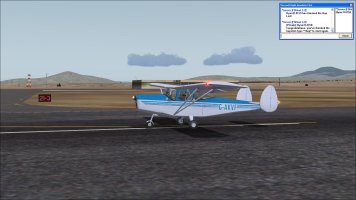
Used David Molyneaux's Chrislea Super Ace on the last few hops. Excellent plane!


At_KOLS.jpg

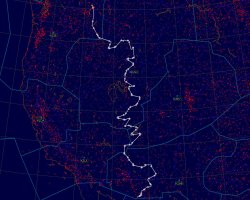
It was an interesting route:

Rocky_Mountain_Hoplist.jpg

The Alaska or Bust hoplist is next.
 
Sorry the power company is shutting off my power tonight and tomorrow night for maintenance. I have to shut down all my gear. I will update the IP Address when it comes back on and I bring it all on line again.

This is round 1.
 
Just as an update. The power didn't go off last night. They had to cancel. I don't know if today is cancelled as well. If I don't get a notice I will shut off the server again at 5ish EST.

The fail over date was for this Saturday. Depending on what happens I might have to have the server off all day. I will not be home all day.
 
Last edited:
They haven't given me any indication if they are turning off the power today. I am going to risk it and let the server run. If it does become unreachable then power is why.
 
Hi all, long time since I posted. Glad to see that multiplayer for FS9 is still available. Might it also work for my FS2002? Have wanted to do it for years but believed It was no longer possible. Will explore. Any tips re FS2002?
 
Thanks Dangerousdave26 for the confirmation re FS2002. Excuse the long post, but would like to get specific help, am getting closer but still no luck (all problems are at my end).

On my old laptop that has FS2002 on it, Windows Vista Home Edition, plugged via ethernet cable into my router, I could ping websites but the old Internet Explorer browser wouldn't display anything.

Today I did a Google Search for 'can ping but browser won't connect to Internet, Windows Vista, how to fix?’ Got the AI Overview ‘To fix a Windows Vista computer that can ping external IP addresses or domains but cannot browse the web, reset the Winsock catalog and check your browser's proxy LAN settings. ’ '1. Reset Winsock (Command Prompt). A corrupted Winsock catalog often blocks application and browser traffic while allowing basic ICMP pings to go through. 1. Click the Start button, type cmd in the search box. 2. Right-click on Command Prompt in the results and choose Run as administrator. 3. Type the following command and press Enter: cmd then in the command prompt window enter
netsh winsock reset then restart the computer.' I did that successfully. The AI Overview also said 'Check Browser Proxy and LAN Settings. Accidental proxy configurations can intercept and block browser traffic even when the network stack is healthy.' I did that and it was set correctly at the default of no proxy. I then tried in the browser to get some websites. Success with https://www.chocolatesoftware.com appearing and the linked webpages also accessible. Also appears is https://www.chocolatesoftware.com/cgi-bin/fshost_master.cgi?. (Some other websites and pages, including my own, won't display, but the browser is very old and outdated so maybe webpage protocols or somesuch prevent this (some messages came up suggesting this). Am not concerned as such, as I only want to keep using the laptop offline in my sim booth, and if possible, sometimes connect via ethernet cable only to 73.154.69.150 for a multiplayer session.

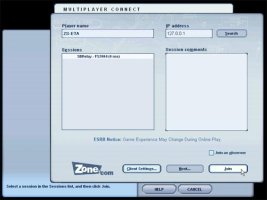
I opened FS2002, went to the Multiplayer settings, nothing there to set or change, then Multiplayer session (been to this numerous times in past years), per instructions (Flight Simulator Multiplayer Tutorial), same as I've done before (I click 'Join as observer), entered into the top right field 'IP address' the address 73.154.69.150 and click the Search button. The spinning circle appears for a few seconds but nothing appears in the other field, no sessions appear.

This is my appeal: could someone who connects successfully in FS2004 (the screens are the same/similar in FS2002) post some screenshots of what they see e.g. as shown in https://flyawaysimulation.com/news/782/ (screenshot attached). I'm perhaps delusional but feeling and hoping that it's only some little setting somewhere on my laptop that I have to tweak to get FS to see the server. Thanks in advance, cheers, MAD1.
 

Attachments

  • FS2004_multiplayer_connect_ screen.jpg
    FS2004_multiplayer_connect_ screen.jpg
    34.4 KB · Views: 4
Back
Top