SU3 launched, but...

Yeah, there seem to be much more anomalies due to the photogrammetry since SU3. As it is an algorithm that depends on its interpretation of the available data, I assume there's little we as users can do to fix it. Deleting the rolling cache and scenery indexes doesn't help: I did this already right after SU3 installed (including deleting the shader cache). ATM, SU3 seems like a step back to me when compared to SU2.
 
Last edited:
Yeah, I had deleted the rolling cache and scenery indexes with no effect too. I agree with you, Lawman, as my experience with SU3 has shown it to be a step back too. I haven't noticed any improvements, only several new issues that hadn't been present before.
 
Yeah, I had deleted the rolling cache and scenery indexes with no effect too. I agree with you, Lawman, as my experience with SU3 has shown it to be a step back too. I haven't noticed any improvements, only several new issues that hadn't been present before.
I agree with you completely.
 
As long as it took to get this update out, I'm certainly not very impressed. I had some positive hopes when there was mention of work with the AI traffic. After I had the update installed, I wanted to give the AI traffic "improvements" a try. I reversed the menu items needed to make Simbrief & BeyondATC work best. Fired it up and what do we have now??? Still airlines with nonsensical factory paint schemes, blank aircraft, and the worst is now there are multiples of the same GA aircraft sitting around with reg numbers like "AS-Beech & AS-Cessna", and others with the blank white patch where a reg number should be.

Needless to say, I'm back to the Simbrief/BeyondATC/FSLTL combo. It's not perfect having no GA traffic, but at least what shows up makes sense.


Forest
 
All I can contribute is the generally unhelpful "Working OK for me". Wish you luck with this going away.
 
All I can contribute is the generally unhelpful "Working OK for me". Wish you luck with this going away.
Nothing wrong with saying that at all. I could actually say the same thing about 95% of issues I read that others are having with MSFS2024. Those things work great on my end. :)


Forest
 
Fired it up and what do we have now??? Still airlines with nonsensical factory paint schemes, blank aircraft

If you have FSLTL, AIG, and/or FSTraffic planes installed, the sim will use them for its own AI traffic if you have their planes active in the sim. IE: I have their model folders active using Addons Linker, but I'm not running their utilities. MSFS will pick up their add-on liveries. I rarely ever see a factory scheme with these models active in my Community folder.

Not saying you should have to do it, just that it works. :)

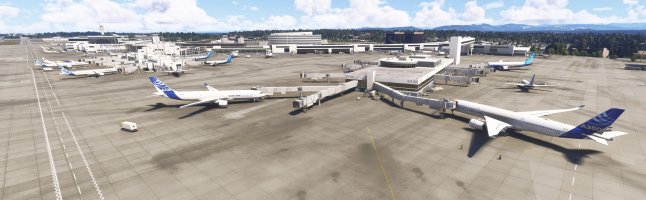
Stock FS2024:

Microsoft Flight Simulator 2024 8_29_2025 1_01_21 PM.jpg

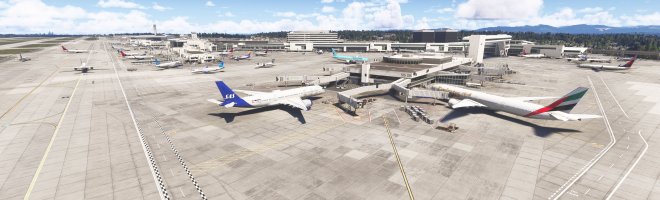
FS2024 with AI planes linked to Community folder, using standard sim AI (no traffic controller apps running):

Microsoft Flight Simulator 2024 8_29_2025 1_48_58 PM.jpg
 
If you have FSLTL, AIG, and/or FSTraffic planes installed, the sim will use them for its own AI traffic if you have their planes active in the sim. IE: I have their model folders active using Addons Linker, but I'm not running their utilities. MSFS will pick up their add-on liveries. I rarely ever see a factory scheme with these models active in my Community folder.

Not saying you should have to do it, just that it works. :)

Stock FS2024:

View attachment 171642

FS2024 with AI planes linked to Community folder, using standard sim AI (no traffic controller apps running):

View attachment 171643
I started out with FSLTL and it works great. I think I added the Simbrief/BeyondATC combo to get better ATC comms, but at this time that extra combo doesn't really work for VFR flights. You di remind me though that I could go back to just FSLTL.


Forest
 
Back
Top