-
Please see the most recent updates in the "Where did the .com name go?" thread. Posts number 16 and 17.
-
IMPORTANT DOWNLOADING INFORMATION - ALL MEMBERS PLEASE READ
Please see this thread for updates. Update Thread
SOH ADMINISTRATION
You are using an out of date browser. It may not display this or other websites correctly.
You should upgrade or use an alternative browser.
You should upgrade or use an alternative browser.
Windows 10/11 snafu / content thread
- Thread starter Steve2112
- Start date
-
- Tags
- cfs2 windows 11

Allen
Styles Editor/Admin
Well it came up on my Desktop PC that has no internet. No sign of gameux.dll on my Laptop as I think I nuked it 2 years ago. Just putting it out there in case some one finds that CFS2 will not start but CFS2 running in Task Manager with Rundll.exe linking to GameUX.dll
It's fine to disable it..... but DON'T DELETE it... could fine problems down the line..... have had my share of lite or customized win 7.... running 1 now with gameux.dll still there just disabled..... win 7 can be a real bitch when deleting stuff...chances are if you run scannow.... it will probably fix it with backup in winsxs folder
Cheerz mav
Cheerz mav

Shadow Wolf 07
SOH-CM-2025
Finally!
I have an HP Win 10 system and couldn't get CFS2 to work for anything for months. Well, I downloaded and installed DirectX-9, set my CFS2.exe compatibility to Win XP SP 3, loaded several, plus a clean, new install to my C Drive in a newly created CFS2 folder, fired them up in the windowed mode and lo... they work at last! Now I can get back to some mission building.

The thing that did it I think was having the installs in a folder, other than the default Program Files (X86) folder. Dumb-assed me!
I have an HP Win 10 system and couldn't get CFS2 to work for anything for months.
Well, I downloaded and installed DirectX-9, set my CFS2.exe compatibility to Win XP SP 3, loaded several, plus a clean, new install to my C Drive in a newly created CFS2 folder, fired them up in the windowed mode and lo... they work at last! Now I can get back to some mission building. The thing that did it I think was having the installs in a folder, other than the default Program Files (X86) folder. Dumb-assed me!

Oglivie
Charter Member
Shadow,
I had issues with the Program Files (X86) folder also for CFS2 installation on Windows 8.1 OS. I couldn't make editing changes to the cfg files, the changes would not update the files. If I recall some files in CFS2 were deleted also in the Program Files (X86) folder. Rather than going through the Windows administrator menus to fix it, I created a new folder for CFS2 in the C:\ root folder like you did and it worked.
I have a couple of XP machines that I prefer to use for CFS2 and for the CFS2 utilities. The 8.1 I primarily use just for the internet mostly. Windows 8.1 is on an HP laptop and there is some graphic issues that exist with CFS2. The aircraft selection window won't operate correctly in window mode or full screen. Older airplanes, designed with FDS 1 or the older Gmax programs, are a no go graphically in the sim, and some parts that break of stock CFS2 aircraft are of weird shapes that are unidentifiable. Knowing this now I probably should have opted for the graphic hardware upgrade when I purchased the laptop, but I have the XP machines for CFS2 that are still plugging away.
Best Regards,
O
I had issues with the Program Files (X86) folder also for CFS2 installation on Windows 8.1 OS. I couldn't make editing changes to the cfg files, the changes would not update the files. If I recall some files in CFS2 were deleted also in the Program Files (X86) folder. Rather than going through the Windows administrator menus to fix it, I created a new folder for CFS2 in the C:\ root folder like you did and it worked.
I have a couple of XP machines that I prefer to use for CFS2 and for the CFS2 utilities. The 8.1 I primarily use just for the internet mostly. Windows 8.1 is on an HP laptop and there is some graphic issues that exist with CFS2. The aircraft selection window won't operate correctly in window mode or full screen. Older airplanes, designed with FDS 1 or the older Gmax programs, are a no go graphically in the sim, and some parts that break of stock CFS2 aircraft are of weird shapes that are unidentifiable. Knowing this now I probably should have opted for the graphic hardware upgrade when I purchased the laptop, but I have the XP machines for CFS2 that are still plugging away.
Best Regards,
O
Shadow Wolf 07
SOH-CM-2025
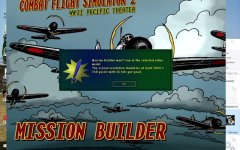
Thanks Oglivie. I ran into a problem with Mission Builder in this and another, otherwise working, install. When I start MB I get a message as shown in the screenshot below. When I click ok, it crashes. I tried various resolution settings both on the computer and in game advanced display settings. Also, when I try to crank MB up via the CFO tab, I get the same result.
Has anyone else had this problem? Does anyone have a solution or some ideas? My resolution by default is normally 1920 X 1080 and uses the intel, not the Nvidia video.
Has anyone else had this problem? Does anyone have a solution or some ideas? My resolution by default is normally 1920 X 1080 and uses the intel, not the Nvidia video.
Attachments
Shadow Wolf 07
SOH-CM-2025
Thanks Oglivie. I ran into a problem with Mission Builder in this and another, otherwise working, install. When I start MB I get a message as shown in the screenshot below. When I click ok, it crashes. I tried various resolution settings both on the computer and in game advanced display settings. Also, when I try to crank MB up via the CFO tab, I get the same result.
Has anyone else had this problem? Does anyone have a solution or some ideas? My resolution by default is normally 1920 X 1080 and uses the intel, not the Nvidia video.
Any suggestions???
rhumbaflappy
Charter Member
What does your CFS2.cfg have under Display?
Shadow Wolf 07
SOH-CM-2025
What does your CFS2.cfg have under Display?
[DISPLAY]
Device=Intel(R) HD Graphics 4600 (\\.\DISPLAY1)
Mode=1366x768x32
AntiAlias=1
Shadow Wolf 07
SOH-CM-2025
Thanks Oglivie. I ran into a problem with Mission Builder in this and another, otherwise working, install. When I start MB I get a message as shown in the screenshot below. When I click ok, it crashes. I tried various resolution settings both on the computer and in game advanced display settings. Also, when I try to crank MB up via the CFO tab, I get the same result.
Has anyone else had this problem? Does anyone have a solution or some ideas? My resolution by default is normally 1920 X 1080 and uses the intel, not the Nvidia video.
I copied an install of cfs2 from my Win7 computer in which MB works fine. I tried it on the Win10 laptop and had the same problem. CFS2 game works fine, but when I try MB, I get the same message as above and the sim crashes.


Ravenna
SOH-CM-2023
Hi Shadow Wolf,
I had a similar problem going over to Win 10. I tried replacing the Objects DP folder with the Objects DP folder from a basic install. It worked so I assumed the problem was with the number of objects. That now seems not to be the case as I've moved most of the DP files across from the old folder to the new one without getting an error message. Just to allow the sim to get used to more files in the Objects folder I started it after adding about 10 DPs.
This was with one install. Starting another install in Win 10 gave me no problems either with the sim or MB, but that was on a different drive so there may be a few variables there.
I had a similar problem going over to Win 10. I tried replacing the Objects DP folder with the Objects DP folder from a basic install. It worked so I assumed the problem was with the number of objects. That now seems not to be the case as I've moved most of the DP files across from the old folder to the new one without getting an error message. Just to allow the sim to get used to more files in the Objects folder I started it after adding about 10 DPs.
This was with one install. Starting another install in Win 10 gave me no problems either with the sim or MB, but that was on a different drive so there may be a few variables there.
Shadow Wolf 07
SOH-CM-2025
Ravenna: I will try my "virgin install" of cfs2 and see if MB works when I get home. As I recall, I don't think it works either.
Does anyone recall the max number of dps for the Objects DP folder - I forgot.
Does anyone recall the max number of dps for the Objects DP folder - I forgot.
e.a.wicklund
Members +
Ravenna: I will try my "virgin install" of cfs2 and see if MB works when I get home. As I recall, I don't think it works either.
Does anyone recall the max number of dps for the Objects DP folder - I forgot.
Just had this problem. Roughly 1600 - 1700 dps. I'm running just over 1700 now with no issue.
Shadow Wolf 07
SOH-CM-2025
...and I have 1248, so that should not be an issue in my case.
Ravenna
SOH-CM-2023
Ravenna: I will try my "virgin install" of cfs2 and see if MB works when I get home. As I recall, I don't think it works either.
Does anyone recall the max number of dps for the Objects DP folder - I forgot.
I'm at about 1800 and still able to run MB, but it may be variable. After adding Robert John's railway tracks I had to delete a lot of them as MB stopped working, so I assumed
 I was over the limit.
Shadow Wolf 07
SOH-CM-2025
I haven't started up my Windows 10 system yet. I decided to plug away on a few missions on my Win 7 laptop. I'd really like to do it on my Win 10 laptop as it is a newer, better computer with a larger screen.
All my installs on my 10 system give the same result when I try to open MB. I've even downloaded and installed an earlier version of DirectX, set it to run as administrator with User Controls set to the minimum and placed the installs in a separate folder other than Programs or Programs (x86) . Still, the CFS2 game works fine but Mission Builder gives me that display error and crashes.
All my installs on my 10 system give the same result when I try to open MB. I've even downloaded and installed an earlier version of DirectX, set it to run as administrator with User Controls set to the minimum and placed the installs in a separate folder other than Programs or Programs (x86) . Still, the CFS2 game works fine but Mission Builder gives me that display error and crashes.

baldy
SOH Staff
Windows 10
Good afternoon gentlemen,
as the originator of this thread nearly three years ago I feel I must bring you up to date with my latest acquaintance with W10 - I recently read that Microsoft were ending their support of W7 in January next year so decided that I'd have another go at upping to W10.
https://www.theguardian.com/technol...-be-forced-to-upgrade-windows-7-to-windows-10
following the link in the article I downloaded the MediaCreationTool - however before using it I took a few precautions :
1. read thru' this entire thread - No CD patch essential for all installs
2. performed disc clean-up
3. created new restore point in system ( just in case )
then with bated breath set MediaCreationTool in motion
after a lot of pacing up and down ( like an expectant father ) and ticking boxes when required I am now in W10
naturally enough the first thing I tried was good ol' CFS 2 - 'et voila !' or indeed 'ca va !' as notre cher ami, dombral would say she appears to work perfectly, including MB.
It's early days yet but so far so promising -- this has proved to be far less stressful than my first collision with W10.
Good luck to anyone else who tries it
all the best
baldy
Good afternoon gentlemen,
as the originator of this thread nearly three years ago I feel I must bring you up to date with my latest acquaintance with W10 - I recently read that Microsoft were ending their support of W7 in January next year so decided that I'd have another go at upping to W10.
https://www.theguardian.com/technol...-be-forced-to-upgrade-windows-7-to-windows-10
following the link in the article I downloaded the MediaCreationTool - however before using it I took a few precautions :
1. read thru' this entire thread - No CD patch essential for all installs
2. performed disc clean-up
3. created new restore point in system ( just in case )
then with bated breath set MediaCreationTool in motion
after a lot of pacing up and down ( like an expectant father ) and ticking boxes when required I am now in W10
naturally enough the first thing I tried was good ol' CFS 2 - 'et voila !' or indeed 'ca va !' as notre cher ami, dombral would say she appears to work perfectly, including MB.
It's early days yet but so far so promising -- this has proved to be far less stressful than my first collision with W10.
Good luck to anyone else who tries it
all the best
baldy
Allen
Styles Editor/Admin
Manually setting [DISPLAY]
Below is all of the keys to add to your CFS2.CFG to manually set display settings. You will need to change the Device= and Mode= to suit your PC. The rest should work.
[DISPLAY]
Device=NVIDIA GeForce GTX 1050 TI (\\.\DISPLAY1)
Mode=1024x768x32
Dither=0
Filter=1
TriLinear=0
MipMap=1
AntiAlias=1
HWTnL=1
Disable=0
Details explanation below of what each key means. 0 is off and 1 is on unless noted.
Filter Options. Only one can be on. Dither = No Filter, Filter = Bilinear Filter and TriLinear = Trilinear Filter.
Dither=0
Filter=0
TriLinear=0
All 3 can be on at the same time. MipMap = Mip Maping, AntiAlias = Anti-Alias and HWTnL = T and L.
MipMap=0
AntiAlias=0
HWTnL=0
Enable hardware acceleration (Check Box)
Disable=0 This looks to Enable Hardware Acceleration when set to 0.
Unknown...
Stencil=0
PageFlip=0
Fog=0 This looks to be the blend fog I guess fog is on by defalt unless you put Fog=0 in the [DISPLAY] cat.
TripleBuffer=0
SWTnL=0
DXTn=0
Below is all of the keys to add to your CFS2.CFG to manually set display settings. You will need to change the Device= and Mode= to suit your PC. The rest should work.
[DISPLAY]
Device=NVIDIA GeForce GTX 1050 TI (\\.\DISPLAY1)
Mode=1024x768x32
Dither=0
Filter=1
TriLinear=0
MipMap=1
AntiAlias=1
HWTnL=1
Disable=0
Details explanation below of what each key means. 0 is off and 1 is on unless noted.
Filter Options. Only one can be on. Dither = No Filter, Filter = Bilinear Filter and TriLinear = Trilinear Filter.
Dither=0
Filter=0
TriLinear=0
All 3 can be on at the same time. MipMap = Mip Maping, AntiAlias = Anti-Alias and HWTnL = T and L.
MipMap=0
AntiAlias=0
HWTnL=0
Enable hardware acceleration (Check Box)
Disable=0 This looks to Enable Hardware Acceleration when set to 0.
Unknown...
Stencil=0
PageFlip=0
Fog=0 This looks to be the blend fog I guess fog is on by defalt unless you put Fog=0 in the [DISPLAY] cat.
TripleBuffer=0
SWTnL=0
DXTn=0