
-
Please see the most recent updates in the "Where did the .com name go?" thread. Posts number 16 and 17.
-
IMPORTANT DOWNLOADING INFORMATION - ALL MEMBERS PLEASE READ
Please see this thread for updates. Update Thread
SOH ADMINISTRATION
You are using an out of date browser. It may not display this or other websites correctly.
You should upgrade or use an alternative browser.
You should upgrade or use an alternative browser.
WW1 Western Front scenery package!
- Thread starter Westfront
- Start date
 Thanks Kevin for your organisational genius. Thanks Scott for all the new objects. They add a lot to the look of the place.
The B24 Guy
SOH-CM-2022
Who would have guessed what one little Mole could cause.
Great job by all involved.
Great job by all involved.

Ravenna
SOH-CM-2023
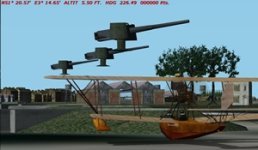
Just wondering what I missed doing to have the cannons on the ground unless they are actually on camouflaged towers. About N51*20.57', E3*14.65'
voyager
Hi Voyager,
Those look like the guns B24Guy reworked to sit on the mole at Zeebrugge. I think they are called 'z_mole_gun'. The gun you are looking for is in one of the packs from Pen32Win.
Try here...http://www.sim-outhouse.com/sohforums/local_links.php?action=jump&catid=280&id=5901
Hi kdriver,
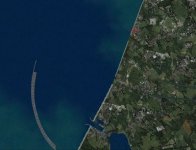
Fortunately the mole is where it is supposed to be with its guns in place. At N51*20.55' and E3*14.05' (middle gun) the emplacements are there but the guns are several feet above them. I have no idea if there other places where this particular gun is used would have the same problem. Hope not.
voyager
The B24 Guy
SOH-CM-2022
Hi All,
Of course I could not leave well enough alone. After replacing the guns in front of the Hotel I saw that they were sunk in the platforms.
I made a new BGL called AF_Hotel_Gun. I also added 5 more guns to fill the empty gun pits under the camo nets near the other location.
Here are the files if you want to try them out.
Regards,
B24Guy
Of course I could not leave well enough alone. After replacing the guns in front of the Hotel I saw that they were sunk in the platforms.
I made a new BGL called AF_Hotel_Gun. I also added 5 more guns to fill the empty gun pits under the camo nets near the other location.
Here are the files if you want to try them out.
Regards,
B24Guy
Attachments
Hi Scott,
I just finished replacing the guns with MB when I saw this post. Thanks for doing this.
I also replaced the third railway parts warehouse on the mole with your raised version. As usual, the railway tracks no longer lined up with those in the adjoining GOB areas.
How did you add the extra guns without other objects being moved? The tracks still line up with your new GSL.
As your latest gun is designed to sit on bldeck, I wonder if naming it "hotel" might be a bit vague for anyone using it in the future.
Either way, it looks like another amendment to the expanded library objects pack is needed.
Cheers,
Kevin
I just finished replacing the guns with MB when I saw this post. Thanks for doing this.
I also replaced the third railway parts warehouse on the mole with your raised version. As usual, the railway tracks no longer lined up with those in the adjoining GOB areas.
How did you add the extra guns without other objects being moved? The tracks still line up with your new GSL.
As your latest gun is designed to sit on bldeck, I wonder if naming it "hotel" might be a bit vague for anyone using it in the future.
Either way, it looks like another amendment to the expanded library objects pack is needed.
Cheers,
Kevin
The B24 Guy
SOH-CM-2022
Hi Kevin,
I started with a empty gsl added the western front gsl to it with gslman. Then started mission builder and used the built in gsl editor to replace and add the guns.
Saved the edited gsl using the built in editor. Then I renamed the newly created cfs2 gsl to western front gsl. Copied a stock gsl file into the folder and used glsman to add the new western front gsl to it.
As for the name I really did not think about it much. Just wanted something I could remember easily.
Regards,
Scott
I started with a empty gsl added the western front gsl to it with gslman. Then started mission builder and used the built in gsl editor to replace and add the guns.
Saved the edited gsl using the built in editor. Then I renamed the newly created cfs2 gsl to western front gsl. Copied a stock gsl file into the folder and used glsman to add the new western front gsl to it.
As for the name I really did not think about it much. Just wanted something I could remember easily.
Regards,
Scott
Ravenna
SOH-CM-2023
Brilliant work Scott. Couldn't the last step also be accomplished by naming the 'western front.gsl' as 'cfs2.gsl' and placing that in the GSL folder?
The new guns add an extra level of flexibility to gun placement. When I placed some of the smaller open gun revetments around Zeebrugge and Bruges I left them empty as the guns available at the time sank into the concrete floor.
The new guns add an extra level of flexibility to gun placement. When I placed some of the smaller open gun revetments around Zeebrugge and Bruges I left them empty as the guns available at the time sank into the concrete floor.
The B24 Guy
SOH-CM-2022
Hi Ravenna,
You are correct. I did not know if my workaround would work.
Using a stock gsl was for proof of concept. I did notice that the guns do sink into the floor of the revetments some.
Not enough to worry about though.
There are two houses near the lock that have a hedge by Stiz that are lacking a texture named hedgetop.bmp. It is not in the package.
The package is called MB_Objects_and_API_Marcos.zip.
Do you happen to have that texture?
Regards,
Scott
You are correct. I did not know if my workaround would work.
Using a stock gsl was for proof of concept. I did notice that the guns do sink into the floor of the revetments some.
Not enough to worry about though.
There are two houses near the lock that have a hedge by Stiz that are lacking a texture named hedgetop.bmp. It is not in the package.
The package is called MB_Objects_and_API_Marcos.zip.
Do you happen to have that texture?
Regards,
Scott