• Please see the most recent updates in the "Where did the .com name go?" thread. Posts number 16 and 17.

    Post 16 Update

    Post 17 Warning old domain name stealing credentials

  • Special Server Maintenance

    Just when you think you have everything running some what better...

    You get a message from the Hosting company. Short story they need to move us to a new server. I have been working with them to plan a good date for all concerned. Here is what we have come up with as a schedule.

    1. November 4th 17:00 -5UTC shut off the forums and start backup proceedures. During this time there will be no access to the forums or the Resource Section.
    2. November 5th Continue with Backups and download same until complete.
    3. November 6th 7:00 turn over server to hosting company to move system to new server
    4. November 7th - 8th restore backups and upgrade forum software.

    If all goes well we should be back online on November 8th.

    To keep you updated we will post updates on AVSIM forums.

    Thank you for your support.

MV DHC-2 Beaver repaints.....and requests.

Hi Ron,

I am getting a little old and dumb...grin.

I can't get this installed. Can you give me any more instructions?

Thanks,

Tom

Take two aspirin and see me tomorrow if you don't feel better. :very_drunk:

You DID read the README? The only thing I can find wrong is I started the sentence ' Change the 'XX' to the next consecutive number.' with a lower case c.

Can you be more specific?
 
Take two aspirin and see me tomorrow if you don't feel better. :very_drunk:

You DID read the README? The only thing I can find wrong is I started the sentence ' Change the 'XX' to the next consecutive number.' with a lower case c.

Can you be more specific?

Hi Ron,

I always read the "Read Me" first, but as I said I am a little slow. I have the .cfg file in the right place. but something else is missing as the plane does not show up in the files when I try to load it.

Sorry for being a pest,

Tom
 
You've added the necessary lines from Ron's readme to the Beaver's aircraft.cfg? Once you've done that don't forget to change the fltsim.xx to fltsim.6 or 7 or 8 (whatever the next number in line would be)

BTW, Ron - awesome paint!
 
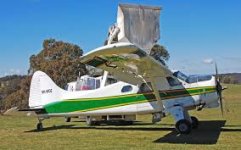
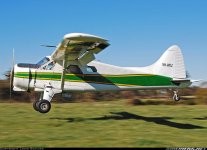
Hi guys
Would really
attachment.php
attachment.php
like this repaint if possible

Thanks in advance
 

Attachments

  • VH-WOZ.jpg
    VH-WOZ.jpg
    10 KB · Views: 24
  • 264.jpg
    264.jpg
    85.9 KB · Views: 24
You've added the necessary lines from Ron's readme to the Beaver's aircraft.cfg? Once you've done that don't forget to change the fltsim.xx to fltsim.6 or 7 or 8 (whatever the next number in line would be)

BTW, Ron - awesome paint!


I did that also.

Thanks,

Tom
 
Timmy I will upload these later this week, Im just going over the P3D v4 update to make sure its all lining up

2017-6-14_21-51-12-570.png

2017-6-14_21-54-48-132.png
 
I did that also.

Thanks,

Tom

:icon_idea: This just happened to me. Did you run the update AFTER installing the paint? If you did, Milviz helpfully replaces the aircraft.cfg with a basic one. I usually make a backup of aircraft.cfgs but I failed miserably this time! That's my best shot.
 
On the subject of FLOATS! Several people have, quite rightly, drawn my attention to the difference between the two floats on P2-HOR. I've tried to rectify it but Milviz' paint kit makes it nigh on impossible to do a proper job. If your paint calls for 'unkempt, scruffy, dirty and unwashed' then no problem. The trouble lies with the Beaver_ext_float.dds. In the paint kit the scum is baked on leaving one float, which is on the main Beaver_ext texture, nice and....Well it just sucks!

Here endeth the ramblings of a frustrated old git.

I've taken the Float version off my MediaFire and replaced it with a wheeled version. HERE


 
On the subject of FLOATS! Several people have, quite rightly, drawn my attention to the difference between the two floats on P2-HOR. I've tried to rectify it but Milviz' paint kit makes it nigh on impossible to do a proper job. If your paint calls for 'unkempt, scruffy, dirty and unwashed' then no problem. The trouble lies with the Beaver_ext_float.dds. In the paint kit the scum is baked on leaving one float, which is on the main Beaver_ext texture, nice and....Well it just sucks!

Here endeth the ramblings of a frustrated old git.

I've taken the Float version off my MediaFire and replaced it with a wheeled version. HERE


Hello Ron,

Sorry I did not notice the standard Milviz floats?! After yours, I went back and byjingobycrikey the Milviz ones have it too!!!

I am quite happy with yours as she is (OEM) and thank you again for that paint.

Cheers,
Tim.
 
THanks Guys!

just wanted to reach out with a quick word of appreciation for Ron and Matt and the guys doing these repaints. Hope you are able to keep them coming.
 
Gunnar, Matt, Ron, thank you very much !
Ron, OK, now I have a wheel, and a float version, love it!
LOL
Sue
 
Thank you very much Matt. Will these paints fit the "cargo" version at all?

Cheers,
Tim.

Yes timmy it also works on the cargo version (model.1)

Im in the process of doing the floats for the Antarctic survey scheme 003, however with the 7 new pins in the right shoulder, im restricted to short periods with the mouse at any given time
 
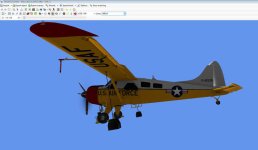
A cri de coeur. I'm just now putting the last bits and pieces on this:

attachment.php


If you've seen the real one you'll know it has a red spinner. But I CAN'T FIND IT! :redfire:

Yes there is a circle bottom right which has a grey layer over it. Remove the layer and it looks chromey. I made a red layer ABOVE the grey layer. Now you'd think that would do it, no?

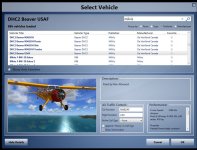
This is it in P3D:

attachment.php


I've tried the spinner part in the floats PSD no luck.

Please throw me a bone!
 

Attachments

  • usaf-wip.jpg
    usaf-wip.jpg
    45.9 KB · Views: 15
  • ingame_beaver.jpg
    ingame_beaver.jpg
    117.5 KB · Views: 14
Back
Top