Looking for an old payware T-37 Dragonfly

Well, to paraphrase Theodore "Ted" Logan in the first Bill And Ted movie, "There are strange things afoot at the Circle K". :geek:

Those stock gauges shouldn't even show up in the VC if you swap out the Panel folders. :unsure:
I've known about this plane for a long time. I bought it for FS2002 but wound up giving up on it. Windows Vista would freak out because of the batch files and the separate cfg file. (I told you it was a long time ago).
 
I've gone through the panel cfg, isolated the gauges that stop the engines from working and attach my two new versions of it.
The differences are that I've blanked out the two gauges stopping it from performing correctly and then made some amendments to the small nav' panel settings. The basic cfg has the gauge visible at startup and the one in the SMALL NAV PANEL NOT VISIBLE AT STARTUP does precisely what it says on the tin. I've flown a couple of circuits in it and it all seems to work as advertised so hopefully it will do the same for any of you who might wish to try it.
The only drawback is that you'll have to right click and "close window" on the intro bmp that turns up in the middle of the screen and if required on the window selector at the top. I managed to remove them manually but it did odd things to rest of it that I couldn't find a work around for so thought two short clicks would be preferable to it not working at all.
With regard to the textures and their ludicrous fifteen feet deep layer of shine, take copies of the following bitmaps from your relevant texture folder (T-37_ body_T.bmp, t37_cessna2_T.bmp, T37-top_T.bmp and T37_topright_bmp), open DXTBmp, open each in turn, save it as a DXT1-no alpha and then repeat but this time saving them as a DXT3. The results show up the limitations of the original textures but at least your retina's live to fight another day.
I hope some of you might find this useful but what I’ve done here is at the limit of my knowledge and abilities so please don't expect me to be able to answer degree level questions about anything that doesn't work for you. I'll try but can't promise anything. Anyway, I offer it as it as and at the risk of rep[eating myself, I hope some of you enjoy it.
Regards,
Alan
 

Attachments

  • T-37 PANEL.zip
    5.5 KB · Views: 7
With regard to the textures and their ludicrous fifteen feet deep layer of shine,...
Regards,
Alan
I've got a better way to take care of it. :ernaehrung004:
I'm just "reusing" the Alpha layers of the "white birds" and I can do it in FSRepaint without any losses to the artwork.
Right now, I'm putting the artwork/textures lower on the list until we make sure this thing is really fly-able.
The stock FD still needs some tuning.
Once we know it works and its stable, I'll post the fixed textures. (y)
 
Last edited:
BTW, y'all take a minute to pat yourselves on the back, have some tea and biscuits, maybe drink a beer. :geek:
This is why I started posting at SOH. In a couple of days, we've managed to take a 20 year old joke in the FS world (a good looking joke but an unflyable joke) and turn it into a flyable trainer.

I've been doing this stuff since 1995 and I just wanted to say that's been an honor to post in this thread. :wiggle:
Now, get back to work! :p
 
Last edited:
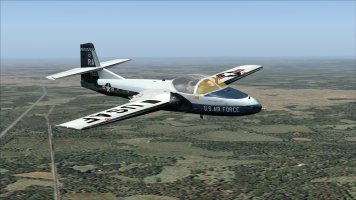
BTW, has anyone loaded the ROKAF (Korean) textures yet?
Mine show USAF wings, which was possible if the ROKAF pilots were training in the States but unlikely. :unsure:
I'm just wondering if this is another item to put on the "to do" list?
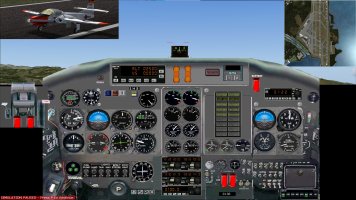
Speaking of, here's the ROKAF textures with less of a shine.
I still want to do more with the alpha channels but this is supposed to be an all metal/mostly metal paint and this isn't the final version. I want to make the anti-glare paint on the nose flat black.
Also, the T-37C (Viet Nam AF) textures use all-white alphas.
 

Attachments

  • T-37 10.zip
    4.2 MB · Views: 6
Last edited:
Texture (alpha) test.
What I did was replace the shiny alpha layers/channels with the pure white alphas from the T-37C.
It looks pretty good to me, no more 800 layers of clear coat on top of the paint and its still got a little shine. I'm running an i3 CPU with a 1050Ti GPU and I'd like some feedback.
This replaces the TEXTURE.4 folder (Randolph AFB). Try it out and let me know if this is what you all want.

tex4.jpg
 

Attachments

  • tex4.zip
    3.8 MB · Views: 7
Last edited:
BTW, has anyone loaded the ROKAF (Korean) textures yet?
Mine show USAF wings, which was possible if the ROKAF pilots were training in the States but unlikely. :unsure:
I'm just wondering if this is another item to put on the "to do" list?
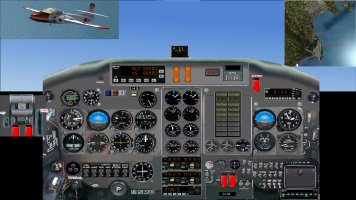
Irritatingly I saw a fix for this but, of course, I forgot to bookmark it & can't find it again. I shall keep looking.
 
I checked out the actual aircraft using Google image search. I couldn't match the tail number but it looked like the pics were old static display birds that had the roundels on the fuse but nothing (besides the red tips) on the wings. Worse case, I can fix it using some cut and paste.
 
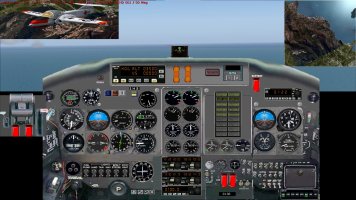
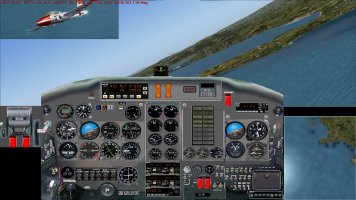
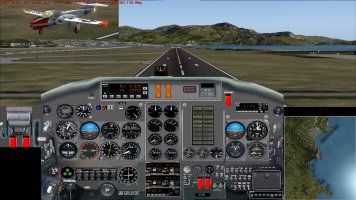
For Alain0568, and anyone else who is interested, pictures of a circuit of Nice Cote D’Azur, showing the D’Attomo panel in use in the T37.

Taxiing is best kept below 15 Kts (you have to keep using the brakes in this T37)
Lift off:
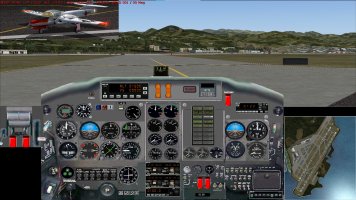
Panel 1 lift off.jpg

One of the oddities of this bird is the lights; it has switched the landing light on automatically, but switched all other lights off!
I found take off is best done without flaps otherwise she has a tendency to leap into the air.
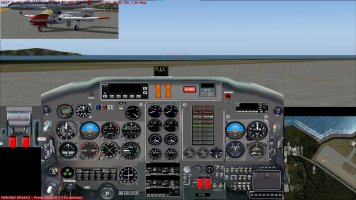
Climb out:
Panel 2 in climb.jpg

In the cruise at 235 Kts:
Panel 3 cruise.jpg

Turning onto base:
Panel 4 turn to base.jpg

On short final:
Panel 5 on final.jpg

Leaving the runway:
Panel 6 leaving the runway.jpg

All off next to the Historic Caravelle:
Panel 7 all off.jpg

For Sbob: yes the Korean plane has USAF markings on the wings.
I’m looking forward to your repaints, in the meantime, being a simple soul, I just switched reflections off in the settings.
 
hello ScottishMike1,
Thank you for these images of the panel!
As for me, I only use virtual cockpits (3D)
It’s true that I’m on FSX!And that's why I have difficulty with this T-37!! ;)

Alain
-
 
I've noticed that its very sensitive to changes in trim settings.
The more I play with the stock FD, the more I kind of like it. :p

As a trainer, it makes you feel like a noob. Lots of mystery to explore as you gain experience.
Again, the real plane was supposed to be brutal in how quickly you could load up the G.
Its actually tough to get over 7 G. Of course, if you've never experienced 5 G it feels like a lot.
The tail does feel like its over powered, you definitely need a light touch on the rudder unless you start to edit the CFG file.
 
BTW, if all of this has you craving some realistic afcads, call signs, and AI, head over to MAIW or The Owl's Nest and grab MAIW Package #3. :wiggle:
This is mostly for USAF T-37s but there are a couple of other packages you may also want.

I did some digging, for the Korean T-37 you'll want to fly out of Sacheon (RKPS). There's an AFCAD for it over at Avsim. I'm thinking the ROKAF ramp is the large area on the opposite side from the tower. For the T-37C, as I recall they flew out of Tan Son Nhut.
 
Back
Top