
-
Please see the most recent updates in the "Where did the .com name go?" thread. Posts number 16 and 17.
-
IMPORTANT DOWNLOADING INFORMATION - ALL MEMBERS PLEASE READ
Please see this thread for updates. Update Thread
SOH ADMINISTRATION
You are using an out of date browser. It may not display this or other websites correctly.
You should upgrade or use an alternative browser.
You should upgrade or use an alternative browser.
AnKor's Shaders
- Thread starter MajorMagee
- Start date

MajorMagee
SOH-CM-2022
Here's today's update.
http://simhq.com/forum/ubbthreads.php/topics/3930178/Re_DirectX_8_to_9_converter_Ma#Post3930178
As he warned, the water looks very strange in CFS3. I'll try tweaking some of the parameters to see if I can get it looking better.
http://simhq.com/forum/ubbthreads.php/topics/3930178/Re_DirectX_8_to_9_converter_Ma#Post3930178
As he warned, the water looks very strange in CFS3. I'll try tweaking some of the parameters to see if I can get it looking better.


MajorMagee
SOH-CM-2022
Some have had that trouble. First thing to try is re-reunning CFS3config.exe, and explicitly setting the screen resolution again. Also, make sure you have the d3d8.ini with the first parameter for anti-aliasing set to 1 rather than the default 0.
Daiwilletti
Charter Member
Some have had that trouble. First thing to try is re-reunning CFS3config.exe, and explicitly setting the screen resolution again. Also, make sure you have the d3d8.ini with the first parameter for anti-aliasing set to 1 rather than the default 0.
Thanks I'll need to try that too. The D3D9 stuff is fine but the D3D8 stuff was causing lockups. Funnily enough just the D3D9 stuff on its own was an improvement, especially with a good shaders.xml file.
MajorMagee
SOH-CM-2022
The water ends up looking quite different in the various different installs of CFS3 I have with AnKor's latest version.
My quick test in Solomon Islands this morning looked terrible. Most of my other versions look generally okay.
It turns out that the alpha channel in the effects\fxtextures\h20d_##.dds files has to be pretty finely textured, and the color variations have to be subtle (no harsh shade transitions) for it to bump map realistically.
I'm still not sure I like what it does to the water's color in all cases (generally it turns nearly black). That's supposed to be controlled by the effects\fxtextures\cfs3h2o.dds file. I'll have to try tuning it to something that will get it to render closer to the original colors.
My quick test in Solomon Islands this morning looked terrible. Most of my other versions look generally okay.
It turns out that the alpha channel in the effects\fxtextures\h20d_##.dds files has to be pretty finely textured, and the color variations have to be subtle (no harsh shade transitions) for it to bump map realistically.
I'm still not sure I like what it does to the water's color in all cases (generally it turns nearly black). That's supposed to be controlled by the effects\fxtextures\cfs3h2o.dds file. I'll have to try tuning it to something that will get it to render closer to the original colors.

gosd
Charter Member
Here's today's update.
http://simhq.com/forum/ubbthreads.php/topics/3930178/Re_DirectX_8_to_9_converter_Ma#Post3930178
As he warned, the water looks very strange in CFS3. I'll try tweaking some of the parameters to see if I can get it looking better.
Installed the latest version;great cockpit shadows but lots the cockpit light.the colors of the planes also seem a bit light (pale).

gecko
Charter Member
Try porting over the WOFF panoramic_cubic_test.dds to your other installs, and swapping around different cfs3h2o.dds textures and you ought to get rid of the black coloration. It's starting to look quite good in my install. There's lots to explore with this new version and some great features to make use of.
MajorMagee
SOH-CM-2022
Installed the latest version;great cockpit shadows but lots the cockpit light.the colors of the planes also seem a bit light (pale).
The light colors are usually related to the specular layer, and that needs to be fixed by hex editing the m3d files.
Hi!
I've finally registered here and will be able to provide some clarifications. Unfortunately accessing this forum is a bit convoluted from here, so I won't be posting too often.
The DirectX 9 mod is generally intended to be used with WOFF, but since people still play CFS3 I will be trying to keep it compatible as well. Currently main issues are reflective surfaces and cockpit lights which weren't implemented because they aren't used by WOFF. There are also some glitches with certain 3rd party models as mentioned above.
I'm working with gecko and MajorMagee to improve CFS3 compatibility, so eventually I hope to get rid of all these issues.
Minimum system requirements for self shadowing are AMD HD 4xxx series or NVidia 8xxx series. These cards are from around 2008, so I believe it is not a problem for most people. Modern built-in Intel graphics should also work, but they are quite slow. I'm using Windows 7 for development and haven't tested it on XP, but I don't know any reason why it shouldn't work there.
The first thing to try if the game fails to start with my mod is running cfs3config.exe and selecting screen resolution again.
And just one more note - although my mod enables the use of SweetFX, it is not connected to it in any other way
I've finally registered here and will be able to provide some clarifications. Unfortunately accessing this forum is a bit convoluted from here, so I won't be posting too often.
The DirectX 9 mod is generally intended to be used with WOFF, but since people still play CFS3 I will be trying to keep it compatible as well. Currently main issues are reflective surfaces and cockpit lights which weren't implemented because they aren't used by WOFF. There are also some glitches with certain 3rd party models as mentioned above.
I'm working with gecko and MajorMagee to improve CFS3 compatibility, so eventually I hope to get rid of all these issues.
Minimum system requirements for self shadowing are AMD HD 4xxx series or NVidia 8xxx series. These cards are from around 2008, so I believe it is not a problem for most people. Modern built-in Intel graphics should also work, but they are quite slow. I'm using Windows 7 for development and haven't tested it on XP, but I don't know any reason why it shouldn't work there.
The first thing to try if the game fails to start with my mod is running cfs3config.exe and selecting screen resolution again.
And just one more note - although my mod enables the use of SweetFX, it is not connected to it in any other way


Pat Pattle
SOH-CM-2026
Ankor,
These mods are THE best thing to happen to cfs3 and it's derivatives. Thank you for all your efforts. They bring them bang up to date in the graphics department. Thanks also to Andy and Daniel for helping.
I'm on XP and can't get it working but I do intend buying a new PC so hope I'll be joining the brave new world soon.
Cheers!
Clive
ps I'm l using your mouse view mod and liking it a lot, another break though. Thank you!
These mods are THE best thing to happen to cfs3 and it's derivatives. Thank you for all your efforts. They bring them bang up to date in the graphics department. Thanks also to Andy and Daniel for helping.
I'm on XP and can't get it working but I do intend buying a new PC so hope I'll be joining the brave new world soon.
Cheers!
Clive
ps I'm l using your mouse view mod and liking it a lot, another break though. Thank you!
HouseHobbit
Charter Member
Thank You Ankor very much for this work, it is Most welcomed..
I am spending time today to try to sort this out for CFS3 from the files from Andy, taking a break from my ETO team work.
I am Very interested in this addition to our beloved sims..
Thank to all for this work..
And there is Much rejoicing!

I am spending time today to try to sort this out for CFS3 from the files from Andy, taking a break from my ETO team work.
I am Very interested in this addition to our beloved sims..
Thank to all for this work..
And there is Much rejoicing!

phrog_phixer
Charter Member
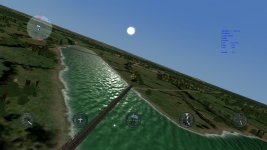
rocketred, that actually look awesome...river's a little green tho
MajorMagee
SOH-CM-2022
I've developed several new panoramic_cubic_test.dds files to correct the reflectivity and dark grey color for AnKor's latest water shader files in CFS3. One of these will need to be used for anyone that doesn't have OFF or WOFF to borrow those files from.
View attachment panoramic_cubic_test_files_by_MajorMagee.zip
Gecko is working on modifying the chfsh2o.dds files to fine tune the water colors. (I'm actually beginning to like the green color of the water in ETO)
View attachment panoramic_cubic_test_files_by_MajorMagee.zip
Gecko is working on modifying the chfsh2o.dds files to fine tune the water colors. (I'm actually beginning to like the green color of the water in ETO)
Last edited: