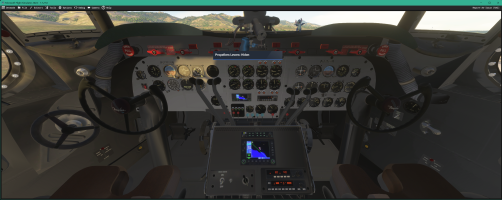
DC-4 Skymaster

@Hollister56,
Ed, you can rest assured that I have finally found the culprit this afternoon: 8 options that had been mistakenly inserted into Lines statements linking two elements and that had nothing to do with it.

Now it remains to program the cross-feed, that is, 6 additional junctions, and complete the lever animation to adjust this progress point.
In the end, problems that are the most difficult to resolve are almost always errors ... obvious after we have found them
 
Hello,

Yesterday, after several days of intensive testing, I was able to offer testers a more advanced v0.4.8d version with an almost complete fuel management system. (It remained to implement the cross-feed mechanisms in the flight_model.cfg file, but this version already had animations for all fuel levers: tank selection, carburetor heating, cross-feed; as well as some overhead animations.

The procedure for starting in automatic mode has been validated and is available in version v0.4.8d.
Sometimes during the loading of the aircraft, the external gateways do not have time to be loaded, but under FS2020 when reloading the aircraft (QuickLoad menu in Developer mode), these appear correctly: this is a problem for the simulator, not for the developer ;)

Once in the cockpit, the CTRL+E procedure automates the following phases:
- removal of the GustLock,
- setting up the seat for the Flight Engineer,
- the various levers are set in position: throttle, mixture, pitch propeller, master batterry, avionics, magnetos, etc.
Outdoors, you can see:
- the closing of the front and rear boarding gates, the closing of the luggage hold doors and the removal of external gateways,
- After a few seconds, the pilots and co-pilots appear in the cockpit and open the windows on either side of the cockpit to interact with the ramp agents,
- From that moment, the engine no. 3 begins to rotate very slowly so that it can count between 6 and 9 propeller blades, then the starter is put into motion and starts up.
- Engine no. 4 starts in the same way,
- then it’s the turn of no. 2 and no. 1.
- When all engines have started, the cockpit windows are closed and the GPU is removed.

All that’s left is to release the parking brake to be able to run on the gateway. We must not forget to push the levers controlling the propellers fully forward and to position the flaps at the required level, and the elevator trim (10°~11°). The rest is left to the initiative of the "pilot" :cool:

I am currently making a better video (greater resolution) than the previous one to illustrate this start-up.
Of course, despite this procedure (for people in a hurry) I plan to be able to program the plane so as to achieve a Cold & Dark...

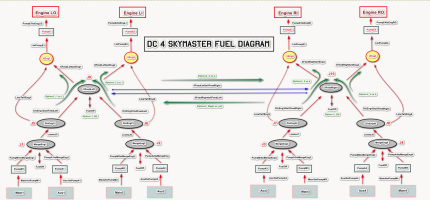
Today, after creating an overall diagram of the different fuel flows on paper, I only had to postpone the latest changes in the [FUEL_SYSTEM] section.
Here is the diagram in question, you can check the consistency of this diagram with the official diagram presented on page 8. I think all scenarios are taken into account.

1777462111353.png

Now all the different cases need to be thoroughly tested to validate this last version and finally move on to the animation of the remaining gauges (OverHead and VC).
 
Last edited:
Hello,

WARNING: A small correction is needed on the diagram I posted in the last post (above): you can’t have two lines as inputs to a valve, so I had to create four new junctions so that I could join these lines and then route them to the valves.

Once modified as such, this diagram reported in flight_model.cfg works perfectly... provided you have written all the behaviors models to manage the 6 flow selection controllers and the management of pumping, junctions, and valves, of course.

Today I have a fuel system that roughly matches reality, including crossfeed, and the main switches on the overhead panel have been programmed, which allowed me to test a cold & dark start this morning: it’s functional.
Programming isn’t the most difficult thing there is, It’s mostly the tests that are very long and boring... especially when you forget to select the tanks and position the mixture before clicking on the switches for the pumps and starters... without fuel supply, it works less well. :rolleyes:

A check was made on the automatic start: nothing has been degraded and both modes work perfectly. (y)

We will be able to look at the dials (oerhead and VC panel) and other switches that still need to be animated/coded.
A new version for test will be create as soon as possible.
 
Last edited:
Hello,

First of all, thank you to the Sim-Outhouse team for having restarted this forum so quickly :encouragement: without being addicted, I missed it a bit these last two days. Having been an admin for over 30 years, I know how stressful these operations can be and how difficult they can sometimes be. Therefore, a big thank you for the team. :very_drunk: :very_drunk: :very_drunk:

On the DC-4, he’s made good progress ...
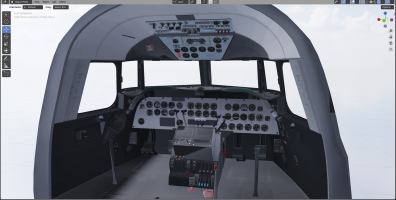
- The VC of the DC-4 model is animated and coded "three-quarters": there are still a few dials or switches but of lesser importance for the current tests as spotlights, lightings, de-ice, hydraulic pressure.
- The overhead is functional to perform a Cold & Dark start : primer, energizer, starter, magetos, ignition, battery, avionic, generators; and the VC has the main gauges to manage a flight : airspeed gauges, attitude indicators, altitude indicators, manifolds, rpms, oil and fuel levels, oil and fuel pressures, suction pressure. Turn ball and compass should be added as soon as possible.

WARNING: the airspeed displayed on the VC is in MPH and the one on the "HUD" that a lot of you use is in KTAS ... ;)

1778575334436.png

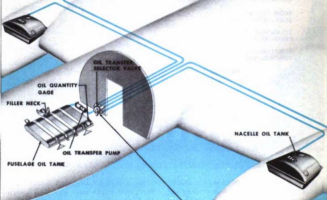
- I took advantage of these few days to add personal management for the oil tanks. Each engine therefore has its own 20-gallon oil tank, and in the compartment reserved for the aircraft crew, a 50-gallon reserve has been added to the port side.

1778574283285.png

For now, only the tanks have been declared in the flight_system.cfg.
Afterwards, I will have to add a pump for transfers from the reserve to the engine tanks, then a selector to direct the flow, and a switch.

In fact, I use the ability that fuel tanks have, which means being able to interact with them via the Weight & Payload interface and the fact that they have settable variables: A:FUELSYSTEM TANK LEVEL:x for example.

By creating "these particular tanks" that will not be directly managed by MSFS, I open up other possibilities: MSFS calculates a fuel consumption for each engine according to its use, the consumption of the DC-4/C-54 is known as well as the oil consumption.
By setting a ratio parameter between the two types of consumption (fuel / oil), it becomes possible in a few lines of XML (or javascript) to calculate the oil consumption and to modify in "real time" the level of these oil tanks but also to intervene on the weight of the aircraft (I had practiced this way on the CANSO PBY to manage water/retardant tanks and it function very well.)
It will be possible to apply theses modifications to a FireFighter version ...
 
Last edited:
Hello,

Since the project started, we managed to retrieve a lot of documentation on the C-54s but very little on the DC-4 itself.
Nevertheless, lately I managed to get a link to the DC-4 flight manual from site https://aviationarchives.blogspot.com. Since the link was outdated, thanks to Webarchive I was still able to get a copy.

This manual on the DC-4 is from April 1951 so it’s not the latest version but it should give good information.
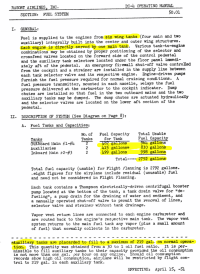
Already it seems that for this DC-4 from a version C-54B (for number and localization of boost pump), there are only 6 fuel tanks: four main in the wings and two auxiliary located between the two main of each wing. It seems logical that for commercial use, the engineers wanted to reduce the maximum range in order to increase the payload by the number of passengers carried. The maximum capacities of the tanks are also different.

1779008900651.png
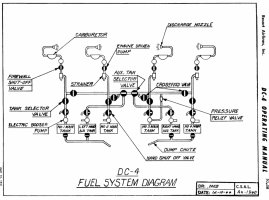
The DC-4 diagram for the fuel management is always a bit different so, I will have to take back the work done and make a specific version for the DC-4.
1779009425666.png
This documentation and that of the C-54 clearly shows that the fuel pump boosts do indeed have three positions: high, off, low.
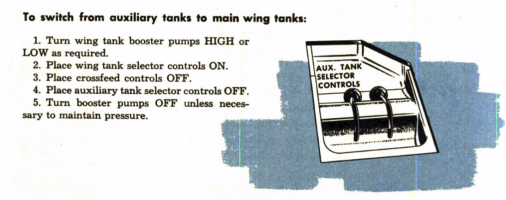
On the other hand, for the C-54B and the DC-4 the two selector valve control handles are beneath the floor plate just after of the control pedestal.

1779011432311.png
Therefore, I will slightly review my schedules and focus first on a long-distance C-54 version, then I will take back the incriminated files (flight_model.cfg and XML code) to develop a specific version of the DC-4. Wanting to do both at the same time could be a source of additional problems.
Regarding the instrumentation, by working on the original files, I managed to isolate 2 vintage instrumentations and I am in the process of finishing the modern version using the photos from the N500EJ as a base.
Nevertheless, during the life of this aircraft, several instrumentations followed one another and there are different photos, so I will try to do my best, based on my library of assets, to make a VC as pleasant as possible.
 
Last edited:
I'm so happy to see someone giving the DC4 real serious attention!!

I was an FSX/P3D user who never managed to get the Flight Replicas DC4/Argonaut to work properly, for some reason the Autopilot was totally inop, even after requesting help from the dev, I couldn't get it to work.

So I was patiently waiting for the day when Flight Replicas would bring his DC4/Argonaut to the MSFS platform, only to be crushed when he had it released as a barely working freeware port that basically isn't worth flying.

So I'm deeply happy to see this progress, and attention to the fine detail!!

I'm also in the middle of developing vintage scenery set around the late 1950's specifically for propliners. Because I want to see more devs take propliners seriously in msfs2024, and so I'm giving scenery development a go. Starting with Shannon, 1959.
 
@Mantock,
I am pleased with your interest in this project and I do not want to give you false hope regarding a future version of the Argonaut DC-4M1/2.
This version is very different in terms of engines (3D, XML code, flight model) and choosing another variant would not be a wise choice at present.

I will study this when I have at least one correct and operational version
 
Yea no problem, I didn't imagine you were planning on the Argonaut, at least at this early stage. I'll be following your development closely, looking forward to more progress updates! And when it comes time to be needing testers, I'd happily help by putting this through several trans-Atlantic rotations!
 
Argonaut would be super-cool, but with all your other ideas on the table (A-26, the Beaver, the Canso, etc.), unless we can duplicate you somehow we understand wanting to keep the variety going!
 
Yes Denny, sometimes it is good to say no or later maybe ;)

Over the past two days, I wanted to validate some ideas regarding this addon’s architecture.
Under 2020 it was possible according to the SDK to be able to add after compilation one or more objects to a 3D set via the AttachModel and MergeModel functions. Unfortunately, both properties were declared as Beta in 2020-2021 and not supported on Blender, unlike 3DS Max.

In 2023, with the Stearman, I managed to get AttachModel to work and add a decorative element to the entirely blue Stearman , proof that the SDK had made progress but that the documentation was not following (it is still not up to date today).
Currently, stairs for passengers and grown power unit are manage as AttachModel with Blender.

I just spent two days trying out the MergeModel and in the end I managed to make it work:
- the interior structure of the plane is a compiled object (DC4_interior_LOD00.gltf / DC4_interior_LOD00.bin)
- and the complete VC is another set of objects (vc_modern_LOD00.gltf / vc_modern_LOD00.bin ) that merges with the first.

Finaly, the last Asobo v1.3.3 plugin with Blender 3.6.23 support a lot of things that the Vitus's plugin and Blender 2.83 did not supported in 2021 ... but the documentation isn't updated at this day.

View attachment 188329

With AttachModel, there was no interaction possible with the elements of the attached set; now with MergeModel, you can interact, for example, with the buttons of certain gauges. But in both cases, if the attached or merged objects have animations, they remain operational: stairs can move when the engines are starting ...

Yesterday, so the VC finally worked on the DC-4, which allows me to work independently on the VC or the interior and only compile what is necessary.

View attachment 188328

This also allows you to change a modern VC, not a vintage one, simply by modifying a few lines of XML code.

At the same time as I was working on this, I cleaned up the files I had left in suspension and now I have :
- 3 available VCs (one modern and two vintage),
- 2 external models
- and 2 internal models.
So add and other variation, for example an Argonot variation can be something much more easier ... now :cool:

For vintage VCs, the animation code is still that of FSX/P3D, but the work required to make it work as it is in the C-54 must be one or two days at most. It will switch to Model Behavior when I have some time and "to change my mind" (it's a hobby not a work ;) ).

All this allows me to say that the project is moving faster than in recent weeks, which is very encouraging.

 
An other day working on the C-54 and its modern VC ... with a real success :cool: .

The "avionic" of the PBY has been "ported" to the C-54 and I was the first surprised to see that most instruments worked on the first try.
Two screens remained dark (transponder and auto-pilot gauge) but the buttons react correctly.

The issue is minor and must be at the level of the statement of $TEXTURES in the file panel.cfg or in the system.cfg, at the number of each electrical circuits that are not coordinated with the instruments: the system.cfg of the PBY is not identical line by line to that of the C-54, this point will need to be checked later.

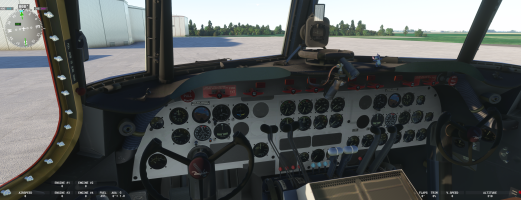
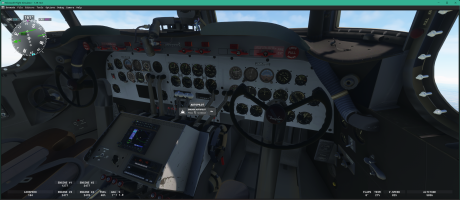
This screen is under MSFS2020 but under 2024: it work also !

1779301404291.png
 
Back
Top