
gray eagle
SOH-CM-2026
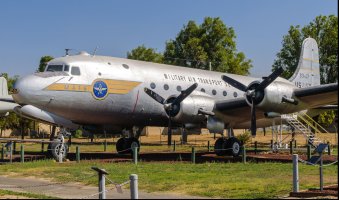
Would like to see a repaint of this....

Please see the most recent updates in the "Where did the .com name go?" thread. Posts number 16 and 17.
Just when you think you have everything running some what better...
You get a message from the Hosting company. Short story they need to move us to a new server. I have been working with them to plan a good date for all concerned. Here is what we have come up with as a schedule.
If all goes well we should be back online on November 8th.
To keep you updated we will post updates on AVSIM forums.
Thank you for your support.

 .
.The main files used for exterior repaints are the following so rename them:
- ns_fuselage.png.dds (i.e. the diffuse file) in dc4_fuselage_albd.png.dds
- ns_fuselage_bump.png.dds in dc4_fuselage_nrm.png.dds
- ns_wing_l.png.dds (i.e. the diffuse file) in dc4_wingl_albd.png.dds
- ns_wing_l_bump.png.dds in dc4_wingl_nrm.png.dds
- ns_wing_r.png.dds (i.e. the diffuse file) in dc4_wingr_albd.png.dds
- ns_wing_r_bump.png.dds in dc4_wingr_nrm.png.dds
, some explanations:
We deeply appreciate your selfless efforts in this endeavor. Thank you sir.If you want to tak a little "greek"
FS use many types of variables to compute the aircraft's state or other real components.
In very short, you have two main types:
- AVars which are variables used by FS, and some ones are possibly useable/editable by the developers (some but not all, read the SDK to know more)
- LVars which are users variables, created by the developer and that can be initialized, modified, etc
In this aircraft, I have created between 80 ~100 LVars for manage and obtain my purposes.
if FS is a success, it’s because of the presence of these LVars that allow the user to go beyond what FS offers and to be able to create many different things in sceneries but also in aircrafts.
This morning, I have implemented the "lighting system" on the DC-4-1009 and the DC-4-1009 SAAF (first on the various panels and overhead).
-----------------------------------------------------------------------------------------------------------------------------------------
The system is managed by 6 knobs: lh panel, eng panel, radio panel, rh panel, and compass/overhead (the spots knob isn't made yet).
The result with every knob to 100%:
View attachment 194199
I still need to add the lighting on the upper panel (I think that lighting is designed by glareshield ? ... ) as well as a few spots on the auxiliary lamps for the pilot, the copilot, the navigator, and the radio.
I’m also thinking of adding some mood lamps in the DC-4 model for the passenger cabin.
Hi is this paint available to download?une autre version du DC4
View attachment 193378
circuit.12 = Type:CIRCUIT_LIGHT_PANEL:1 #Connections:bus.1 #Power:2, 5, 20.0 #Name: Panel_Light_1 ; panel light 5W
circuit.13 = Type:CIRCUIT_LIGHT_GLARESHIELD:1 #Connections:bus.1 #Power:10, 15, 20.0 #Name:Glareshield_1
circuit.15 = Type:CIRCUIT_LIGHT_CABIN:1 #Connections:bus.1 #Power:30, 40, 20.0 #Name:Cabin_Light_pilot ; Cabin light 40W
circuit.16 = Type:CIRCUIT_LIGHT_CABIN:2 #Connections:bus.1 #Power:30, 40, 20.0 #Name:Cabin_Light_copilot ; Cabin light 40W
circuit.17 = Type:CIRCUIT_LIGHT_CABIN:3 #Connections:bus.1 #Power:30, 40, 20.0 #Name:Cabin_Light_radio ; Cabin light 40W
circuit.18 = Type:CIRCUIT_LIGHT_CABIN:4 #Connections:bus.1 #Power:30, 40, 20.0 #Name:Cabin_Light_passengerA ; Cabin light 40W
circuit.19 = Type:CIRCUIT_LIGHT_CABIN:5 #Connections:bus.1 #Power:30, 40, 20.0 #Name:Cabin_Light_passengerB ; Cabin light 40W
circuit.20 = Type:CIRCUIT_LIGHT_CABIN:6 #Connections:bus.1 #Power:30, 40, 20.0 #Name:Cabin_Light_passengerC ; Cabin light 40W
In a second step, we can add to the [Lights] section of this file the light effects for the navigation, landing but also that will serve as lamps for the panels.circuit.56 = Type:CIRCUIT_LIGHT_PANEL:2 #Connections:bus.1 #Power:2, 5, 20.0 #Name: Panel_Light_1 ; panel light 5W
circuit.57 = Type:CIRCUIT_LIGHT_PANEL:3 #Connections:bus.1 #Power:2, 5, 20.0 #Name: Panel_Light_1 ; panel light 5W
circuit.58 = Type:CIRCUIT_LIGHT_PANEL:4 #Connections:bus.1 #Power:2, 5, 20.0 #Name: Panel_Light_1 ; panel light 5W
circuit.59 = Type:CIRCUIT_LIGHT_PANEL:5 #Connections:bus.1 #Power:2, 5, 20.0 #Name: Panel_Light_1 ; panel light 5W
circuit.60 = Type:CIRCUIT_LIGHT_PANEL:6 #Connections:bus.1 #Power:2, 5, 20.0 #Name: Panel_Light_1 ; panel light 5W
; Types: 1=beacon, 2=strobe, 3=navigation, 4=cockpit, 5=landing 6=Taxi, 7=Recognition, 8=Wing, 9=Logo, 10=Cabin
For the modern cockpit (i.e. C-54 N500EJ) I have study the various photos and for this aircraft, "gauges lights" are located on little supports which are positionned above the gauge.lightdef.10 = Type:4 #Index:1 #LocalPosition:Y,X,Z #LocalRotation: P,H B #EffectFile:LIGHT_SOH_Gauge#PotentiometerIndex:3
lightdef.11 = Type:4 #Index:1 #LocalPosition:Y,X,Z #LocalRotation: P,H,B #EffectFile:LIGHT_SOH_Gauge#PotentiometerIndex:3
....
Currently, I have equiped only 9 gauges on the modern panels (17 lights to locate with precision ...) using the first method define above.lightdef.10 = Type:4 #Index:1 #LocalPosition: 0,0,0 #LocalRotation: 0,0,0 #EffectFile:LIGHT_SOH_Gauge#PotentiometerIndex:3 #EmMesh: Light_10 #Node: Light_10
lightdef.11 = Type:4 #Index:1 #LocalPosition: 0,0,0 #LocalRotation: 0,0,0 #EffectFile:LIGHT_SOH_Gauge#PotentiometerIndex:3 #EmMesh: Light_11 #Node: Light_11
....


<Component ID="DC4_LIGHTING_ENG_EMISSIVE">
<DefaultTemplateParameters>
<POTENTIOMETER>3</POTENTIOMETER>
<FAILURE>(A:CIRCUIT ON:57, Bool)</FAILURE>
<NO_SIMVAR_LIGHT/>
<EMISSIVE_CODE>0.1</EMISSIVE_CODE>
</DefaultTemplateParameters>
<UseTemplate Name="ASOBO_LIGHTING_Panel_Emissive_Template">
<NODE_ID>eng_inst_background</NODE_ID>
</UseTemplate>
<UseTemplate Name="ASOBO_LIGHTING_Panel_Emissive_Template">
<NODE_ID>manifold_pressure_eng1</NODE_ID>
</UseTemplate>
<UseTemplate Name="ASOBO_LIGHTING_Panel_Emissive_Template">
<NODE_ID>manifold_pressure_eng2</NODE_ID>
</UseTemplate>
...
<UseTemplate Name="ASOBO_LIGHTING_Knob_Panel_Template">
<NODE_ID>custom_knob_enginst_light</NODE_ID>
<ANIM_NAME>custom_knob_enginst_light</ANIM_NAME>
<POTENTIOMETER>3</POTENTIOMETER>
<INIT_VALUE>0</INIT_VALUE>
<ID>3</ID>
<SIMVAR_INDEX>3</SIMVAR_INDEX>
</UseTemplate>
</Component>


[VIEWS]
eyepoint = 25.4,-1.82,4.8 ; (meter) longitudinal, lateral, vertical distance from reference datum
Moreover, it depends a lot on whether you fly in VR or with a screen. As far as I’m concerned, I have a 32-inch screen.[Views]
eyepoint=25.5, -1.91, 4.8
.
It is 2024 compatible though!Ahhh ok. Thanks. Yes I'm now fully on msfs2024 now so won't be able to help test. Hopefully one day it comes to 2024 as well!! I'm currently building propliner era airfields and love this era.

Oh my goodness this is like Christmas. Can't wait - thanks. Will begin testing some Shannon-Gander longhauls!It is 2024 compatible though!
