• Please see the most recent updates in the "Where did the .com name go?" thread. Posts number 16 and 17.

    Post 16 Update

    Post 17 Warning old domain name stealing credentials

  • Special Server Maintenance

    Just when you think you have everything running some what better...

    You get a message from the Hosting company. Short story they need to move us to a new server. I have been working with them to plan a good date for all concerned. Here is what we have come up with as a schedule.

    1. November 4th 17:00 -5UTC shut off the forums and start backup proceedures. During this time there will be no access to the forums or the Resource Section.
    2. November 5th Continue with Backups and download same until complete.
    3. November 6th 7:00 turn over server to hosting company to move system to new server
    4. November 7th - 8th restore backups and upgrade forum software.

    If all goes well we should be back online on November 8th.

    To keep you updated we will post updates on AVSIM forums.

    Thank you for your support.

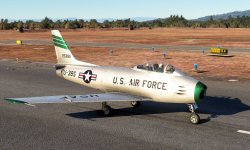
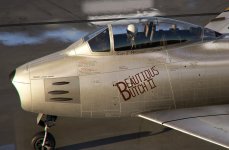
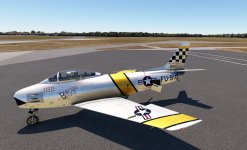
Shrike (Milviz) F-86 Sabre Now Available!

Great Comp Texture Tutorial

Correspondence with Blackbird now. Less turbulent. I've let them know the problems, and provided images. Yet to know if anything will be done to fix the polygons/verticies yet, but being treated now like I know what I'm talking about. We'll see...

Holister56 that looks great!

The reflection is controlled by the COMP texture as it relates to the ALBEDO. If you open the ALBEDO in PS and look under the Layers section on the right, you see that the image is split into 3 layers. Red, Green, Blue. In MSFS, Red is used for Ambient Occlusion ( shadow how it relates to the light direction in the sim) , Green for the smoothness (reflection), Blue is used to control the metallic ( white is pure metal, black is painted surface). So if you want less shine, you would have to lighten the grey value of the Green channel (for the green channel - Black is glossy - White is matt or no shine). Finding the right shade of grey takes a bit of time /trial and error if you are checking in the sim after each adjustment, but start around a value of 200 and try 10 degrees either side of that and see how that looks. Eventually you find a nice tone of grey that looks great in the sim.

There is more to it, like composing the 3 channels into a COMPLETE image in the right format an all, and I use GIMP which is similar to PS maybe less sophisticated, but works well for me. Recently I used Materialize to create the individual red/green/blue channels and compiled them into an COMP image using Gimp which worked well. It's a learned process, not long ago I was new to all this, but now I have a workflow that stays consistent when creating liveries. It just takes a bit of time to wrap your head around it.

Fnerg, very nice tutorial on composing and using COMP TEXTURES. Thanks for the input. Milton is also one of my heroes.
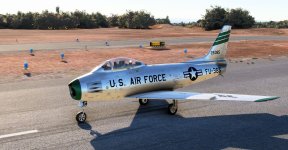
 
Foxhounds 32nd TFS F-86F

Waiting for Gunnar's version but just playing around with the 32nd TFS Foxhounds.

F-86 Foxhounds1.jpg

F-86 Foxhounds2.jpg
 
Waiting for Gunnar's version but just playing around with the 32nd TFS Foxhounds.

View attachment 94077

View attachment 94078

Looks great Tom!
I'almost finished with the albedo files, and I will soon start tuning the comp files. I've painted the base color more like photos shown earlier in this thread.

F86-EXT1-ALBD.jpg
 
Last edited:
Gunnar, send me an email so I can send you several images regarding the glare shield. The images have it a little different than your pics.

Tom
 
Been sitting on these screens for a while now. These are waaaaay pre-release and before some of the model changes. But, I was experimenting with making new metal textures for it back then. If anyone has any questions about getting better results let let me know. MSFS uses essentially the same textures as DCS. Just named differently.

unknown.png


unknown.png


unknown.png


unknown.png


unknown.png


unknown.png


unknown.png


unknown.png
 
Back
Top