
-
Please see the most recent updates in the "Where did the .com name go?" thread. Posts number 16 and 17.
-
Special Server Maintenance
Just when you think you have everything running some what better...
You get a message from the Hosting company. Short story they need to move us to a new server. I have been working with them to plan a good date for all concerned. Here is what we have come up with as a schedule.
- November 4th 17:00 -5UTC shut off the forums and start backup proceedures. During this time there will be no access to the forums or the Resource Section.
- November 5th Continue with Backups and download same until complete.
- November 6th 7:00 turn over server to hosting company to move system to new server
- November 7th - 8th restore backups and upgrade forum software.
If all goes well we should be back online on November 8th.
To keep you updated we will post updates on AVSIM forums.
Thank you for your support.
You are using an out of date browser. It may not display this or other websites correctly.
You should upgrade or use an alternative browser.
You should upgrade or use an alternative browser.
SOH A-26 Invader FSX Converted Files Download
- Thread starter Bomber_12th
- Start date


Erdinger
Charter Member

What scenery is this?

Tom also sent teh FM to me just in case he could not get it posted.
I added another 6 or so fltsim sections from what I have if you are interested, otherwise teh same as Tom posted.
I added another 6 or so fltsim sections from what I have if you are interested, otherwise teh same as Tom posted.

StormILM
Charter Member
Is anyone else having an issue with the some of the VC textures not displaying/displaying as gray on the center pedestal, seat and black background around parts of the panel? I'm not sure if I goofed with proper placement with some of the bump textures or if there is a minor mapping issue.
Any ideas?
Any ideas?
remove what text?
Which one of these files are you referring to and what txt is removed?
Try these, remove the .txt at the end:
T
Which one of these files are you referring to and what txt is removed?
Any Differences
any appreciable differences from the original files?
Tom also sent teh FM to me just in case he could not get it posted.
I added another 6 or so fltsim sections from what I have if you are interested, otherwise teh same as Tom posted.
any appreciable differences from the original files?

Sundog
SOH-CM-2026
Which one of these files are you referring to and what txt is removed?
The files you downloaded have ".txt" at the end of their names. Just delete that part and copy and overwrite the existing files. If you have textures installed, you may want to copy that part of the file over into the new ones before copying and pasting, or just rename the current ones to ".bak" so they don't get over written.
Edit: OK, I see, when you download them, using "saveas" they download without the .txt at the end of them. So you can probably just copy them over.

Roger
Senior Administrator
Which one of these files are you referring to and what txt is removed?
Download them both (one is the .air file the other the .cfg file). Then remove the .txt from the file name. If you have additional repaints then you might want to copy these entries from the old .cfg and add them to the new one, ensuring that the number sequence is maintained..


Bomber_12th
SOH-CM-2025
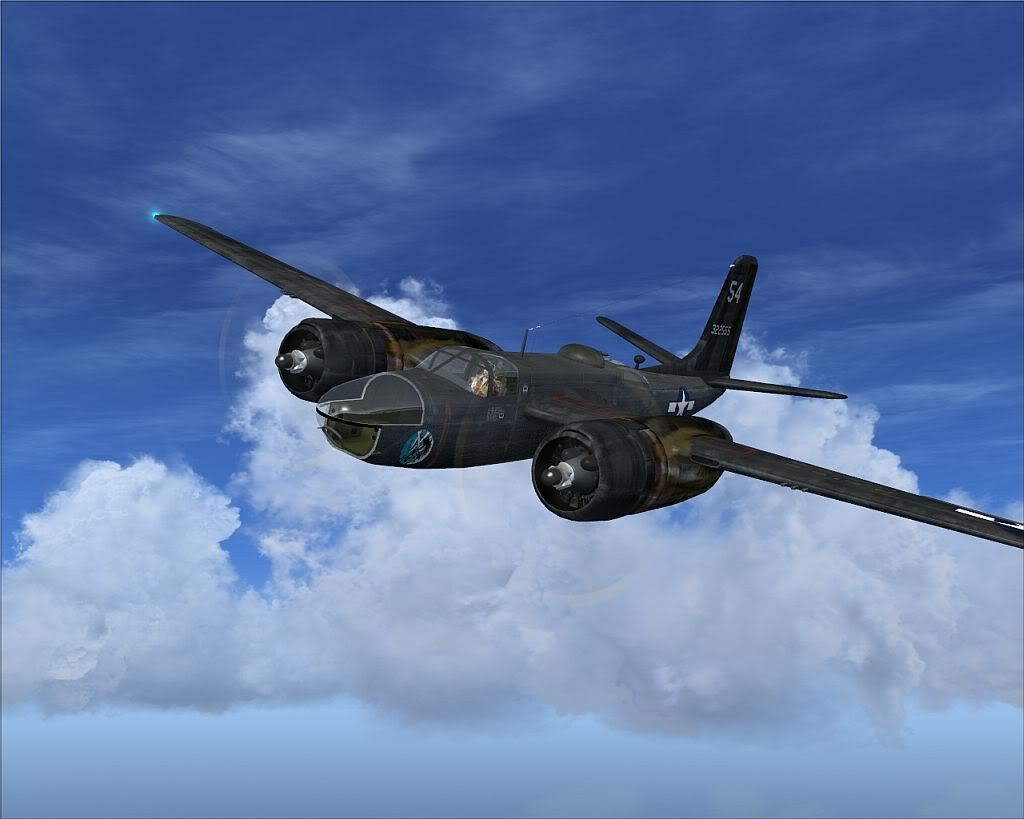
That looks simply awesome, Ted! And great screenshots too!
Tom, thank you for the updated flight dynamics!
Tom, thank you for the updated flight dynamics!
Bomber_12th
SOH-CM-2025
Here are some more shots collected from yesterday:


StormILM
Charter Member
Screens of the VC texture
Here are screens of the VC texture issue I am experiencing that I mentioned on a post above. The red arrows mark the problem areas.
View attachment 65050View attachment 65051View attachment 65052View attachment 65053
I did revert back to the original FSX native models & textures minus the bump textures and the blacked out texture area in the front-right side of the VC was again green but the center pedestal & seat, retracted boarding ladder appear partly untextured gray. I did go back an fully check to make sure all the files were in the proper location and return to the newest version of the models & textures but the issue is still present. Everything else appears normal and functions perfectly.
Here are screens of the VC texture issue I am experiencing that I mentioned on a post above. The red arrows mark the problem areas.
View attachment 65050View attachment 65051View attachment 65052View attachment 65053
I did revert back to the original FSX native models & textures minus the bump textures and the blacked out texture area in the front-right side of the VC was again green but the center pedestal & seat, retracted boarding ladder appear partly untextured gray. I did go back an fully check to make sure all the files were in the proper location and return to the newest version of the models & textures but the issue is still present. Everything else appears normal and functions perfectly.
Bomber_12th
SOH-CM-2025
StormILM, it is displaying correctly for you. That is how the VC was originally in FS9 as well, and I have left it just as is. Unfortunately I'm not in a position that I can invest the time needed to advance it further.

DennyA
SOH-CM-2023
Wow... I'm away from S-O for a few days and I come back and find this! I've been waiting literally years for someone to update this amazing model for FSX.
I just have to pop in and say a huge THANK YOU to John! I think I can speak for everyone here in saying we all really appreciate the time and effort you put into this.
(Actual huge "thank you" ;-) ______________^^
And it was fun to come in and see the enthusiasm of the crowd here push you to go back to it after "finishing" and add the bump maps too! Anyway, I can't wait to fire it up. Please know that your time and effort is is greatly appreciated!
I just have to pop in and say a huge THANK YOU to John! I think I can speak for everyone here in saying we all really appreciate the time and effort you put into this.
(Actual huge "thank you" ;-) ______________^^
And it was fun to come in and see the enthusiasm of the crowd here push you to go back to it after "finishing" and add the bump maps too! Anyway, I can't wait to fire it up. Please know that your time and effort is is greatly appreciated!
StormILM
Charter Member
StormILM, it is displaying correctly for you. That is how the VC was originally in FS9 as well, and I have left it just as is. Unfortunately I'm not in a position that I can invest the time needed to advance it further.
John, thanks for the reply and for doing what you have done on this model for us! I guess that one spot (forward right wall) appeared different after the changes and I thought I screwed up something/misplaced some files. It's a minor visual and not a killer to the rest of the model. But if you don't mind me asking, if myself/some of my fellow A-26 users wanted to update the VC texture spots pointed out, is it something that can be tackled by normal painting tools or does it fall into more advanced MDL/Mapping needs? I'd be willing to take a crack at it if pointed in the right direction or help contribute.