• Please see the most recent updates in the "Where did the .com name go?" thread. Posts number 16 and 17.

    Post 16 Update

    Post 17 Warning old domain name stealing credentials

  • Special Server Maintenance

    Just when you think you have everything running some what better...

    You get a message from the Hosting company. Short story they need to move us to a new server. I have been working with them to plan a good date for all concerned. Here is what we have come up with as a schedule.

    1. November 4th 17:00 -5UTC shut off the forums and start backup proceedures. During this time there will be no access to the forums or the Resource Section.
    2. November 5th Continue with Backups and download same until complete.
    3. November 6th 7:00 turn over server to hosting company to move system to new server
    4. November 7th - 8th restore backups and upgrade forum software.

    If all goes well we should be back online on November 8th.

    To keep you updated we will post updates on AVSIM forums.

    Thank you for your support.

Lockheed Jetstar II

JETSTAR II - Missed some detail!!

After working on some improved textures, I noticed that I could not find empanage de-ice boots in any pictures, and all leading edges were either chrome or painted.

Reviewing manuals I have, it is clear that the JETSTAR I had them, the JETSTAR II did not. In a lengthy description of the entire de-ice system the JSII had wing boots only, heated engine inlets and windshields - nothing on the rear stabs.

I have reworked these areas and will be posting updated repaints and a white / metal paint kit as significantly improved updates. I hope to finish through the coming weekend.
 
Just for INFO here-->THATS FS9 !!!!

Gregory has taken the task to repair, and test, as loabour of Love, Jim Goldman's Jetstar II in FS2004/FS9

Soon we will post here, and we hope you have fun flying it

As I even do not have FS9 anymore Glory goes to Jim and Gregory

You can look below

Roland


paperclip.png
Attached Thumbnails
 
Just for INFO here-->THATS FS9 !!!!

Gregory has taken the task to repair, and test, as loabour of Love, Jim Goldman's Jetstar II in FS2004/FS9

Soon we will post here, and we hope you have fun flying it

As I even do not have FS9 anymore Glory goes to Jim and Gregory

You can look below

Roland


paperclip.png
Attached Thumbnails

I sure do like seeing the start cart, intake covers etc. Wish the P3D version had all those goodies.
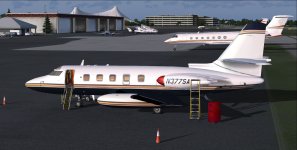
 
Hi All

Updated Paintkit by Mike ( thanks a lot ) is available in Downloads

So please fellow repainters give is a go !!

Thank you

Roland

PS : in the FS9 Download there is a now paint in too-->You can get here bellow as well

https://we.tl/t-qNzeqcWZh5

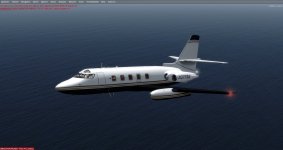
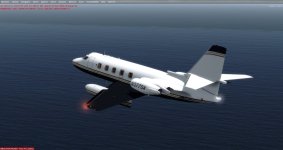
2021-12-6_9-18-58-90.jpg2021-12-6_9-19-9-817.jpg
 
Hi Brian, didn't think there as any interest. I have all three completed. I can upload any or all of the three.

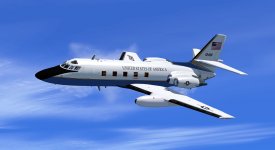
Camo P3d 1.jpg USAF Camo Com Metal1.jpg USAF Communications USAF.jpg USAF (United States of America)
 
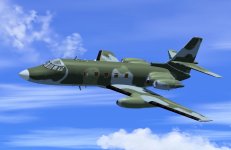
Ok, I will put the packages together and upload all three. I wasn't happy with the camo paint as it was in the first image. Here is an image of the final. I will let you know once they are uploaded. Thanks for the interest.

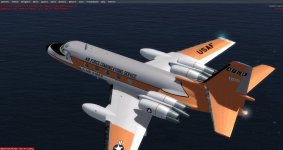
Camo Blurred6.jpg
 
Ok, I will put the packages together and upload all three. I wasn't happy with the camo paint as it was in the first image. Here is an image of the final. I will let you know once they are uploaded. Thanks for the interest.

An excellent model should have great repaints to compliment her lines. Thank you..!
 
All three USAF paints are in the same download. Finished uploading. As soon as it is approved it will be available. Thanks for the interest. Hope my repaint skills aren't dwindling with my age. Enjoy.
 
The thanks is mine Roland, you have a great team and the work is superb. My small contribution to the effort.
 
Love the USAF VIP paint. Now to figure out which VIP left their Teddy Bear in the aircraft. :biggrin-new: Thanks Tom! :encouragement:

Brian
 
I just remembered a thought. Using MCX I tried to remove the teddy bear and some of the furnishings in the Camo version. I evens tried to change the pictures to snipers and the like. Also tried to put a rack of M-16's in the area. No luck. Anyone who has the skills and can make the inside of the Covert Camo version look like a Seal Team environment, I would love that. What do you think?
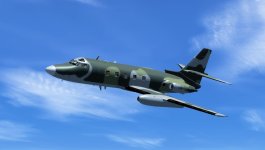
 
I just remembered a thought. Using MCX I tried to remove the teddy bear and some of the furnishings in the Camo version. I evens tried to change the pictures to snipers and the like. Also tried to put a rack of M-16's in the area. No luck. Anyone who has the skills and can make the inside of the Covert Camo version look like a Seal Team environment, I would love that. What do you think?
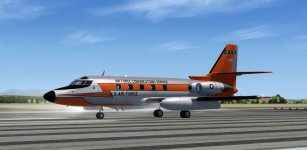
A military interior would be nice. I'm thinking you'd need access to the source files to change/remove items from the interior. Maybe you could re-texture Teddy and give him a USAF shirt?

Brian
 
I can take away the bear and some pillows. You can recolour the interior

Also some seats can go, but not the Sofa

Stovall what model do you use FSX or P3D?

Roland

PS: I cannot move an Gaitling in, but you can change the pictures
 
Back
Top