
-
Please see the most recent updates in the "Where did the .com name go?" thread. Posts number 16 and 17.
-
Special Server Maintenance
Just when you think you have everything running some what better...
You get a message from the Hosting company. Short story they need to move us to a new server. I have been working with them to plan a good date for all concerned. Here is what we have come up with as a schedule.
- November 4th 17:00 -5UTC shut off the forums and start backup proceedures. During this time there will be no access to the forums or the Resource Section.
- November 5th Continue with Backups and download same until complete.
- November 6th 7:00 turn over server to hosting company to move system to new server
- November 7th - 8th restore backups and upgrade forum software.
If all goes well we should be back online on November 8th.
To keep you updated we will post updates on AVSIM forums.
Thank you for your support.
You are using an out of date browser. It may not display this or other websites correctly.
You should upgrade or use an alternative browser.
You should upgrade or use an alternative browser.
DC-4 Skymaster
- Thread starter lagaffe
- Start date

lagaffe
SOH-CM-2026
Thanks for the link to this manual but if you read the post since the beginning I have gave hit in page 2 (Jan 31) and most of screenshot for the fuel management are taken in this manual 
When I work on an airplane, I have a model-making approach and the first thing I do is to gather as much documentation as possible about it. At present, I have more than 830 MB of PDFs and images on my hard drive regarding the DC-4 and C-54.
This manual and a DC-4 manual are provided in this addon since the first alpha version tested
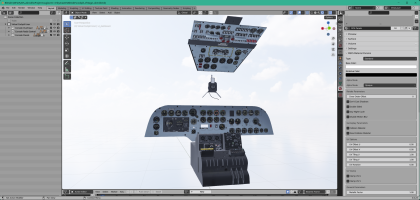
As for the instruments, I have already prepared three virtual cockpits which will be "merged" with an interior model to have as much flexibility as possible in case another variation is created:
The second cockpit on which I will be working next week need to be cleaned up and then the XML code will be written.
It is this one which is planned to be "merged" with the DC-4 "Liner" like DC-4 Air France or South-Africa.
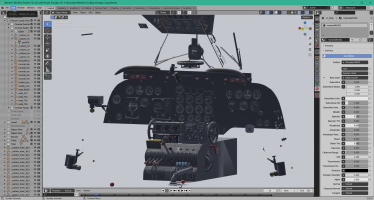
The third one is for now just a rough draft that needs a lot of work to be usable. It will probably be associated with a military C-54 cargo version.
A little trick for developers I found to resolve my issues with the clickable area around the center console.
In the first versions, it was the entire trim that was declared clickable via the associated ModelBehavior, but since the manipulation wheel is very large or even too large, it was very difficult to click on the levers at the back. (tank selection, carburetor control or cross-feed).
The solution is finally quite simple, I separated the trims into two parts:
- the central axis and
- the manipulation wheel.
The wheel was declared as an child object of the central axis and it was the axis that was then declared in the ModelBehavior.
In this way, to act with the mouse, the cursor must be moved on the axis and not on the wheel, which allows for better separation between the various areas on the virtual cockpit.
When I work on an airplane, I have a model-making approach and the first thing I do is to gather as much documentation as possible about it. At present, I have more than 830 MB of PDFs and images on my hard drive regarding the DC-4 and C-54.
This manual and a DC-4 manual are provided in this addon since the first alpha version tested
As for the instruments, I have already prepared three virtual cockpits which will be "merged" with an interior model to have as much flexibility as possible in case another variation is created:
The second cockpit on which I will be working next week need to be cleaned up and then the XML code will be written.
It is this one which is planned to be "merged" with the DC-4 "Liner" like DC-4 Air France or South-Africa.
The third one is for now just a rough draft that needs a lot of work to be usable. It will probably be associated with a military C-54 cargo version.
A little trick for developers I found to resolve my issues with the clickable area around the center console.
In the first versions, it was the entire trim that was declared clickable via the associated ModelBehavior, but since the manipulation wheel is very large or even too large, it was very difficult to click on the levers at the back. (tank selection, carburetor control or cross-feed).
The solution is finally quite simple, I separated the trims into two parts:
- the central axis and
- the manipulation wheel.
The wheel was declared as an child object of the central axis and it was the axis that was then declared in the ModelBehavior.
In this way, to act with the mouse, the cursor must be moved on the axis and not on the wheel, which allows for better separation between the various areas on the virtual cockpit.
Last edited:

Hollister56
Members +
That is great to here!
lagaffe
SOH-CM-2026
Hello,
In France, we’ve had a "heat wave" since last Saturday and it’s practically impossible to work on the computer from noon onwards (=> 36°C), so I reserve mornings between 7 and 11 a.m. to move the project forward.
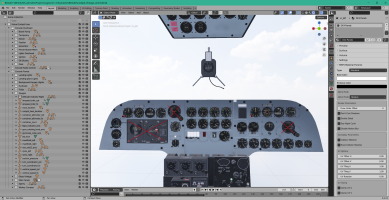
Currently, the vintage cockpit of the DC-4 has made good progress: all that remains is to adjust the Sperry and the ATI, which is coupled with certain variables. The other gauges are functional even if some operate with FSX code.
In France, we’ve had a "heat wave" since last Saturday and it’s practically impossible to work on the computer from noon onwards (=> 36°C), so I reserve mornings between 7 and 11 a.m. to move the project forward.
Currently, the vintage cockpit of the DC-4 has made good progress: all that remains is to adjust the Sperry and the ATI, which is coupled with certain variables. The other gauges are functional even if some operate with FSX code.

i fully admit ive only read the 1st page and then this page, page 9, i will come back and read it all, but ,im guessing here, my ADHD/ADD is stopping me,i really struggle to stay on topic. have you made up your mind on if there will be a tanker version? some people like military, some like airliners, some just like the general aviation set... me? i want to fly airtankers. any and all, which is why i want 2024 so bad, but right now my 2020 is still stuck on the updates spinning thingy. and i cant get into the microsoft store to do a reinstall or whatever is going to fix it....sigh
lagaffe
SOH-CM-2026
Yes Dave a airtankercan can be extrapolated from the existing version, because Mike has provide this kind of aircraft in his FSX package and because I thought to use certain scripts I had written for the Canso about water tanks managing.
To continue on the DC-4, yesterday I have begin to work on the Sperry block. But curious I have searched some informations about the Sperry and that it did in the first aircraft where it was used because to model an instrument, you still need to know exactly how it is made and how it works.
At least, that’s how I do it, because even though I love aviation, I try to learn a little more each day about this vast subject ...
First, an anecdote that made me smile about Lawrence Sperry, who is considered to be the co-inventor of autopilot with his father.
Lawrence Sperry, legendary founder of the Mile High Club
It’s hard to go around potential candidates for the first humans to get laid without mentioning the misadventures of aviation pioneer Lawrence Burst Sperry. Especially since he is the father of autopilot, an invention so essential to be able to fully enjoy aerial galipettes, freeing up the hands and attention of the pilot. It seems that, as a great seducer, he himself would have made the most of this advantage of his invention. On November 21, 1916, Sperry flew the Curtis Flying Boat C2 of Mr. Waldo Peirce from Babylon to Lindenhurst (New York) with the wife of the owner of the seaplane, Mrs. Dorothy Rice Peirce, to whom he had taught how to fly and who became the 10th American woman to receive a pilot’s license on August 23 of the same year. While flying at an altitude of about 600 feet, the autopilot was cut off accidentally and the aircraft crashed into the water half a mile from the coast of Great South Bay on Long Island. According to legend, the two duck hunters who came to rescue them were surprised to discover the pilot and his former student in the simplest aircraft. Playboy but courteous, Sperry would then have explained, to spare a scandal to Mrs. Pierce, that they had been stripped of their clothes by the violence of the shock of the accident. Sperry later told a friend that Dorothy was his mistress and that the autopilot system had probably been turned off by an involuntary movement while they were in the heat of the moment.
Legend or not, this story allowed Dorothy and Lawrence to be considered the founders of the Mile High Club, a non-formal club that brings together all those who have made love aboard an aircraft at an altitude of at least one mile, despite the fact that the couple did not fly as high
Then the true story about the sperry block:
The first prototype of an autopilot was created by Elmer Sperry and his son Lawrence Sperry in 1914, who were also the creators of the artificial horizon. Their autopilot is rather considered a flight stabilizer, their system allows to correct unwanted pitch and roll variations. The innovation allows a straight and stabilized flight without pilot action on the control column.
The Sperries installed 4 gyroscopes on a Curtiss C-2, an aircraft of the American Navy. These gyroscopes, which rotate at about 7,000 rpm, permanently maintain their axis. They train a pulley system, which, with each movement of the aircraft, acts directly on the flight control surfaces to correct these unwanted variations. The Sperries demonstrated the effectiveness of their flight stabilization system on 18 June 1914 during the Airliner Safety Competition in Paris. It’s a success, they are acclaimed by a large audience. In the days when airplanes had just been invented, it was unthinkable that a mechanism could control an aircraft. They win the contest and receive 50,000 francs, which corresponds today to the sum of $225,000.
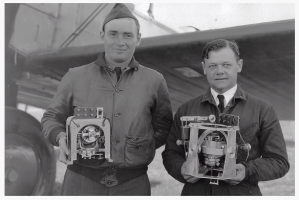
Autopilots work most of the time in this way: an error signal is sent to servo motors (which can be electric or hydraulic, in the case of the DC-3). These actuators act directly on the control surfaces of the aircraft and apply precisely the action to be performed on the control surface. The servomotors send a feedback signal to the autopilot. When the error and feedback signals cancel each other, it means that the action desired by the autopilot has been carried out. Thus, the servomotors are waiting for a new error signal to be corrected.
Automatic pilots have become more complex and diversified over time. In 1935, Douglas unveiled his DC-3, an improved version of the DC-2. This aircraft made history with its unprecedented comfort, reliability and cost-effectiveness. Indeed, the DC-3 offers an autopilot like that of Sperry with integration into the dashboard. It offers pilots the possibility to maintain a slope and a heading given by the pilot. The flight becomes more stable, therefore more comfortable. This autopilot allows pilots to focus on other phases of flight such as radio or navigation, there were only 2 pilots in a DC-3, making it more economical.
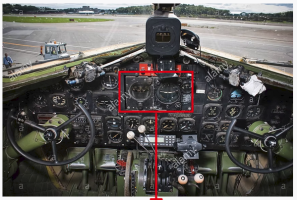
The left instrument allows you to select a heading to maintain and the right one, a trim. This simple sentence has already allowed me to understand the meaning of the two dials and the many buttons, something that reading the XML code found in the addon FSX had not really made me understand.
The XML code provided by the FSX addon is a FS9/FSX code and Model Converter X (MCX from Arno Gerretsen - FSdeveloper.com) that I used to port aircrafts has certain defects: particularly if several objects are linked together but animated with the same animation, the program will :
- separate each object and
- assign it the same animation each time, which in the end greatly complicates the result.
PS: there is no point in having 10 objects animated with the same animation, because a parent object with 9 children and an animation on the parent object is more efficient in terms of MSFS calculation time
My workflow consists in trying to group objects with the same animation before thinking about how the code can be transformed to be "more compatible" with MSFS and Model Behaviors.
Asking to an IA engine (Qwant) how a sperry works, i have receive theses points
)
This loop allows the aircraft to maintain :
- a pilot-defined heading
- or attitude,
even in conditions of reduced visibility or turbulence. So it's a basic auto-pilot with only two functions: heading or attitude.
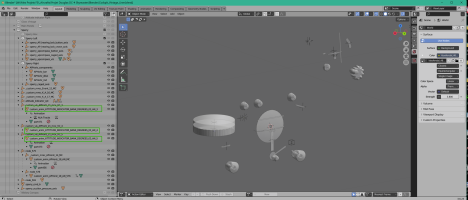
A simple image of the Sperry contains (I have only hidden the boxe around them) to better understand the parts provided by Model ConverterX, the automatic name convention and the pain to compose with all theses "parts" to re-assemble a functionnal gauge ...
Plain axes are the centers of theses parts or Centers of Gravity around parts are moving. Some have the same name but with suffixes differents so it's necessary to link only the right parts together.
To continue on the DC-4, yesterday I have begin to work on the Sperry block. But curious I have searched some informations about the Sperry and that it did in the first aircraft where it was used because to model an instrument, you still need to know exactly how it is made and how it works.
At least, that’s how I do it, because even though I love aviation, I try to learn a little more each day about this vast subject ...
First, an anecdote that made me smile about Lawrence Sperry, who is considered to be the co-inventor of autopilot with his father.
Lawrence Sperry, legendary founder of the Mile High Club
It’s hard to go around potential candidates for the first humans to get laid without mentioning the misadventures of aviation pioneer Lawrence Burst Sperry. Especially since he is the father of autopilot, an invention so essential to be able to fully enjoy aerial galipettes, freeing up the hands and attention of the pilot. It seems that, as a great seducer, he himself would have made the most of this advantage of his invention. On November 21, 1916, Sperry flew the Curtis Flying Boat C2 of Mr. Waldo Peirce from Babylon to Lindenhurst (New York) with the wife of the owner of the seaplane, Mrs. Dorothy Rice Peirce, to whom he had taught how to fly and who became the 10th American woman to receive a pilot’s license on August 23 of the same year. While flying at an altitude of about 600 feet, the autopilot was cut off accidentally and the aircraft crashed into the water half a mile from the coast of Great South Bay on Long Island. According to legend, the two duck hunters who came to rescue them were surprised to discover the pilot and his former student in the simplest aircraft. Playboy but courteous, Sperry would then have explained, to spare a scandal to Mrs. Pierce, that they had been stripped of their clothes by the violence of the shock of the accident. Sperry later told a friend that Dorothy was his mistress and that the autopilot system had probably been turned off by an involuntary movement while they were in the heat of the moment.
Legend or not, this story allowed Dorothy and Lawrence to be considered the founders of the Mile High Club, a non-formal club that brings together all those who have made love aboard an aircraft at an altitude of at least one mile, despite the fact that the couple did not fly as high
Then the true story about the sperry block:
The first prototype of an autopilot was created by Elmer Sperry and his son Lawrence Sperry in 1914, who were also the creators of the artificial horizon. Their autopilot is rather considered a flight stabilizer, their system allows to correct unwanted pitch and roll variations. The innovation allows a straight and stabilized flight without pilot action on the control column.
The Sperries installed 4 gyroscopes on a Curtiss C-2, an aircraft of the American Navy. These gyroscopes, which rotate at about 7,000 rpm, permanently maintain their axis. They train a pulley system, which, with each movement of the aircraft, acts directly on the flight control surfaces to correct these unwanted variations. The Sperries demonstrated the effectiveness of their flight stabilization system on 18 June 1914 during the Airliner Safety Competition in Paris. It’s a success, they are acclaimed by a large audience. In the days when airplanes had just been invented, it was unthinkable that a mechanism could control an aircraft. They win the contest and receive 50,000 francs, which corresponds today to the sum of $225,000.
Autopilots work most of the time in this way: an error signal is sent to servo motors (which can be electric or hydraulic, in the case of the DC-3). These actuators act directly on the control surfaces of the aircraft and apply precisely the action to be performed on the control surface. The servomotors send a feedback signal to the autopilot. When the error and feedback signals cancel each other, it means that the action desired by the autopilot has been carried out. Thus, the servomotors are waiting for a new error signal to be corrected.
Automatic pilots have become more complex and diversified over time. In 1935, Douglas unveiled his DC-3, an improved version of the DC-2. This aircraft made history with its unprecedented comfort, reliability and cost-effectiveness. Indeed, the DC-3 offers an autopilot like that of Sperry with integration into the dashboard. It offers pilots the possibility to maintain a slope and a heading given by the pilot. The flight becomes more stable, therefore more comfortable. This autopilot allows pilots to focus on other phases of flight such as radio or navigation, there were only 2 pilots in a DC-3, making it more economical.
The left instrument allows you to select a heading to maintain and the right one, a trim. This simple sentence has already allowed me to understand the meaning of the two dials and the many buttons, something that reading the XML code found in the addon FSX had not really made me understand.
The XML code provided by the FSX addon is a FS9/FSX code and Model Converter X (MCX from Arno Gerretsen - FSdeveloper.com) that I used to port aircrafts has certain defects: particularly if several objects are linked together but animated with the same animation, the program will :
- separate each object and
- assign it the same animation each time, which in the end greatly complicates the result.
PS: there is no point in having 10 objects animated with the same animation, because a parent object with 9 children and an animation on the parent object is more efficient in terms of MSFS calculation time
My workflow consists in trying to group objects with the same animation before thinking about how the code can be transformed to be "more compatible" with MSFS and Model Behaviors.
Asking to an IA engine (Qwant) how a sperry works, i have receive theses points
PS: on some aircraft the adjustments on the control surfaces are hydraulics and not electrical but this imply that the sperry cannot performs if the Master Battery is OFF (electricity is neededfor the gyroscope animations and to manage servomotorsKey Components
In-flight operation
- Directional gyroscope: measures the direction and heading of the aircraft.
- Horizon gyroscope: keeps the tilt angle (pitch) constant.
- Aneroid barometer: controls altitude by measuring atmospheric pressure.
- Servomotors: perform mechanical adjustments on the control surfaces.
- Pulley system: transmits the gyroscope movements to the servomotors.
- Detection: the gyroscope detects any deviation from the reference axis.
- Error calculation: the deviation is converted into an electrical signal.
- Correction: the signal activates the corresponding servo motor, which adjusts the control surface.
- Feedback: the servo motor returns a feedback signal, indicating that the correction has been made.
- Loop: the system repeats this cycle continuously, thus maintaining stability.
)This loop allows the aircraft to maintain :
- a pilot-defined heading
- or attitude,
even in conditions of reduced visibility or turbulence. So it's a basic auto-pilot with only two functions: heading or attitude.
A simple image of the Sperry contains (I have only hidden the boxe around them) to better understand the parts provided by Model ConverterX, the automatic name convention and the pain to compose with all theses "parts" to re-assemble a functionnal gauge ...
Plain axes are the centers of theses parts or Centers of Gravity around parts are moving. Some have the same name but with suffixes differents so it's necessary to link only the right parts together.
Last edited:
lagaffe
SOH-CM-2026
Hello,
After more than a week of searching, reading documentation on the Gyro Pilot Sperry, I begin to understand how it worked and by comparing the codes of Flight Replicas and planes on MSFS that have a SPERRY, I was able to arrive at a result that satisfies me.
Of course, everything is not perfect, there are still small things to check and improve but 80% of the functions on the Sperry are present and functional (AIL. button & ELE. button should be valided),
All I have to do now is finish the ATTITUDE gauge (XML encoding to finish) to get a vintage VC that’s good enough to be eligible for an open beta. (v0.5.0).
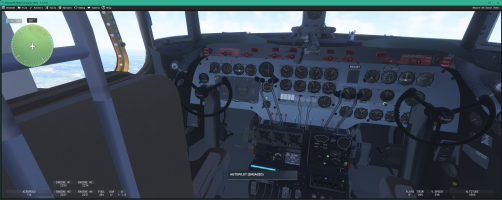
Here a screen on MSFS 2024 with the AUTOPILOT engaged as proven by the LED lit at the top left of the screen
After more than a week of searching, reading documentation on the Gyro Pilot Sperry, I begin to understand how it worked and by comparing the codes of Flight Replicas and planes on MSFS that have a SPERRY, I was able to arrive at a result that satisfies me.
Of course, everything is not perfect, there are still small things to check and improve but 80% of the functions on the Sperry are present and functional (AIL. button & ELE. button should be valided),
All I have to do now is finish the ATTITUDE gauge (XML encoding to finish) to get a vintage VC that’s good enough to be eligible for an open beta. (v0.5.0).
Here a screen on MSFS 2024 with the AUTOPILOT engaged as proven by the LED lit at the top left of the screen
lagaffe
SOH-CM-2026
Hello,
Since my last post, boost pump have been changed and now they have two positions: high and low pressure.
MSFS don't support "this detail" so we have create 8 others pumps ,16 in all: 8 low and 8 high pressure. To achieve that some modifications had to be carried out at the 3D (switchs 2 positions tranformed in 3 positions) and code levels.
With the latest corrections proposed by Hollister56 on the C-54 fuel system, the project has made considerable progress.
The help of CLAUDE AI allowed us to save a lot of time, but be careful, no matter how effective it is, it does not yet replace a human being : the lists of electrical and mechanical pumps were nested and the AI confused the two types, which led to a code that initially worked partially.
It took a thorough review of the code to notice and correct the errors. Since the fuel system reacts much better, and even though some additional tests will be needed to ensure this, I think this step is almost finished
While waiting for the validation of the current test version v0.49G, I am starting to take care of the DC-4 system, which is slightly different:
- the numbers of tanks is different: four main tanks and only two auxiliary ones
- the four tank selection levers are now only in two positions: OFF - ON (on the C-54, they have three positions OFF - MAIN - AUX)
- two new levers will have to be created under a hatch located on the ground between the two seats, which will hold the two levers for the auxiliary tanks.
For whose who are interested, I joined two screenshots of theses details in my post#147.
And of course, all the XML code should be adapted to take in account theses modifications but I hop this will be done quickly
Since my last post, boost pump have been changed and now they have two positions: high and low pressure.
MSFS don't support "this detail" so we have create 8 others pumps ,16 in all: 8 low and 8 high pressure. To achieve that some modifications had to be carried out at the 3D (switchs 2 positions tranformed in 3 positions) and code levels.
With the latest corrections proposed by Hollister56 on the C-54 fuel system, the project has made considerable progress.
The help of CLAUDE AI allowed us to save a lot of time, but be careful, no matter how effective it is, it does not yet replace a human being : the lists of electrical and mechanical pumps were nested and the AI confused the two types, which led to a code that initially worked partially
.It took a thorough review of the code to notice and correct the errors. Since the fuel system reacts much better, and even though some additional tests will be needed to ensure this, I think this step is almost finished
While waiting for the validation of the current test version v0.49G, I am starting to take care of the DC-4 system, which is slightly different:
- the numbers of tanks is different: four main tanks and only two auxiliary ones
- the four tank selection levers are now only in two positions: OFF - ON (on the C-54, they have three positions OFF - MAIN - AUX)
- two new levers will have to be created under a hatch located on the ground between the two seats, which will hold the two levers for the auxiliary tanks.
For whose who are interested, I joined two screenshots of theses details in my post#147.
And of course, all the XML code should be adapted to take in account theses modifications but I hop this will be done quickly
Last edited:

Great discussion! I have read somewhere - I think it was in one of the original C-47 manuals - that you had to have the power and trim settings set to a stable cruise configuration before engaging the Sperry.
Cheers,
Mark
Cheers,
Mark
lagaffe
SOH-CM-2026
Yes, exactly. The gyro in the Sperry are electrical powered so battery must be ON and a stable cruise configuration should be tuned before engaging the Sperry :
the sperry is based on 3 servomechanisms that are automated control systems using a closed loop to precisely adjust the position, speed and movement of an object thanks to sensors and a controller.
The main problem with a servomechanism is that it can only work within a precise range of values; if we try to use it outside, it no longer works efficiently and drifts ... until there is no correction at all.
PS: When I started working professionally at THALES in 1983, I had a chief engineer: Mr Dubault, who was a specialist in servo mechanisms used in radars and I still remember everything he taught me at that time .
the sperry is based on 3 servomechanisms that are automated control systems using a closed loop to precisely adjust the position, speed and movement of an object thanks to sensors and a controller.
The main problem with a servomechanism is that it can only work within a precise range of values; if we try to use it outside, it no longer works efficiently and drifts ... until there is no correction at all.
PS: When I started working professionally at THALES in 1983, I had a chief engineer: Mr Dubault, who was a specialist in servo mechanisms used in radars and I still remember everything he taught me at that time
.
lagaffe
SOH-CM-2026
Hello,
Since the latest changes to fuel management have been coded, I have started testing with Hollister56 and it is progressing well.
Having inadvertently found an error in my code that had been present for a very long time, I was able to correct the reason why external elements were not always displayed despite code checks. In fact, the name allocated to a component of Modelbehavior was identical to the label of a local variable and this seems to cause problems.
At the beginning of the weekend, I wanted to finish these actions so that I could make this v0.5.0 version available for the 250 years of the USA, but as usual, I wanted to add a little extra and it’s not entirely finished. This more concerns the sounds ...
With the Aeronca I started working on the Legacy sounds to complement a WWise package (Savage Cub), the result was satisfactory.
For the DC-4, I had thought about the sounds of the DC-6, but there is too much work because writing ModelBehaviors is special: PMDG does not use standard names for these animations and nodes, but rather acronyms like obj273, which makes reading them too complex.
So I decided to check with the sounds of the DC-3 (provided in the MSFS standard distribution), which would allow me to start seeing how to improve those of the Canso at the same time. Currently, the result is very good but I need more time to add sons when the cockpit windows are open, etc ...
In any case, I’m sending the draft version to Hollister56 and if its test is OK, the version v0.5.0 will be available later this week.
PS: Currently, the only bug found is in the "crossfeed management" for the C-54
Since the latest changes to fuel management have been coded, I have started testing with Hollister56 and it is progressing well.
Having inadvertently found an error in my code that had been present for a very long time, I was able to correct the reason why external elements were not always displayed despite code checks. In fact, the name allocated to a component of Modelbehavior was identical to the label of a local variable and this seems to cause problems.
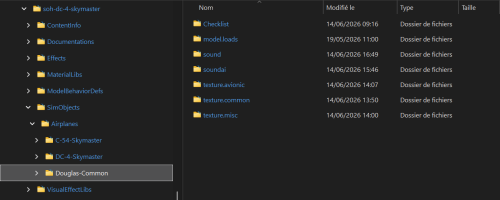
I took the opportunity to modify all the names of the local variables to make them more generic using DGS_xxxx for DouGlaS and I reviewed the organization of directories and files to reduce the size of the addon on disk, in view of the many repaints that will be available soonComponent Id=DC-4_Init et L: DC-4_Init
At the beginning of the weekend, I wanted to finish these actions so that I could make this v0.5.0 version available for the 250 years of the USA, but as usual, I wanted to add a little extra and it’s not entirely finished. This more concerns the sounds ...
With the Aeronca I started working on the Legacy sounds to complement a WWise package (Savage Cub), the result was satisfactory.
For the DC-4, I had thought about the sounds of the DC-6, but there is too much work because writing ModelBehaviors is special: PMDG does not use standard names for these animations and nodes, but rather acronyms like obj273, which makes reading them too complex.
So I decided to check with the sounds of the DC-3 (provided in the MSFS standard distribution), which would allow me to start seeing how to improve those of the Canso at the same time. Currently, the result is very good but I need more time to add sons when the cockpit windows are open, etc ...
In any case, I’m sending the draft version to Hollister56 and if its test is OK, the version v0.5.0 will be available later this week.
PS: Currently, the only bug found is in the "crossfeed management" for the C-54
Last edited:
lagaffe
SOH-CM-2026
Hello,
TIn Europe, temperatures will be stifling (32~35°C above) for more than 10 days according to the forecast, so I can only work 2 to 3 hours during the morning ...
All tests are done with MSFS 2024 !
Nevertheless, yesterday I persisted on the DC-4 without success except for finding that the fuel did not flow between the auxiliary tanks and the merge junctions even though the auxiliary selectors had been correctly positioned and the local variables were correct.
This morning (2 days of research on this bug) I followed the lead from the Fuel_System 2024 debugger, which indicated two "Invalid Commands" at the level of a line concerning crossfeed.
After an hour of research, I finally understood that in the flight_system.cfg, 4 lines had been used as parameters in the main Crossfeed junctions but were not declared as "lines" (Line.XX) plus two unfortunate copy/paste errors that I hadn’t noticed because of the similarities between the names.
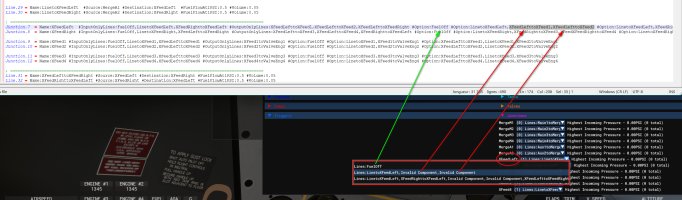
After theses fix I can succesfully select auxiliary tanks and start the four engines but only with hight or low pumps actived.
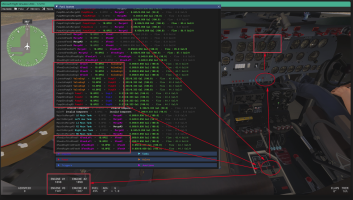
But when the aircraft is flying, you can select the boost pumps middle position without problem.
In the ALL Eng position the fuel flow isn't very stable: one time it is correct on "Left to Right" and one second after for "Right to Left", I should study that.
On a apron, I have not succeed to start the 4 engines in CrossFeed with boost pumps in the middle position.
I think that is due to a fuel flow to low but as I said before when you are flying in the CrossFeed conditions, the middle position can be use in the two cases:
- Eng1-2 & Eng3-4
or
- ALL Eng.
The fuel flow parameter is identical for all lines (standard and crossfeed), but for lines dedicated to crossfeed, since a tank can supply 4 engines, the potential flow rate must be increased so as not to cause stoppages in the fuel flow: it makes sense !
With all theses informations, I will now review the CrossFeed management for the C-54 perhaps I have made the same errors
It's all for today : the thermometer is getting a bit too high for my PC which will have trouble cooling down, and I don’t want to lose my job
  or the work tool
PS: @Hollister56 I have send to you my last version v050 which is working for the DC-4 in CrossFeed configuration
TIn Europe, temperatures will be stifling (32~35°C above) for more than 10 days according to the forecast, so I can only work 2 to 3 hours during the morning ...
All tests are done with MSFS 2024 !
Nevertheless, yesterday I persisted on the DC-4 without success except for finding that the fuel did not flow between the auxiliary tanks and the merge junctions even though the auxiliary selectors had been correctly positioned and the local variables were correct.
This morning (2 days of research on this bug) I followed the lead from the Fuel_System 2024 debugger, which indicated two "Invalid Commands" at the level of a line concerning crossfeed.
After an hour of research, I finally understood that in the flight_system.cfg, 4 lines had been used as parameters in the main Crossfeed junctions but were not declared as "lines" (Line.XX) plus two unfortunate copy/paste errors that I hadn’t noticed because of the similarities between the names.
After theses fix I can succesfully select auxiliary tanks and start the four engines but only with hight or low pumps actived.
But when the aircraft is flying, you can select the boost pumps middle position without problem.
In the ALL Eng position the fuel flow isn't very stable: one time it is correct on "Left to Right" and one second after for "Right to Left", I should study that.
On a apron, I have not succeed to start the 4 engines in CrossFeed with boost pumps in the middle position.
I think that is due to a fuel flow to low but as I said before when you are flying in the CrossFeed conditions, the middle position can be use in the two cases:
- Eng1-2 & Eng3-4
or
- ALL Eng.
The fuel flow parameter is identical for all lines (standard and crossfeed), but for lines dedicated to crossfeed, since a tank can supply 4 engines, the potential flow rate must be increased so as not to cause stoppages in the fuel flow: it makes sense !
Line.9 = Name:Aux1toPumpA1Low #Source:Aux1 #Destination
Line.10 = Name:Aux2toPumpA2Low #Source:Aux2 #Destination
With all theses informations, I will now review the CrossFeed management for the C-54 perhaps I have made the same errors
It's all for today : the thermometer is getting a bit too high for my PC
which will have trouble cooling down, and I don’t want to lose my job or the work tool PS: @Hollister56 I have send to you my last version v050 which is working for the DC-4 in CrossFeed configuration
Last edited:

35°C=95°F - also known as just another spring day here in North Carolina! What are you gonna do when it actually gets hot?

@Tom Clayton I think the word is "suffer"...
LOL - the temps are high here 35degC / 98 degF (Germany) but my home office is in the cellar of our house. Even now it is only a cozy 26 degC / 78 degF down in my man cave.
My suffering is rather in the winter, but my home IT is a good heating source.
Cheers,
Mark
My suffering is rather in the winter, but my home IT is a good heating source.
Cheers,
Mark
lagaffe
SOH-CM-2026
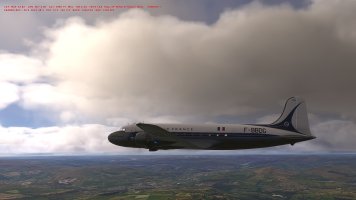
The Beta version on which I work since many days is almost ready: it’s being tested with some friends to validate the latest changes.
This version v0.51 will be released in this state: Work In Progress, that is to say that it is a project still under development but which in its current state allows you to get a fairly good idea of what the addon will be at termination.
A smart screen for my friend Jan with whom this project was decided and then launched last November and my thanks to Mike from Flight Replicas for his kind authorization, I hope this add-on will meet his expectations
From the Aviodome at Lelystad (NL) DC-4/C-54A NL-316
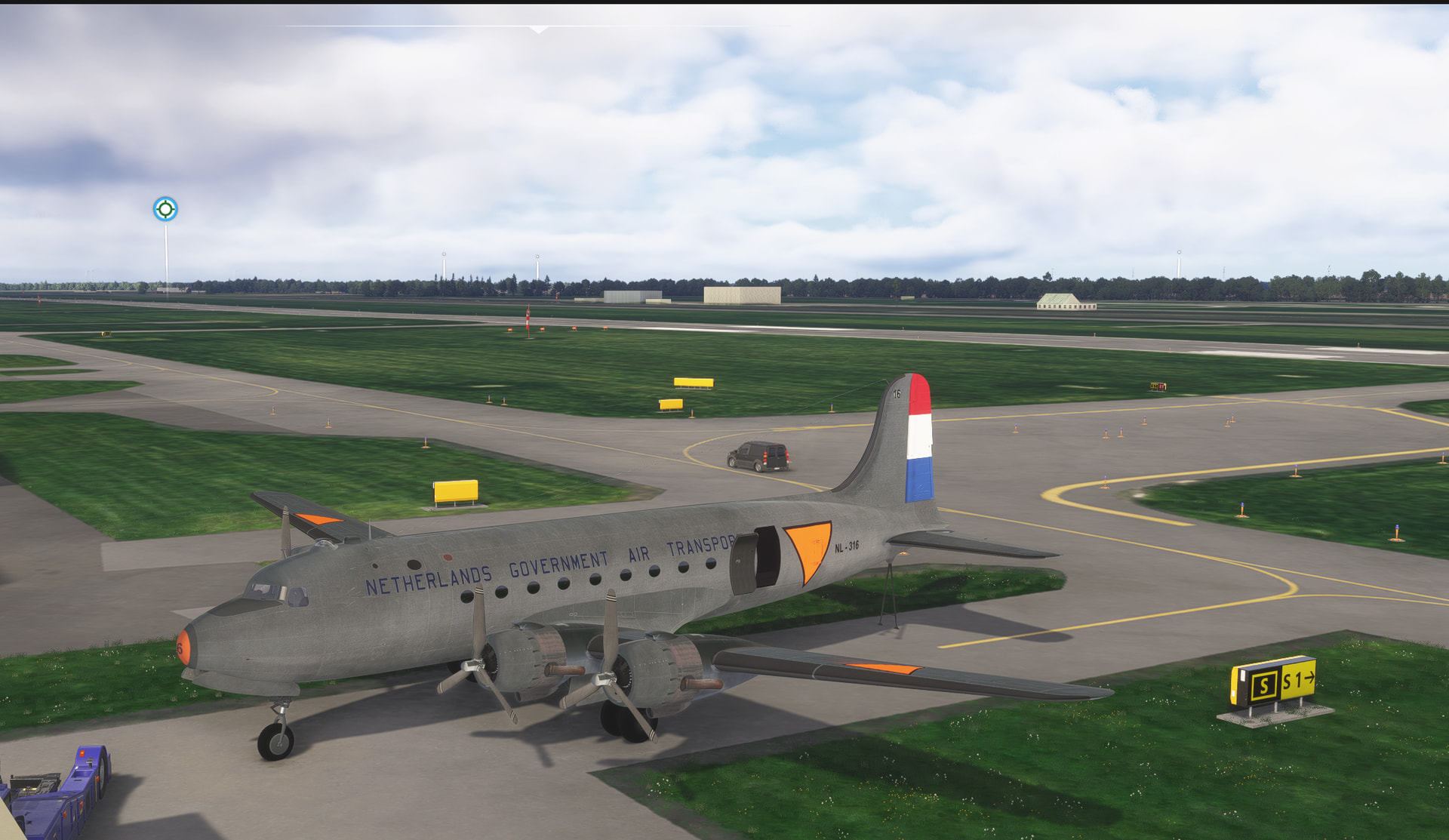
Here is the schedule of future developments for the next versions
ToDo List Step 2:
ToDo List Step 3:
Currently, the paintkit that you can download at Flight Replicas is always useable. Only the name of texttures are modificated for development purposes (to distinguish new modifications in the project) but this can be change in the next week.
Jankees & Ferondoe: if you plan "to play with this new aircraft" send me a MP to have more informations, If I can I will perhaps change the UV for your specific purposes.
This version v0.51 will be released in this state: Work In Progress, that is to say that it is a project still under development but which in its current state allows you to get a fairly good idea of what the addon will be at termination.
A smart screen for my friend Jan with whom this project was decided and then launched last November and my thanks to Mike from Flight Replicas for his kind authorization, I hope this add-on will meet his expectations
From the Aviodome at Lelystad (NL) DC-4/C-54A NL-316
Here is the schedule of future developments for the next versions
ToDo List Step 2:
- Why the oil pressure is in the good ranges for the DC-4 and not for the C-54 ?
- Verification of fuel pressure indicated versus the boos pumps used ...
- FindGyro compass seems to give the opposite direction ? (180° for 300°)
- Animation and coding of feathering for the propellers
- Animation and verification of the code for trims (external model)
- Coding of the remaining gauges on the overhead and on the sides of the cockpit, not to mention the navigator’s station
- Modification of the XML code to use the illuminated night displays in the cockpit
- Animation and coding of landing lights
- Hydraulic management : animation of some 3D gauges, XML code, levers, etc
- Adding a jeep and an engine to transport in the C-54 cabin (3D model ready)
- Adding people or military people in the DC-4 cabin (3D model ready)
- Camera.cfg should be improved [CTRL+7 & CTRL+8]
ToDo List Step 3:
- Modifying sound management: WWISE package or using another sound bank (work in progess ...)
- Tuning the flight model and engine behavior: drag must be added
- Interior texture improvements (UV mapping and PBR textures)
- Exterior repaints to improve ...
Currently, the paintkit that you can download at Flight Replicas is always useable. Only the name of texttures are modificated for development purposes (to distinguish new modifications in the project) but this can be change in the next week.
Jankees & Ferondoe: if you plan "to play with this new aircraft" send me a MP to have more informations, If I can I will perhaps change the UV for your specific purposes.
Last edited:


TuFun
Riveter
My computer sounds like a jet engine fans cranking 100%... here 100F 37.7C temps and no A/C. House built in 1957. 2AM is about good time to run without toasting it.LOL - the temps are high here 35degC / 98 degF (Germany) but my home office is in the cellar of our house. Even now it is only a cozy 26 degC / 78 degF down in my man cave.
My suffering is rather in the winter, but my home IT is a good heating source.
Cheers,
Mark
Right now little heat break, 65F at 8:20am.